R for Data Science (2e)

해당 교재는 https://r4ds.hadley.nz/ 에서 확인하실 수 있습니다. 이 문서에 존재하는 모든 인용은 Hadley Wickham (2023) 입니다.

library(ggplot2)
library(ggthemes) 
library(tidyverse) 
── Attaching core tidyverse packages ──────────────────────── tidyverse 2.0.0 ──
✔ dplyr     1.1.4     ✔ readr     2.1.5
✔ forcats   1.0.0     ✔ stringr   1.5.1
✔ lubridate 1.9.3     ✔ tibble    3.2.1
✔ purrr     1.0.2     ✔ tidyr     1.3.1
── Conflicts ────────────────────────────────────────── tidyverse_conflicts() ──
✖ dplyr::filter() masks stats::filter()
✖ dplyr::lag()    masks stats::lag()
ℹ Use the conflicted package (<http://conflicted.r-lib.org/>) to force all conflicts to become errors
library(palmerpenguins)
library(nycflights13)

1. Data visualization

1.2 First steps

1.2.1 The penguins data frame

penguins contains 344 observations collected and made available by Dr. Kristen Gorman and the Palmer Station, Antarctica LTER2.

To make the discussion easier, let’s define some terms: A variable is a quantity, quality, or property that you can measure. A value is the state of a variable when you measure it. The value of a variable may change from measurement to measurement. An observation is a set of measurements made under similar conditions (you usually make all of the measurements in an observation at the same time and on the same object). An observation will contain several values, each associated with a different variable. We’ll sometimes refer to an observation as a data point. Tabular data is a set of values, each associated with a variable and an observation. Tabular data is tidy if each value is placed in its own “cell”, each variable in its own column, and each observation in its own row.

1.2.2 Ultimate goal

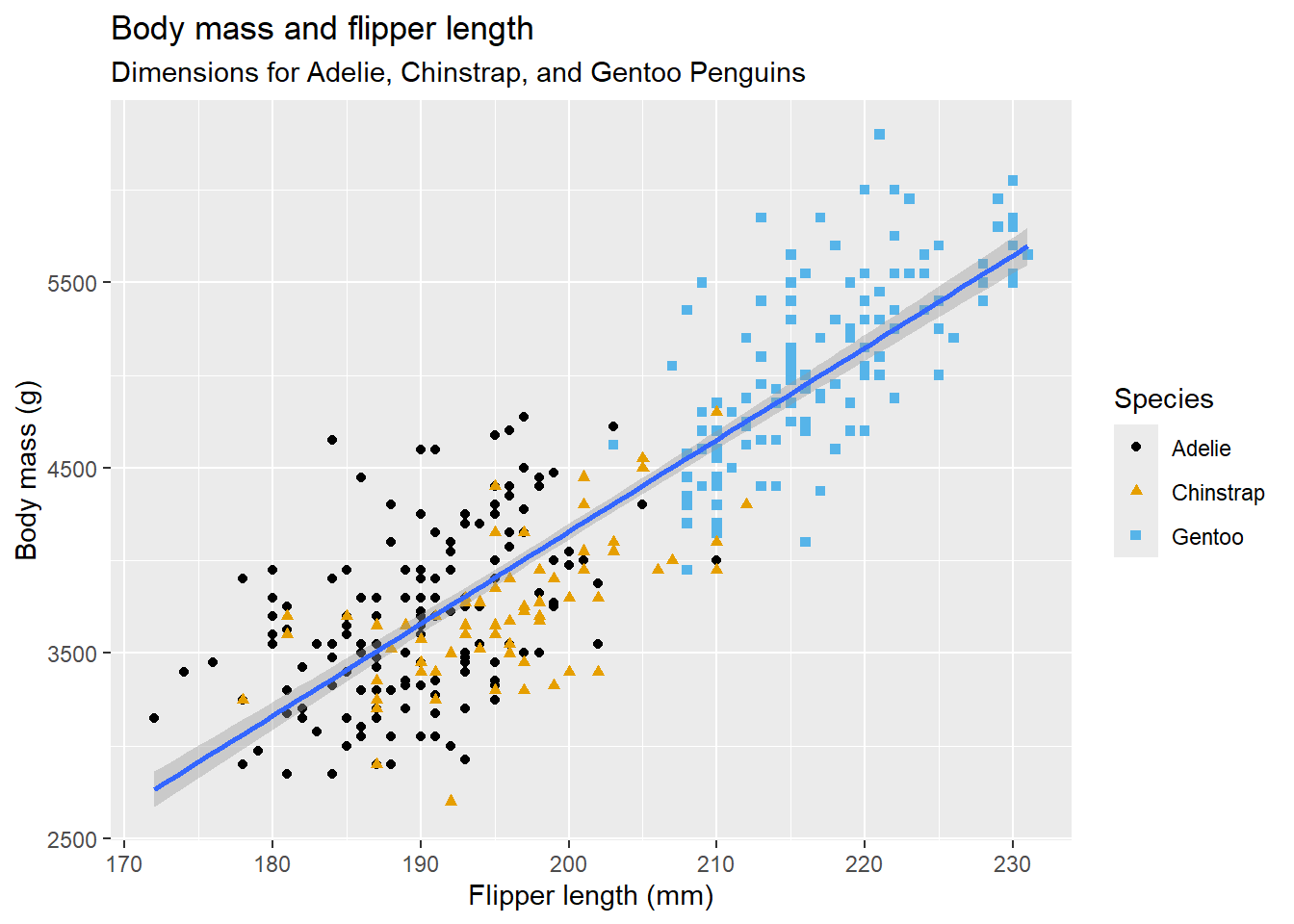
Our ultimate goal in this chapter is to recreate the following visualization displaying the relationship between flipper lengths and body masses of these penguins, taking into consideration the species of the penguin.

1.2.4 Adding aesthetics and layers

ggplot(data = penguins, mapping = aes(x = flipper_length_mm, y = body_mass_g)) + 
  geom_point(mapping = aes(color = species, shape = species), na.rm = TRUE) +
  geom_smooth(formula = y ~ x, method = "lm", na.rm = TRUE) +
  labs(title = "Body mass and flipper length",
    subtitle = "Dimensions for Adelie, Chinstrap, and Gentoo Penguins",
    x = "Flipper length (mm)", y = "Body mass (g)",
    color = "Species", shape = "Species") +
  scale_color_colorblind()

1.2.5(연습문제)
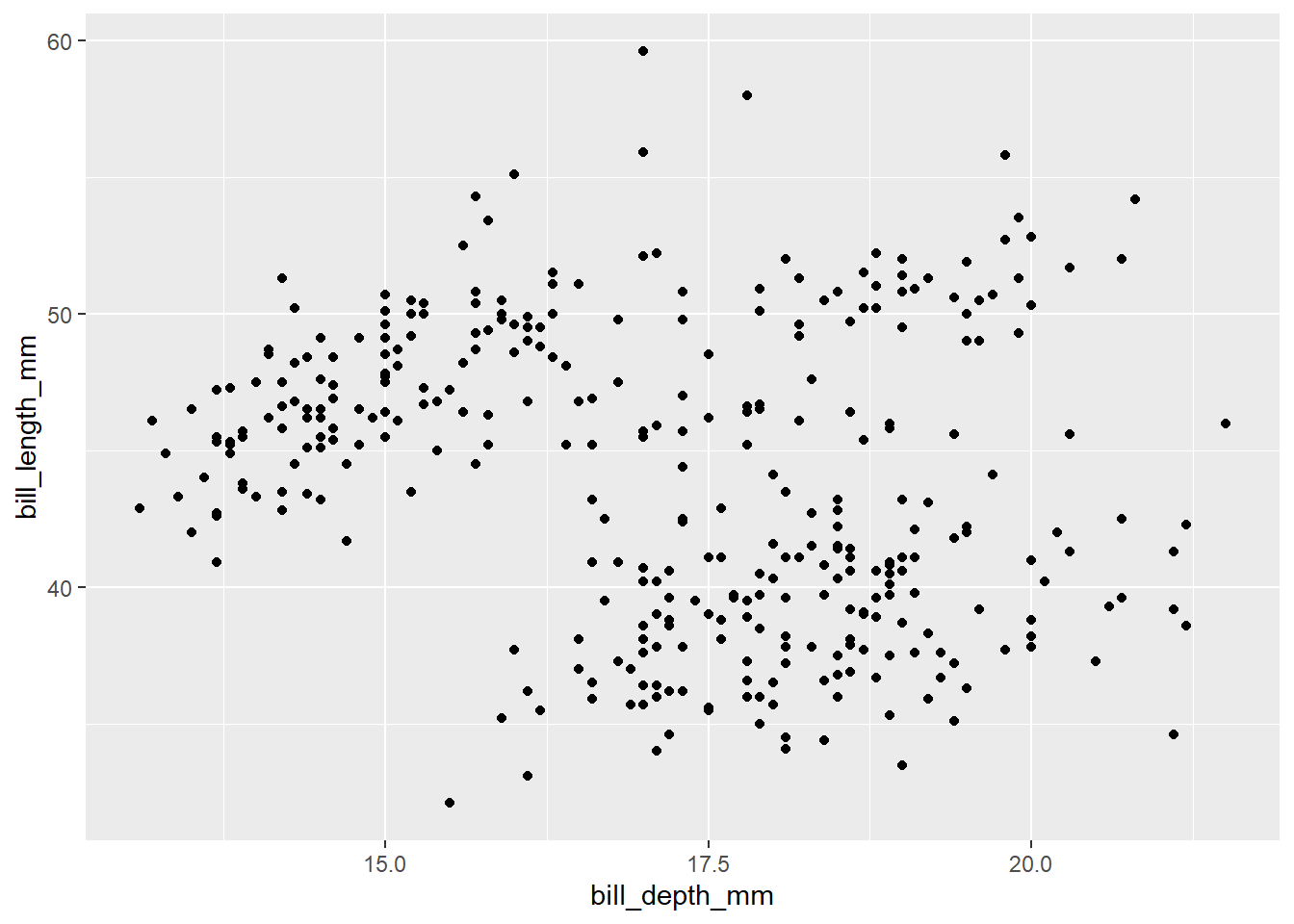
  • 3
ggplot(data = penguins, mapping = aes(x = bill_depth_mm, y = bill_length_mm)) +
  geom_point()
Warning: Removed 2 rows containing missing values or values outside the scale range
(`geom_point()`).

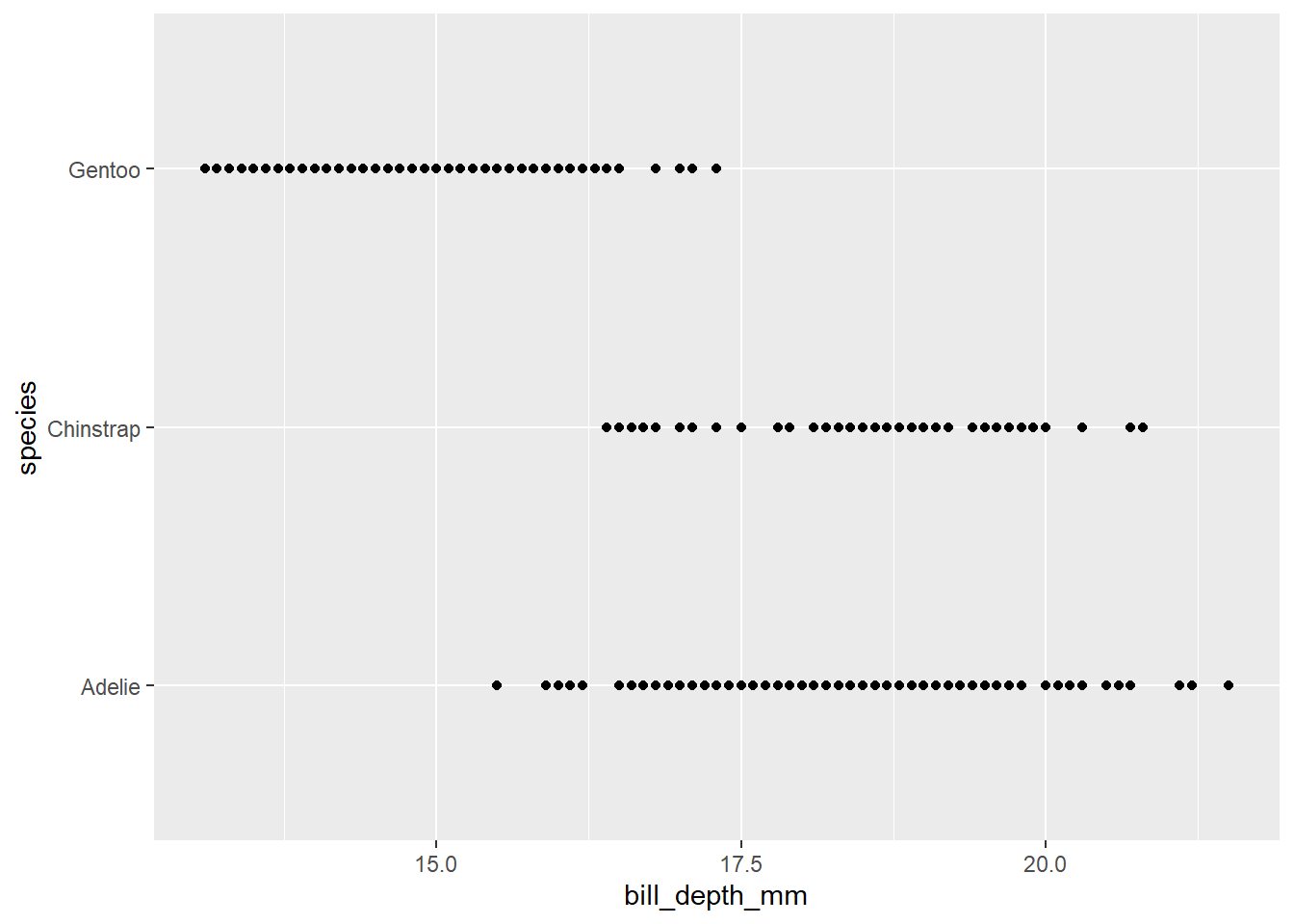
  • 4
ggplot(data = penguins, mapping = aes(x = bill_depth_mm, y = species)) +
  geom_point()
Warning: Removed 2 rows containing missing values or values outside the scale range
(`geom_point()`).

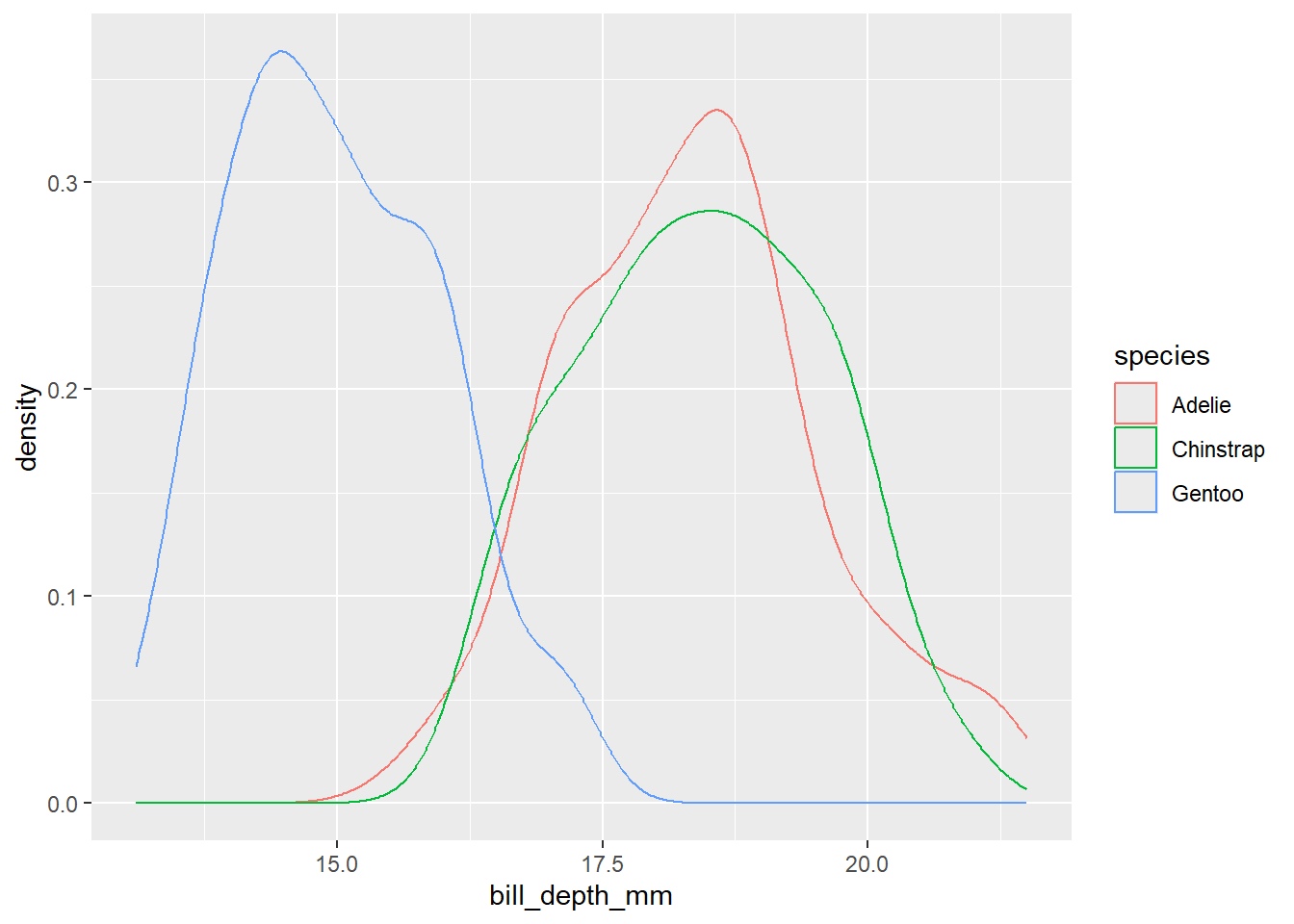
  • 5
ggplot(data = penguins, mapping = aes(x = bill_depth_mm, colour = species)) +
  geom_density()
Warning: Removed 2 rows containing non-finite outside the scale range
(`stat_density()`).

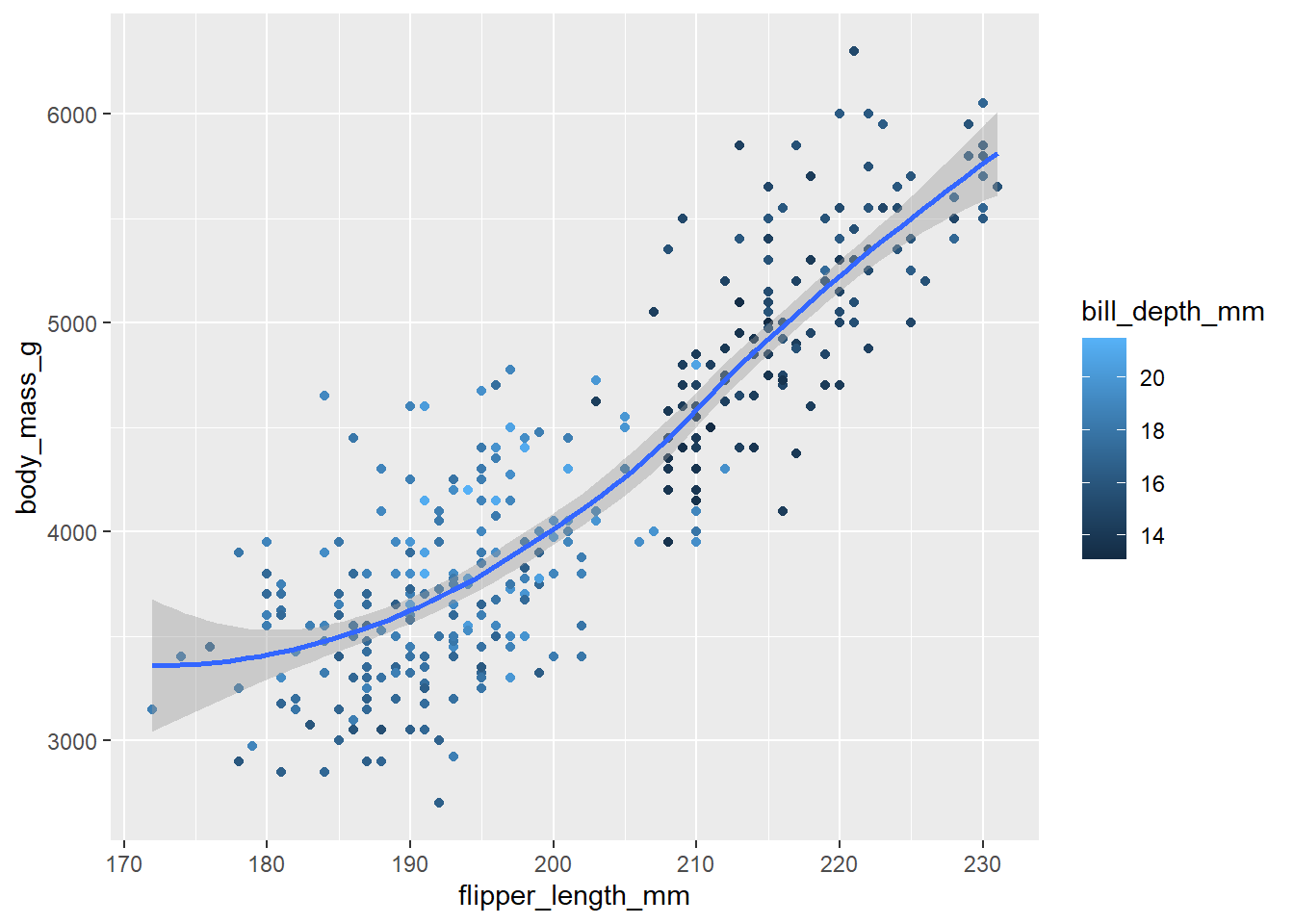
  • 8
penguins %>% 
  ggplot(mapping = aes(x = flipper_length_mm, y = body_mass_g)) + 
  geom_point(aes(colour = bill_depth_mm), na.rm = TRUE) +
  geom_smooth(formula = y ~ x, method = "loess", na.rm = TRUE)

1.3 ggplot2 calls

In the future, you’ll also learn about the pipe, |>, which will allow you to create that plot with.

penguins %>% 
  ggplot(mapping = aes(x = flipper_length_mm, y = body_mass_g)) + 
  geom_point(mapping = aes(color = species, shape = species), na.rm = TRUE) +
  geom_smooth(formula = y ~ x, method = "lm", na.rm = TRUE) +
  labs(title = "Body mass and flipper length",
       subtitle = "Dimensions for Adelie, Chinstrap, and Gentoo Penguins",
       x = "Flipper length (mm)", y = "Body mass (g)",
       color = "Species", shape = "Species") +
  scale_color_colorblind()

1.4 Visualizing distributions

How you visualize the distribution of a variable depends on the type of variable: categorical or numerical.

  • 변수의 개수에 따라 변수가 1개인 경우 히스토그램을 사용하고, 2개인 경우 산점도를 사용하는 것이 일반적(Midway (2020), Kelleher & Wagener (2011), Islam & Jin (2019) 등도 함께 참고)

1.4.1 A categorical variable

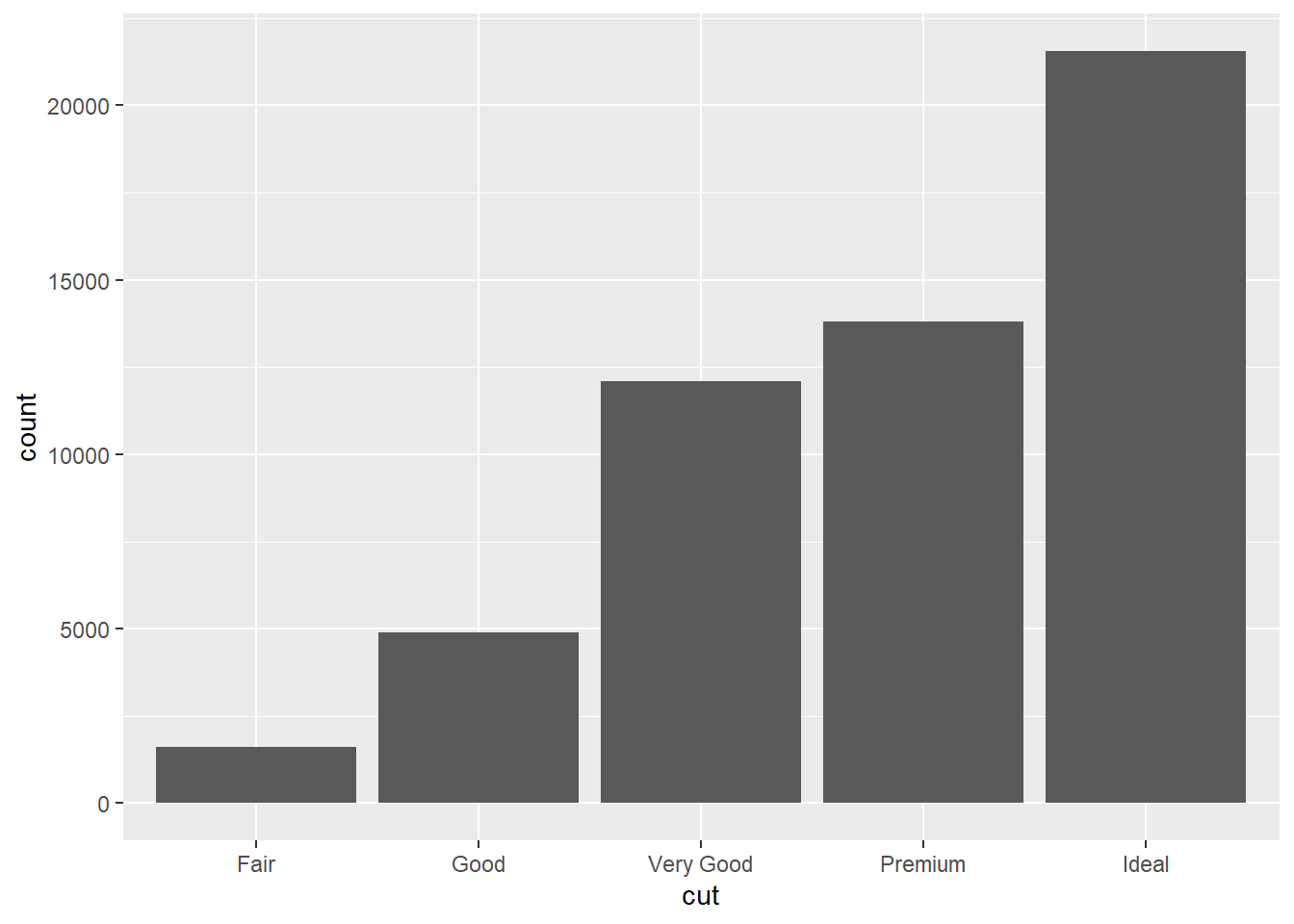
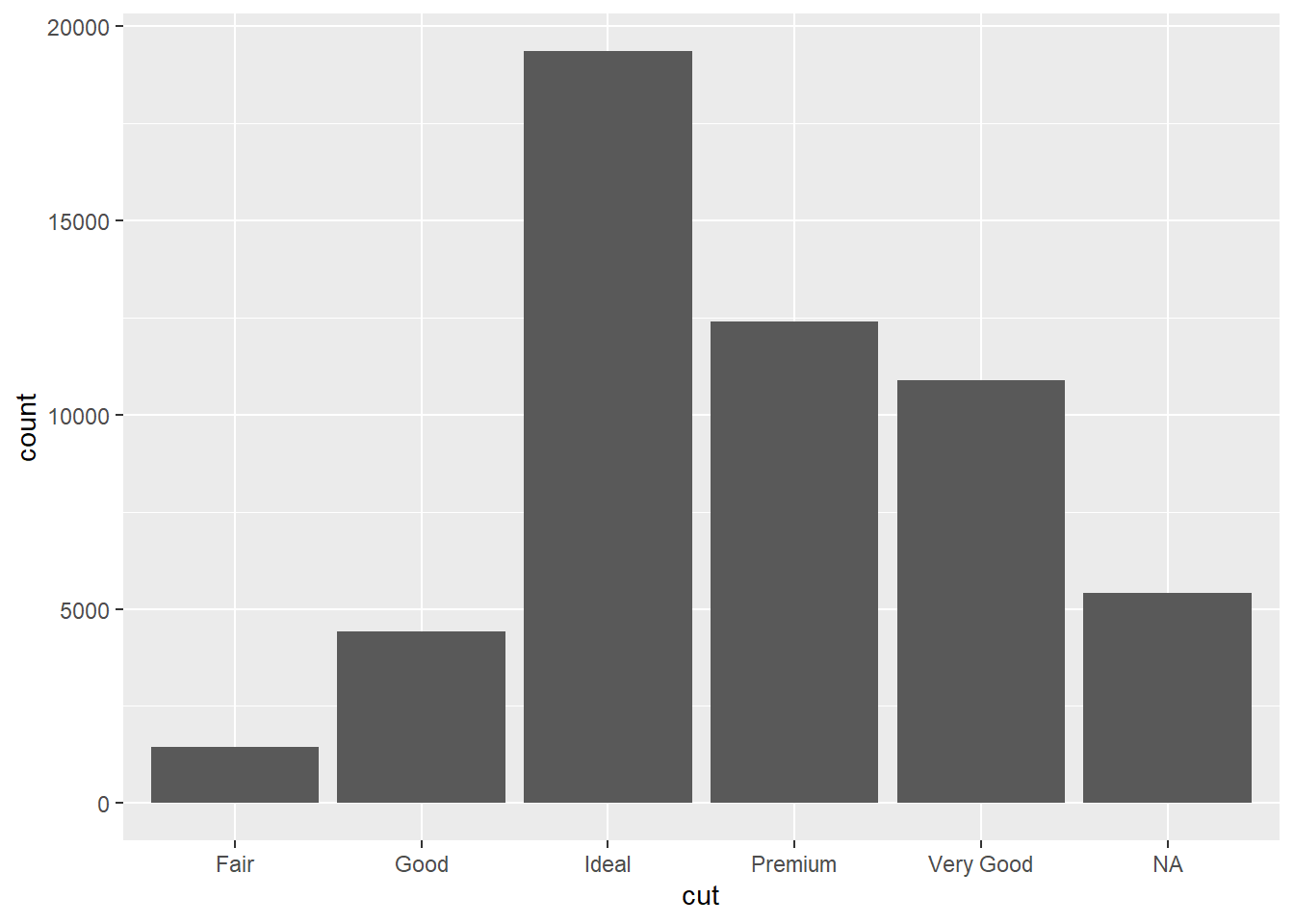
A variable is categorical if it can only take one of a small set of values. To examine the distribution of a categorical variable, you can use a bar chart. The height of the bars displays how many observations occurred with each x value.

1.4.2

A variable is numerical (or quantitative) if it can take on a wide range of numerical values, and it is sensible to add, subtract, or take averages with those values. Numerical variables can be continuous or discrete.

1.4.3(연습문제)

  • 1
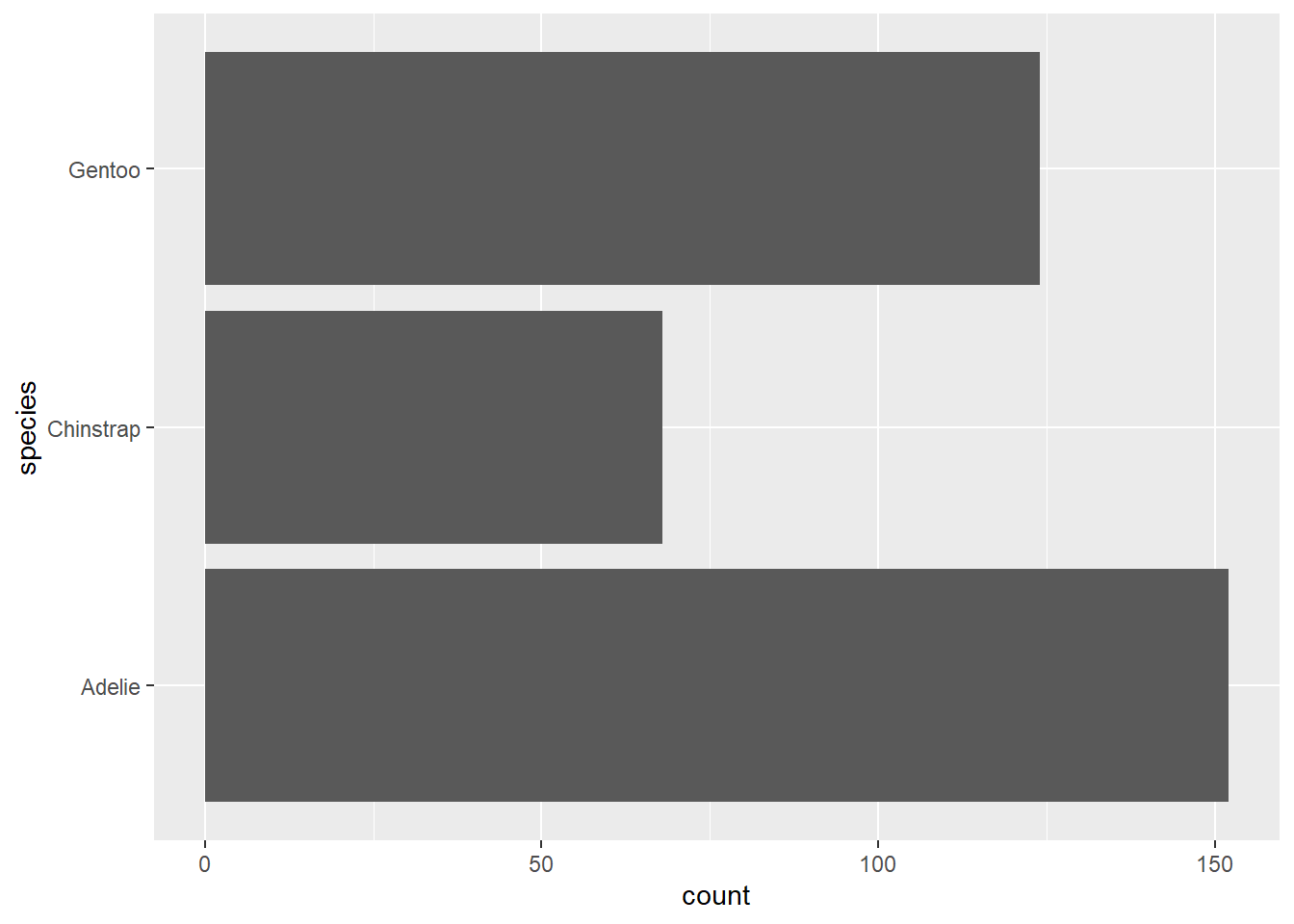
penguins %>% 
  ggplot(aes(y = species))+
  geom_bar()

  • 2
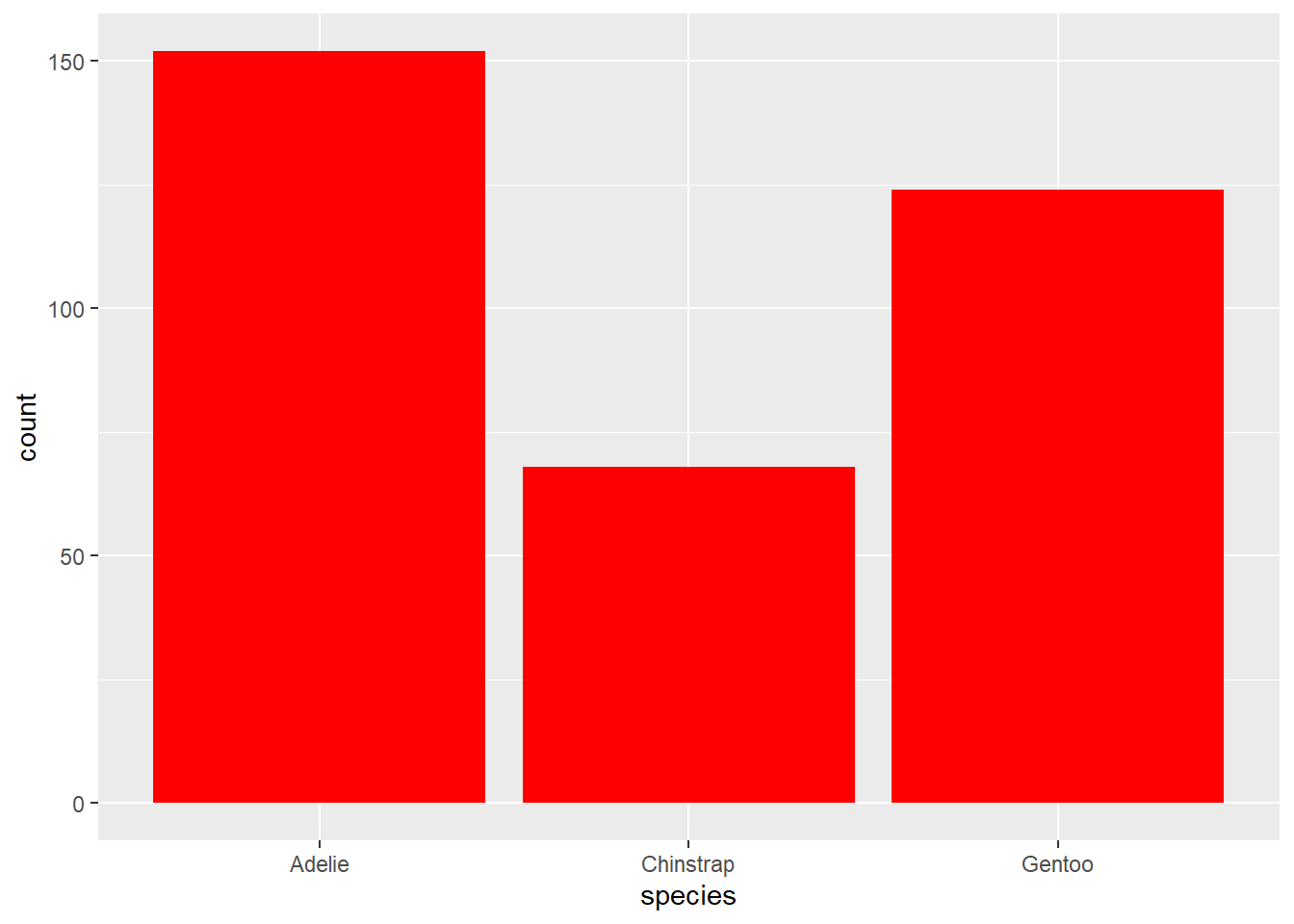
penguins %>% 
  ggplot(aes(x = species)) +
  geom_bar(fill = "red")

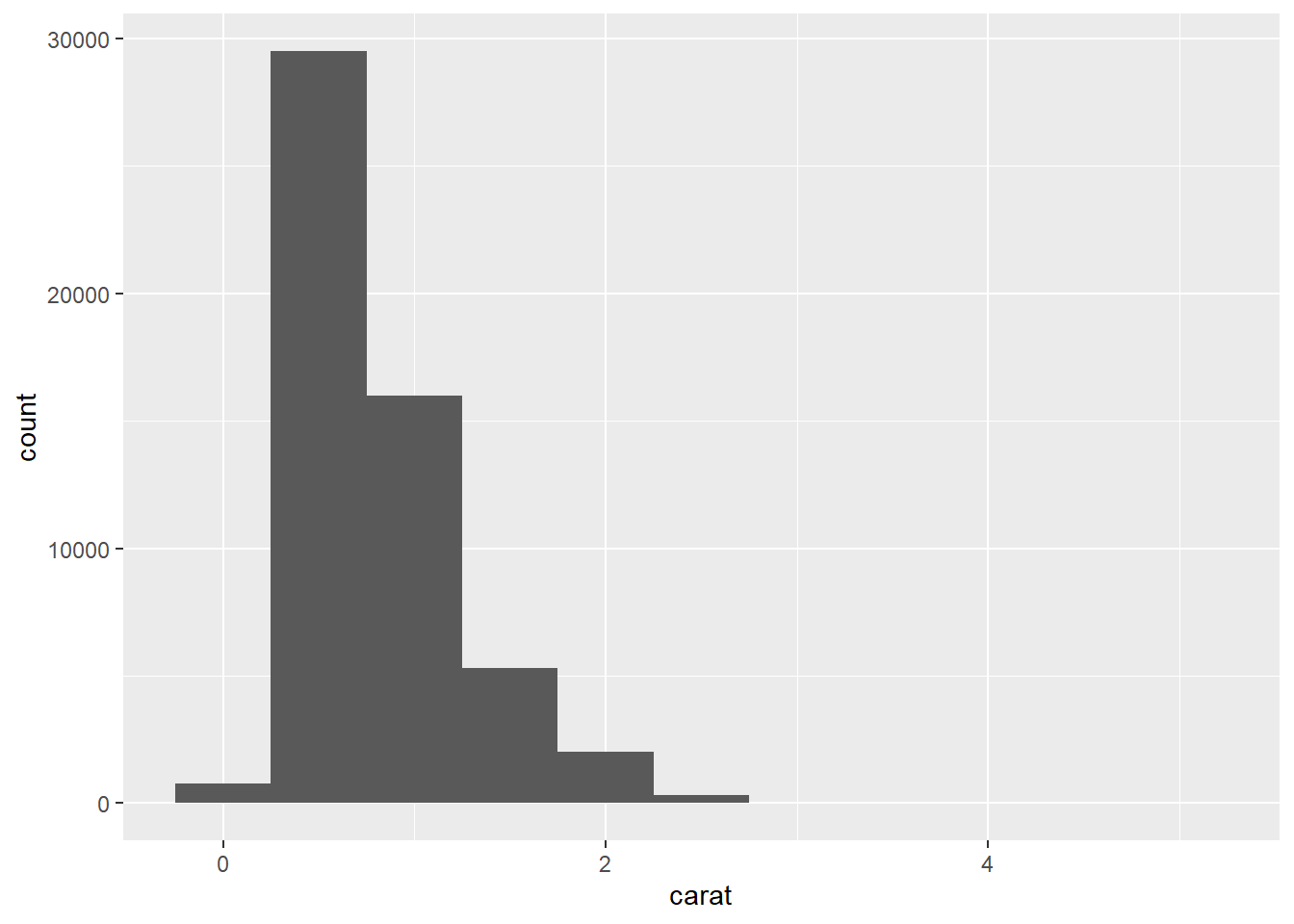
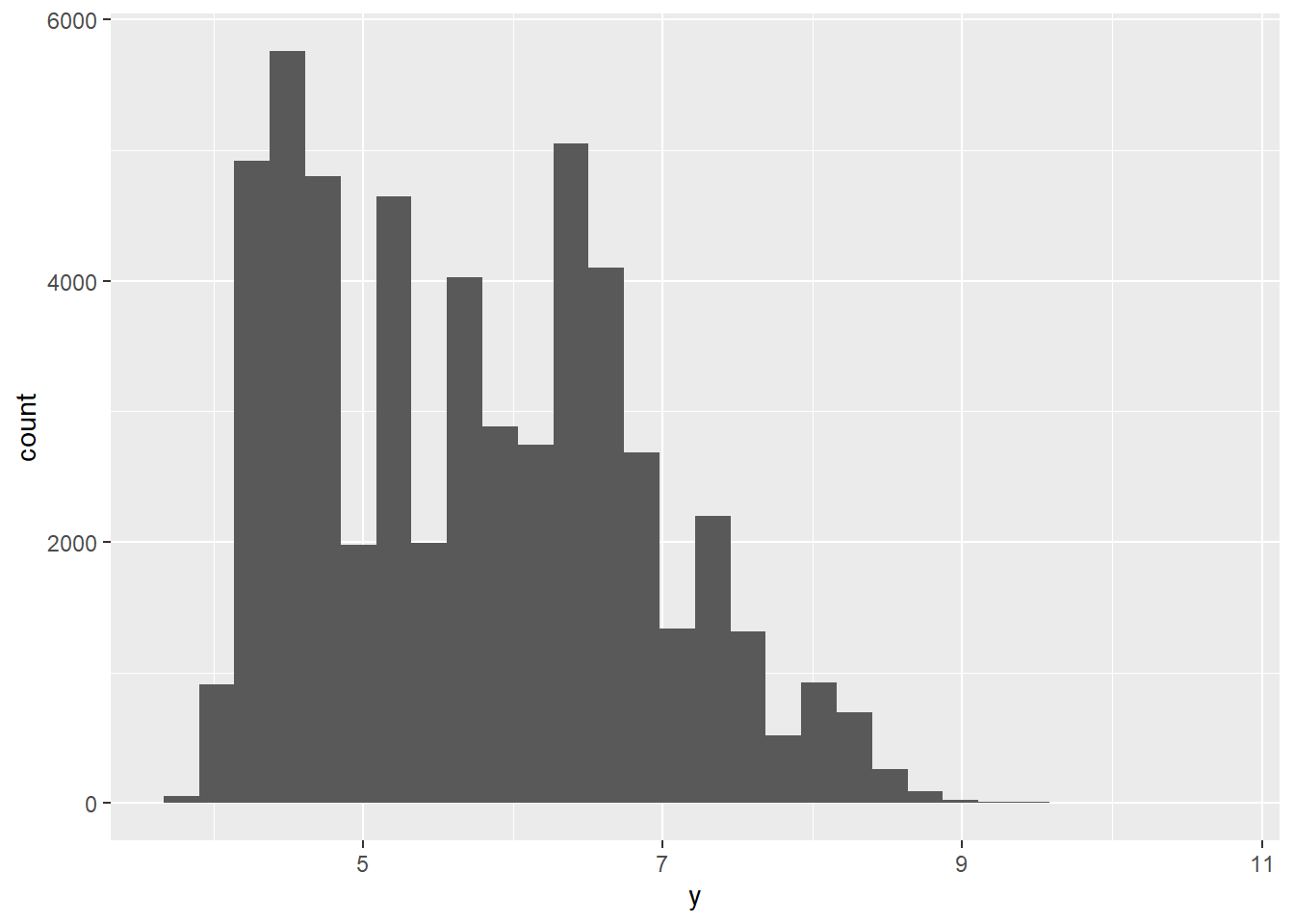
  • 4
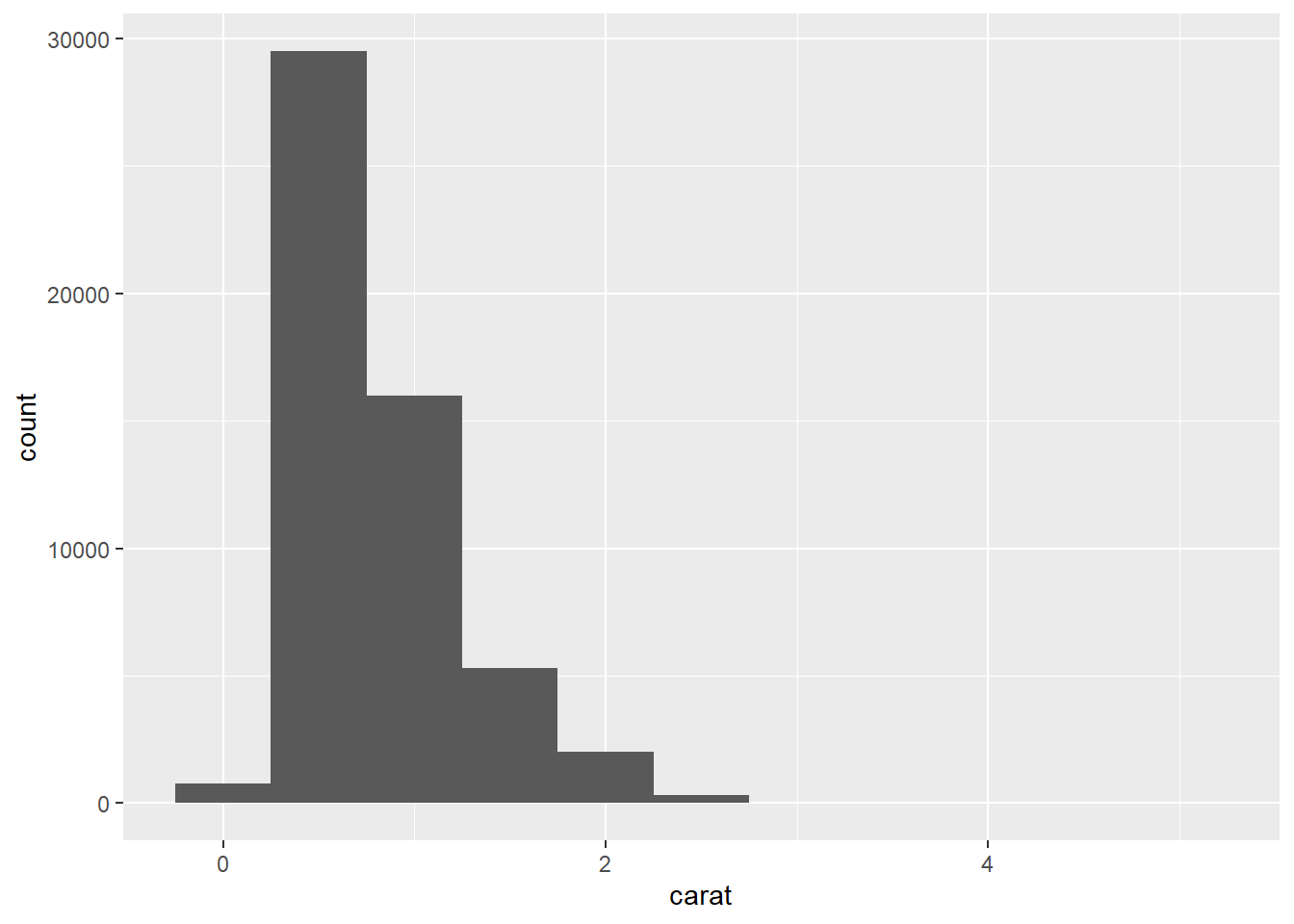
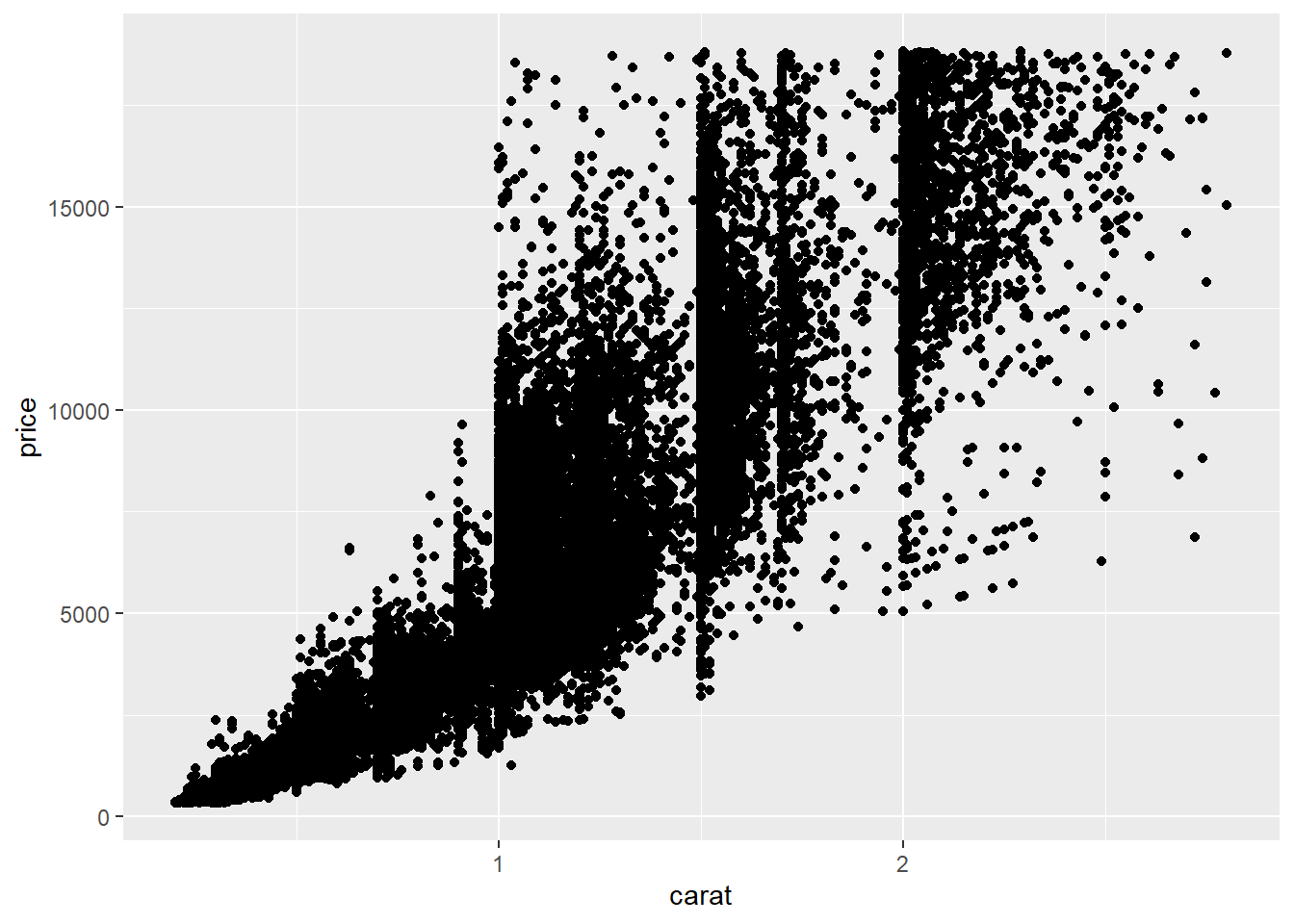
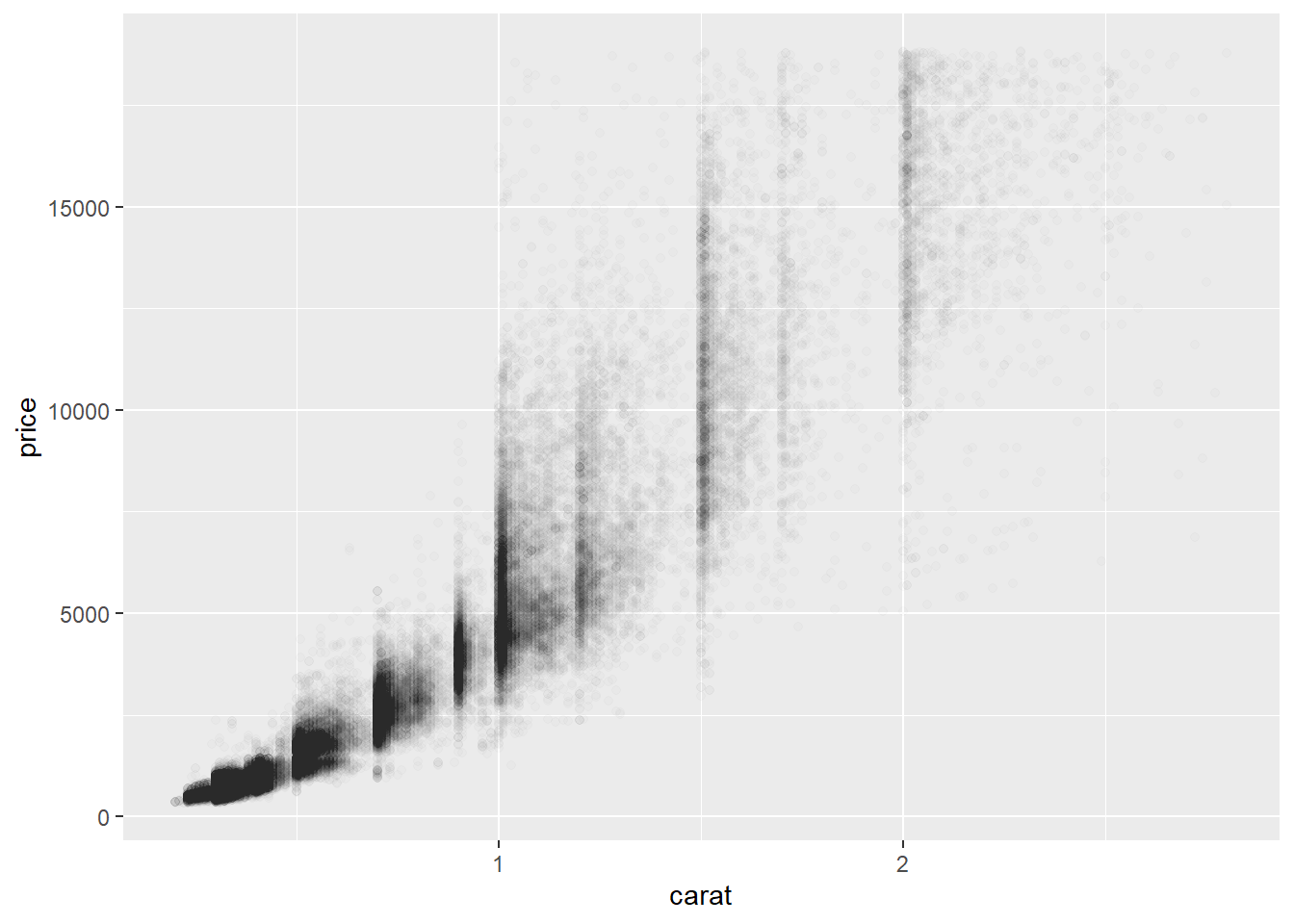
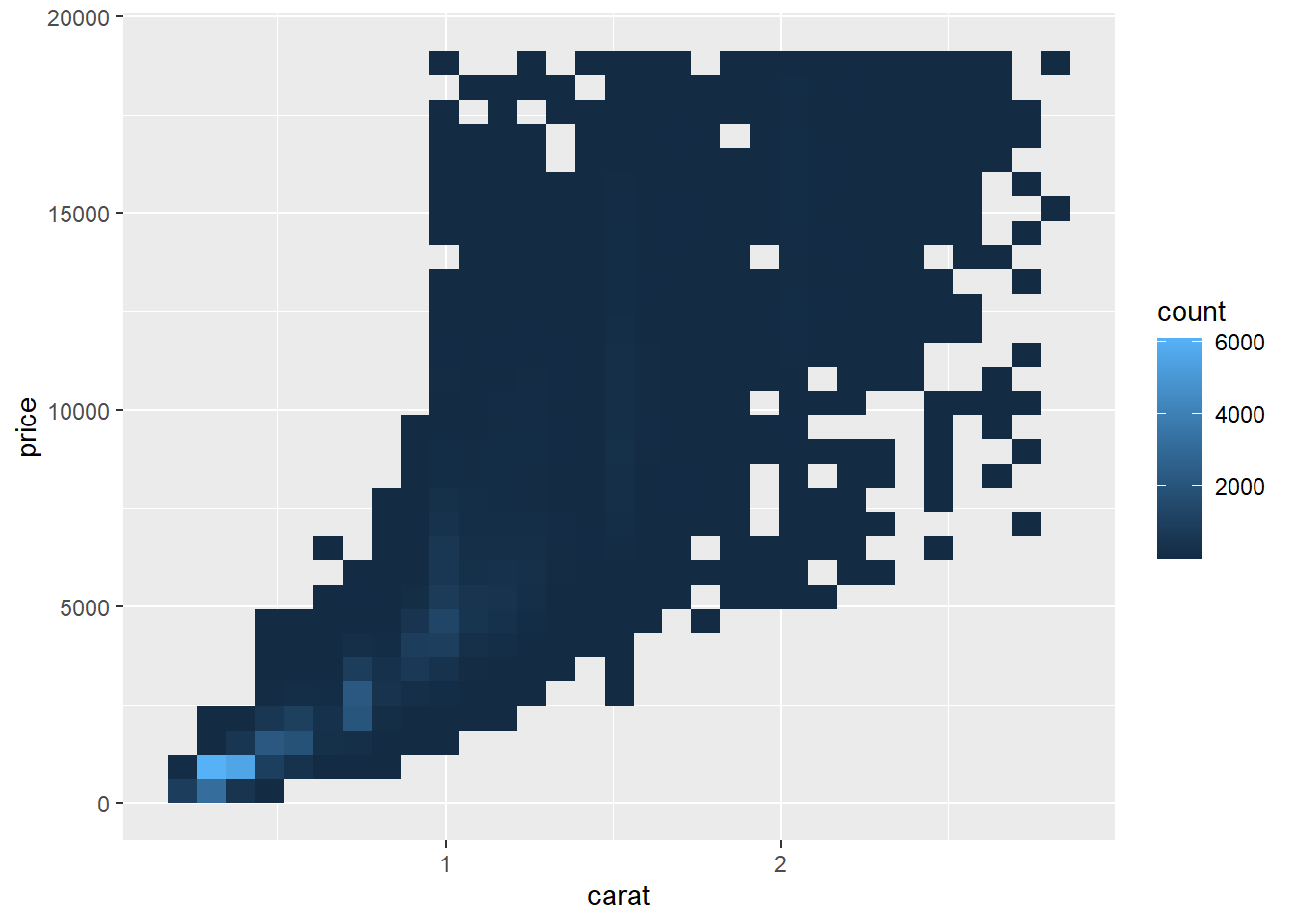
diamonds %>% 
  ggplot(aes(x = carat)) +
  geom_histogram(binwidth = 0.5)

1.5 Visualizing relationships

To visualize a relationship we need to have at least two variables mapped to aesthetics of a plot.

1.5.1 A numerical and a categorical variable

A boxplot is a type of visual shorthand for measures of position (percentiles) that describe a distribution. It is also useful for identifying potential outliers.

1.5.2 Two categorical variables

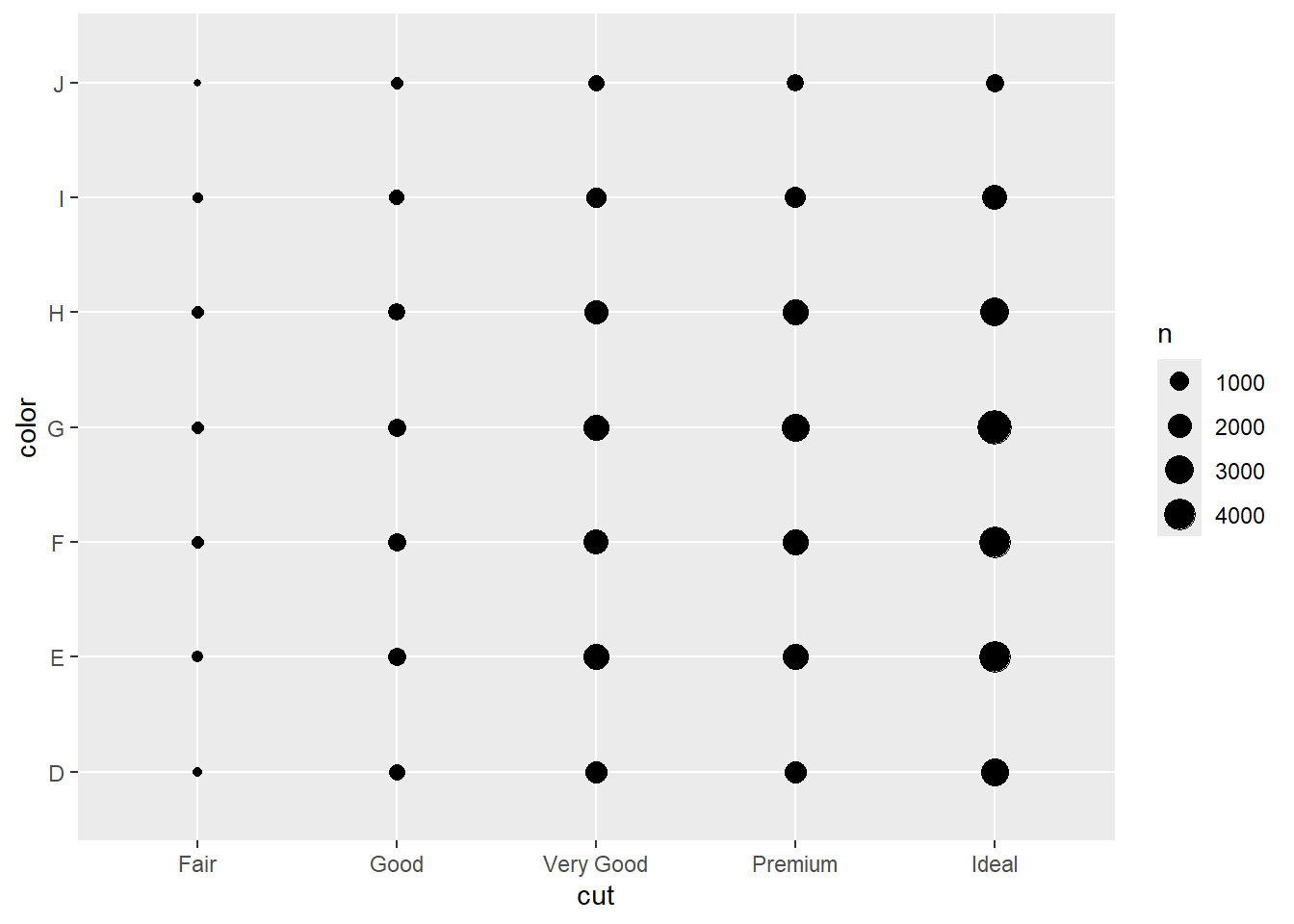
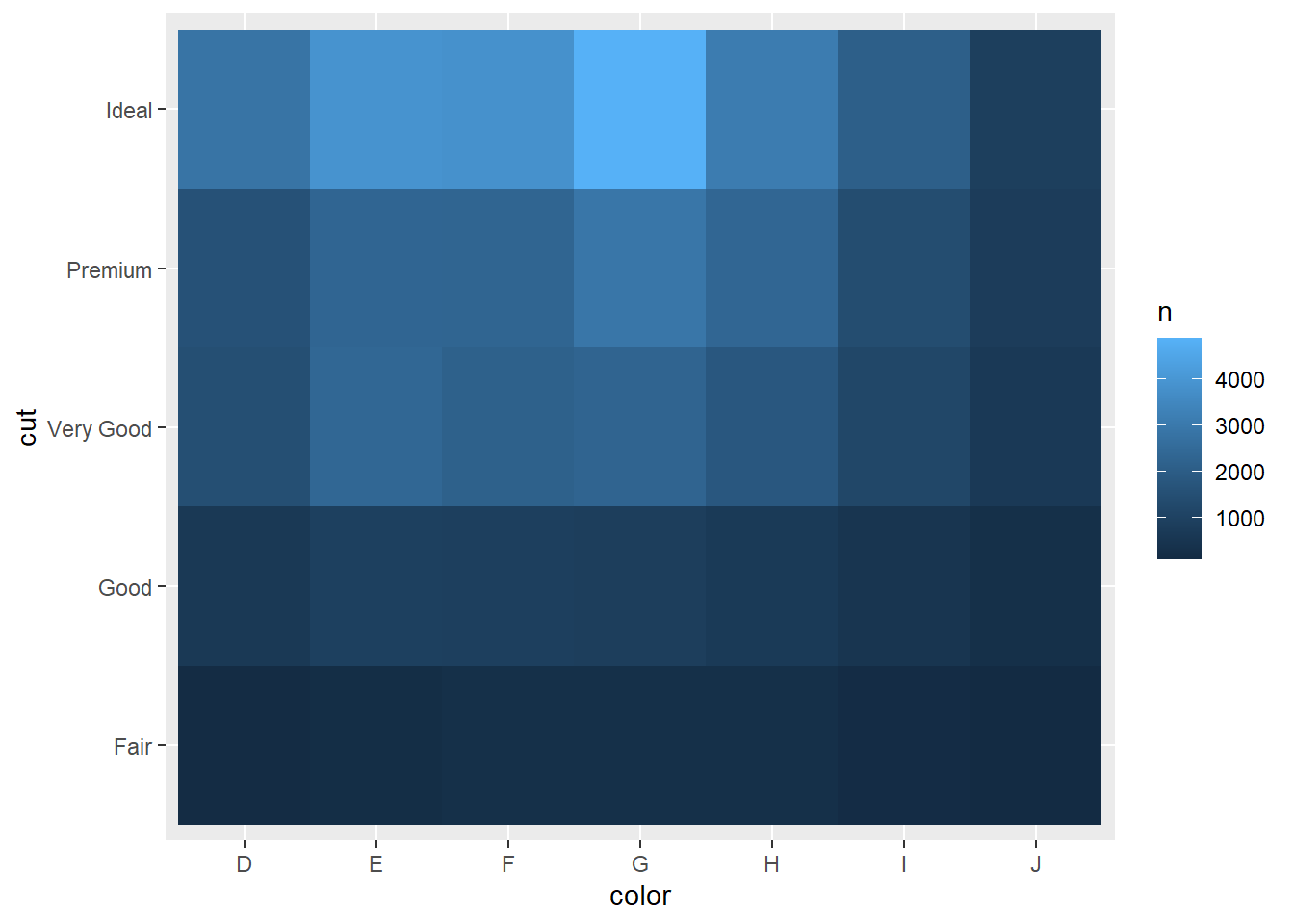
We can use stacked bar plots to visualize the relationship between two categorical variables.

1.5.3 Two numerical variables

[…] A scatterplot is probably the most commonly used plot for visualizing the relationship between two numerical variables.

1.5.4 Three or more variables

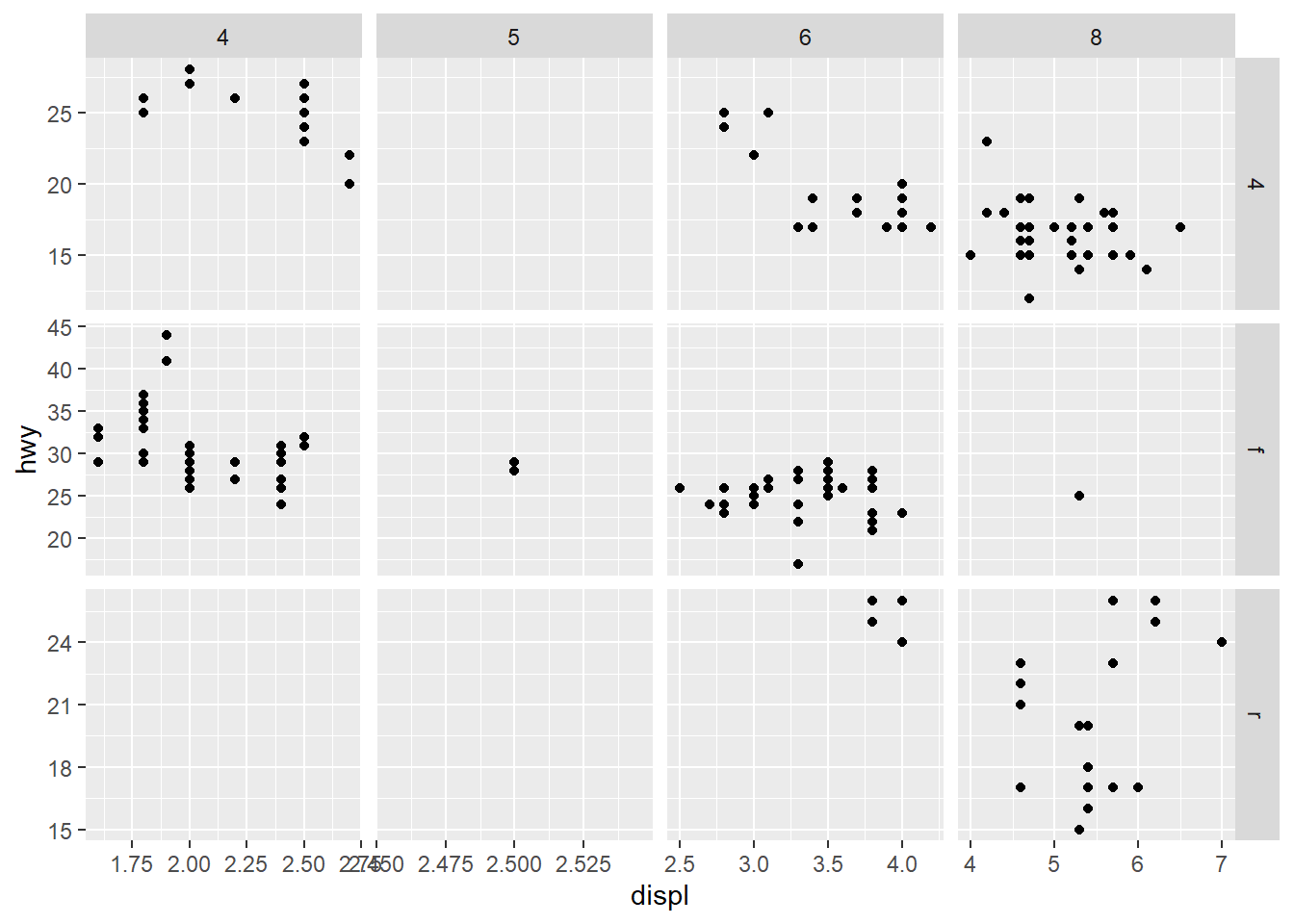
However adding too many aesthetic mappings to a plot makes it cluttered and difficult to make sense of. Another way, which is particularly useful for categorical variables, is to split your plot into facets, subplots that each display one subset of the data.

1.5.5(연습문제)

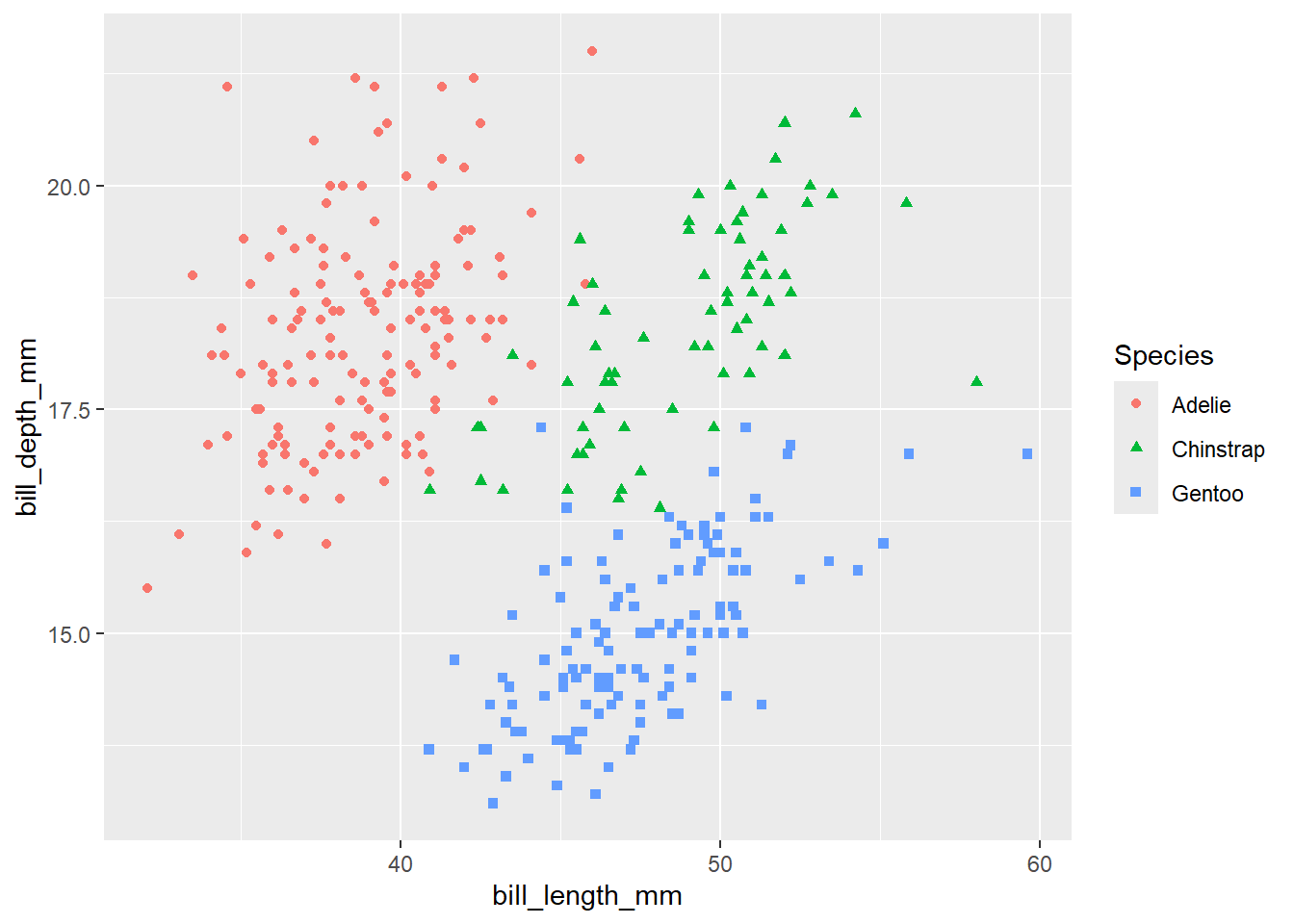
  • 6
penguins %>% 
  ggplot(mapping = aes(x = bill_length_mm, y = bill_depth_mm, 
                       color = species, shape = species)) +
  geom_point(na.rm = TRUE) +
  labs(color = "Species", shape = "Species")

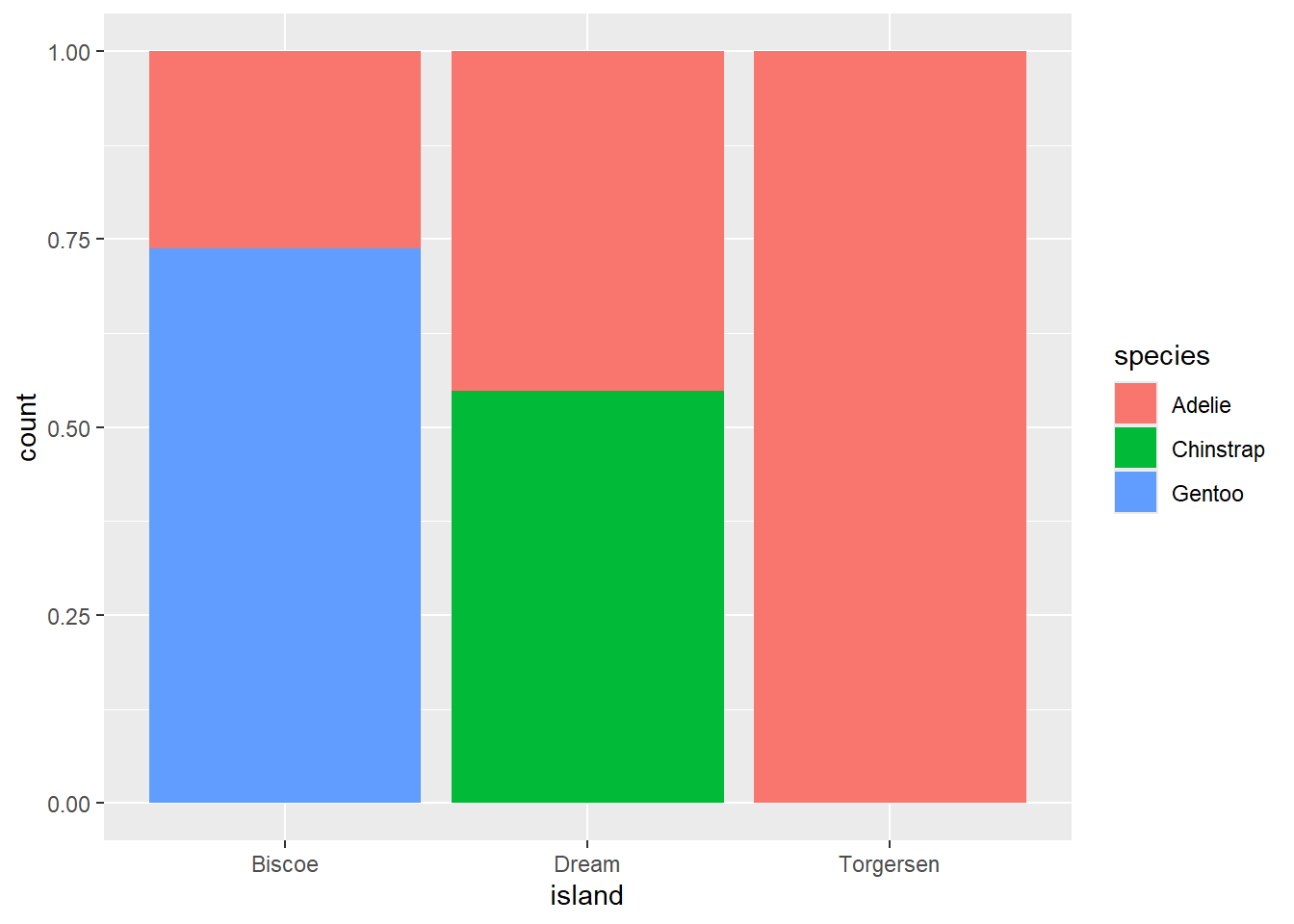
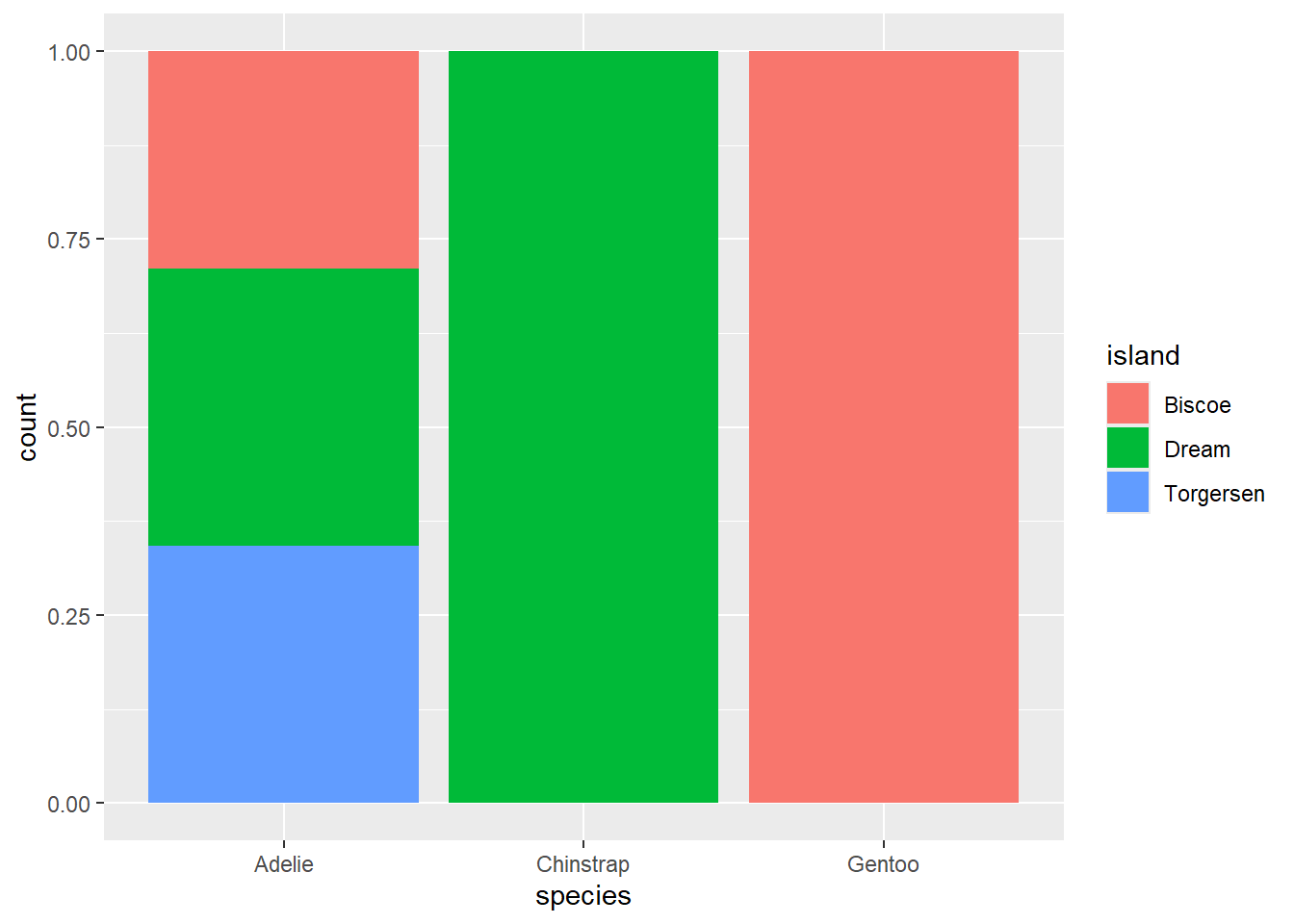
  • 7
penguins %>% ggplot(aes(x = island, fill = species)) +
  geom_bar(position = "fill")

penguins %>% ggplot(aes(x = species, fill = island)) +
  geom_bar(position = "fill")

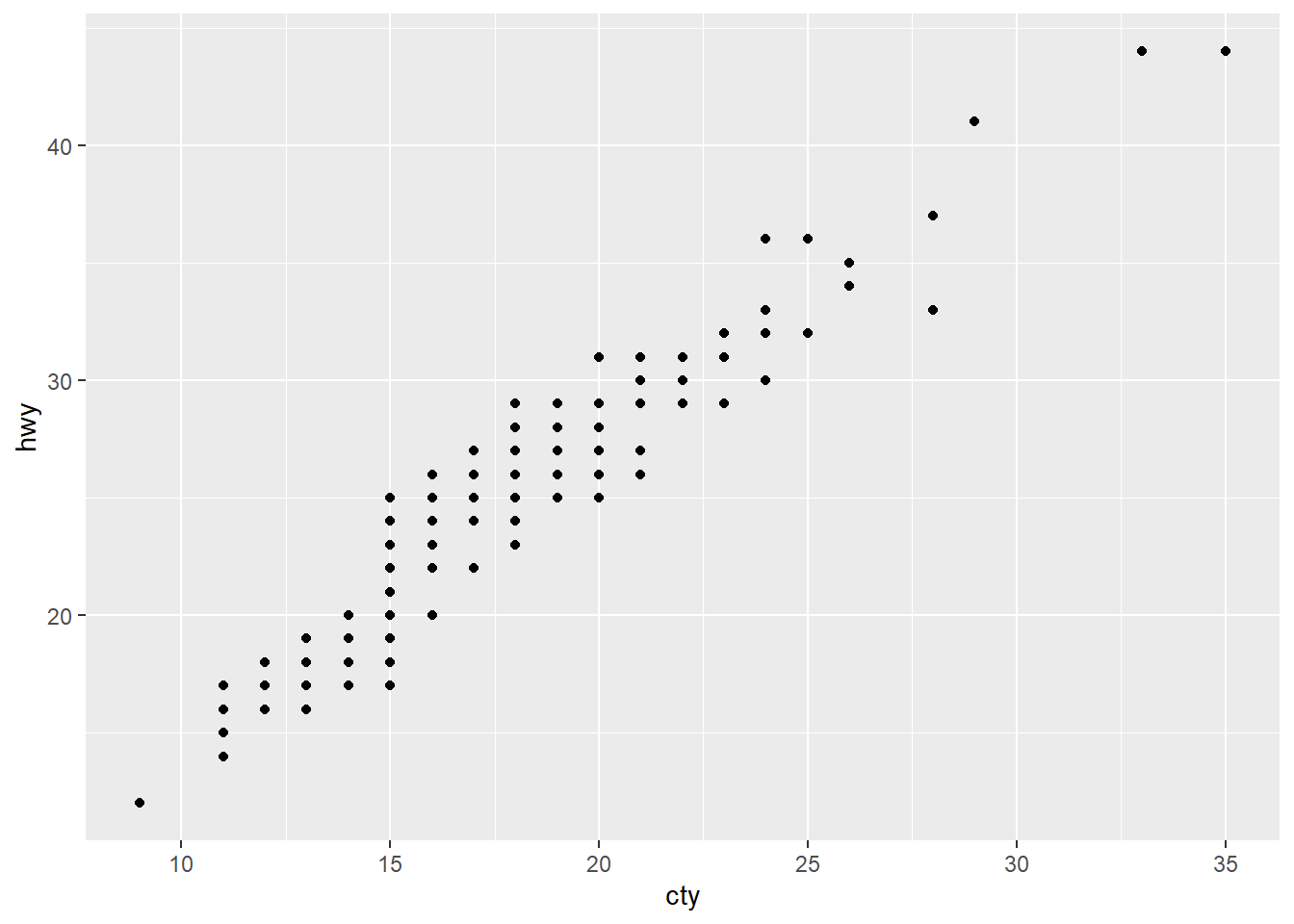
1.6.1(연습문제)

mpg %>% 
  ggplot() +
  geom_point(aes(x = cty, y = hwy))

# ggsave("mpg-plot.pdf")

2. Workflow - basics

You now have some experience running R code. We didn’t give you many details, but you’ve obviously figured out the basics, or you would’ve thrown this book away in frustration! Frustration is natural when you start programming in R because it is such a stickler for punctuation, and even one character out of place can cause it to complain. But while you should expect to be a little frustrated, take comfort in that this experience is typical and temporary: it happens to everyone, and the only way to get over it is to keep trying.

2.1 Coding basics

You will make lots of assignments, and <- is a pain to type. You can save time with RStudio’s keyboard shortcut: Alt + -(the minus sign). Notice that RStudio automatically surrounds <- with spaces, which is a good code formatting practice. Code can be miserable to read on a good day, so giveyoureyesabreak and use spaces.

2.2 Comments

For data analysis code, use comments to explain your overall plan of attack and record important insights as you encounter them. There’s no way to re-capture this knowledge from the code itself.

2.3 What’s in a name

We recommend snake_case, where you separate lowercase words with _.

3. Data transformation

Visualization is an important tool for generating insight, but it’s rare that you get the data in exactly the right form you need to make the graph you want. Often you’ll need to create some new variables or summaries to answer your questions with your data, or maybe you just want to rename the variables or reorder the observations to make the data a little easier to work with.

flights is a tibble, a special type of data frame used by the tidyverse to avoid some common gotchas. The most important difference between tibbles and data frames is the way tibbles print; they are designed for large datasets, so they only show the first few rows and only the columns that fit on one screen. There are a few options to see everything. If you’re using RStudio, the most convenient is probably View(flights), which opens an interactive, scrollable, and filterable view. Otherwise you can use print(flights, width = Inf) to show all columns, or use glimpse():

flights %>% 
  glimpse()
Rows: 336,776
Columns: 19
$ year           <int> 2013, 2013, 2013, 2013, 2013, 2013, 2013, 2013, 2013, 2…
$ month          <int> 1, 1, 1, 1, 1, 1, 1, 1, 1, 1, 1, 1, 1, 1, 1, 1, 1, 1, 1…
$ day            <int> 1, 1, 1, 1, 1, 1, 1, 1, 1, 1, 1, 1, 1, 1, 1, 1, 1, 1, 1…
$ dep_time       <int> 517, 533, 542, 544, 554, 554, 555, 557, 557, 558, 558, …
$ sched_dep_time <int> 515, 529, 540, 545, 600, 558, 600, 600, 600, 600, 600, …
$ dep_delay      <dbl> 2, 4, 2, -1, -6, -4, -5, -3, -3, -2, -2, -2, -2, -2, -1…
$ arr_time       <int> 830, 850, 923, 1004, 812, 740, 913, 709, 838, 753, 849,…
$ sched_arr_time <int> 819, 830, 850, 1022, 837, 728, 854, 723, 846, 745, 851,…
$ arr_delay      <dbl> 11, 20, 33, -18, -25, 12, 19, -14, -8, 8, -2, -3, 7, -1…
$ carrier        <chr> "UA", "UA", "AA", "B6", "DL", "UA", "B6", "EV", "B6", "…
$ flight         <int> 1545, 1714, 1141, 725, 461, 1696, 507, 5708, 79, 301, 4…
$ tailnum        <chr> "N14228", "N24211", "N619AA", "N804JB", "N668DN", "N394…
$ origin         <chr> "EWR", "LGA", "JFK", "JFK", "LGA", "EWR", "EWR", "LGA",…
$ dest           <chr> "IAH", "IAH", "MIA", "BQN", "ATL", "ORD", "FLL", "IAD",…
$ air_time       <dbl> 227, 227, 160, 183, 116, 150, 158, 53, 140, 138, 149, 1…
$ distance       <dbl> 1400, 1416, 1089, 1576, 762, 719, 1065, 229, 944, 733, …
$ hour           <dbl> 5, 5, 5, 5, 6, 5, 6, 6, 6, 6, 6, 6, 6, 6, 6, 5, 6, 6, 6…
$ minute         <dbl> 15, 29, 40, 45, 0, 58, 0, 0, 0, 0, 0, 0, 0, 0, 0, 59, 0…
$ time_hour      <dttm> 2013-01-01 05:00:00, 2013-01-01 05:00:00, 2013-01-01 0…

3.1.3 dplyr basics

You’re about to learn the primary dplyr verbs (functions), which will allow you to solve the vast majority of your data manipulation challenges. But before we discuss their individual differences, it’s worth stating what they have in common: 1. The first argument is always a data frame., 2. The subsequent arguments typically describe which columns to operate on using the variable names (without quotes)., 3. The output is always a new data frame.

flights |>
  filter(dest == "IAH") |> 
  group_by(year, month, day) |> 
  summarize(
    arr_delay = mean(arr_delay, na.rm = TRUE)
  ) 
`summarise()` has grouped output by 'year', 'month'. You can override using the
`.groups` argument.
# A tibble: 365 × 4
# Groups:   year, month [12]
    year month   day arr_delay
   <int> <int> <int>     <dbl>
 1  2013     1     1     17.8 
 2  2013     1     2      7   
 3  2013     1     3     18.3 
 4  2013     1     4     -3.2 
 5  2013     1     5     20.2 
 6  2013     1     6      9.28
 7  2013     1     7     -7.74
 8  2013     1     8      7.79
 9  2013     1     9     18.1 
10  2013     1    10      6.68
# ℹ 355 more rows

dplyr’s verbs are organized into four groups based on what they operate on: rows, columns, groups, or tables. In the following sections, you’ll learn the most important verbs for rows, columns, and groups. Then, we’ll return to the join verbs that work on tables in Chapter 19. Let’s dive in!

3.2 Rows

The most important verbs that operate on rows of a dataset are filter(), which changes which rows are present without changing their order, and arrange(), which changes the order of the rows without changing which are present. Both functions only affect the rows, and the columns are left unchanged. We’ll also discuss distinct() which finds rows with unique values. Unlike arrange() and filter() it can also optionally modify the columns.

3.2.1 filter

filter() allows you to keep rows based on the values of the columns. The first argument is the data frame. The second and subsequent arguments are the conditions that must be true to keep the row.

flights |> 
  filter(dep_delay > 120)
# A tibble: 9,723 × 19
    year month   day dep_time sched_dep_time dep_delay arr_time sched_arr_time
   <int> <int> <int>    <int>          <int>     <dbl>    <int>          <int>
 1  2013     1     1      848           1835       853     1001           1950
 2  2013     1     1      957            733       144     1056            853
 3  2013     1     1     1114            900       134     1447           1222
 4  2013     1     1     1540           1338       122     2020           1825
 5  2013     1     1     1815           1325       290     2120           1542
 6  2013     1     1     1842           1422       260     1958           1535
 7  2013     1     1     1856           1645       131     2212           2005
 8  2013     1     1     1934           1725       129     2126           1855
 9  2013     1     1     1938           1703       155     2109           1823
10  2013     1     1     1942           1705       157     2124           1830
# ℹ 9,713 more rows
# ℹ 11 more variables: arr_delay <dbl>, carrier <chr>, flight <int>,
#   tailnum <chr>, origin <chr>, dest <chr>, air_time <dbl>, distance <dbl>,
#   hour <dbl>, minute <dbl>, time_hour <dttm>

There’s a useful shortcut when you’re combining | and ==: %in%. It keeps rows where the variable equals one of the values on the right:

flights |> 
  filter(month == 1 & day == 1)
# A tibble: 842 × 19
    year month   day dep_time sched_dep_time dep_delay arr_time sched_arr_time
   <int> <int> <int>    <int>          <int>     <dbl>    <int>          <int>
 1  2013     1     1      517            515         2      830            819
 2  2013     1     1      533            529         4      850            830
 3  2013     1     1      542            540         2      923            850
 4  2013     1     1      544            545        -1     1004           1022
 5  2013     1     1      554            600        -6      812            837
 6  2013     1     1      554            558        -4      740            728
 7  2013     1     1      555            600        -5      913            854
 8  2013     1     1      557            600        -3      709            723
 9  2013     1     1      557            600        -3      838            846
10  2013     1     1      558            600        -2      753            745
# ℹ 832 more rows
# ℹ 11 more variables: arr_delay <dbl>, carrier <chr>, flight <int>,
#   tailnum <chr>, origin <chr>, dest <chr>, air_time <dbl>, distance <dbl>,
#   hour <dbl>, minute <dbl>, time_hour <dttm>
flights |> 
  filter(month == 1 | month == 2)
# A tibble: 51,955 × 19
    year month   day dep_time sched_dep_time dep_delay arr_time sched_arr_time
   <int> <int> <int>    <int>          <int>     <dbl>    <int>          <int>
 1  2013     1     1      517            515         2      830            819
 2  2013     1     1      533            529         4      850            830
 3  2013     1     1      542            540         2      923            850
 4  2013     1     1      544            545        -1     1004           1022
 5  2013     1     1      554            600        -6      812            837
 6  2013     1     1      554            558        -4      740            728
 7  2013     1     1      555            600        -5      913            854
 8  2013     1     1      557            600        -3      709            723
 9  2013     1     1      557            600        -3      838            846
10  2013     1     1      558            600        -2      753            745
# ℹ 51,945 more rows
# ℹ 11 more variables: arr_delay <dbl>, carrier <chr>, flight <int>,
#   tailnum <chr>, origin <chr>, dest <chr>, air_time <dbl>, distance <dbl>,
#   hour <dbl>, minute <dbl>, time_hour <dttm>
flights |> 
  filter(month %in% c(1, 2))
# A tibble: 51,955 × 19
    year month   day dep_time sched_dep_time dep_delay arr_time sched_arr_time
   <int> <int> <int>    <int>          <int>     <dbl>    <int>          <int>
 1  2013     1     1      517            515         2      830            819
 2  2013     1     1      533            529         4      850            830
 3  2013     1     1      542            540         2      923            850
 4  2013     1     1      544            545        -1     1004           1022
 5  2013     1     1      554            600        -6      812            837
 6  2013     1     1      554            558        -4      740            728
 7  2013     1     1      555            600        -5      913            854
 8  2013     1     1      557            600        -3      709            723
 9  2013     1     1      557            600        -3      838            846
10  2013     1     1      558            600        -2      753            745
# ℹ 51,945 more rows
# ℹ 11 more variables: arr_delay <dbl>, carrier <chr>, flight <int>,
#   tailnum <chr>, origin <chr>, dest <chr>, air_time <dbl>, distance <dbl>,
#   hour <dbl>, minute <dbl>, time_hour <dttm>
jan1 <- flights |> 
  filter(month == 1 & day == 1)

3.2.3 arrange

arrange() changes the order of the rows based on the value of the columns. It takes a data frame and a set of column names (or more complicated expressions) to order by. If you provide more than one column name, each additional column will be used to break ties in the values of the preceding columns. For example, the following code sorts by the departure time, which is spread over four columns. We get the earliest years first, then within a year, the earliest months, etc

flights |> 
  arrange(year, month, day, dep_time)
# A tibble: 336,776 × 19
    year month   day dep_time sched_dep_time dep_delay arr_time sched_arr_time
   <int> <int> <int>    <int>          <int>     <dbl>    <int>          <int>
 1  2013     1     1      517            515         2      830            819
 2  2013     1     1      533            529         4      850            830
 3  2013     1     1      542            540         2      923            850
 4  2013     1     1      544            545        -1     1004           1022
 5  2013     1     1      554            600        -6      812            837
 6  2013     1     1      554            558        -4      740            728
 7  2013     1     1      555            600        -5      913            854
 8  2013     1     1      557            600        -3      709            723
 9  2013     1     1      557            600        -3      838            846
10  2013     1     1      558            600        -2      753            745
# ℹ 336,766 more rows
# ℹ 11 more variables: arr_delay <dbl>, carrier <chr>, flight <int>,
#   tailnum <chr>, origin <chr>, dest <chr>, air_time <dbl>, distance <dbl>,
#   hour <dbl>, minute <dbl>, time_hour <dttm>
flights |> 
  arrange(desc(dep_delay))
# A tibble: 336,776 × 19
    year month   day dep_time sched_dep_time dep_delay arr_time sched_arr_time
   <int> <int> <int>    <int>          <int>     <dbl>    <int>          <int>
 1  2013     1     9      641            900      1301     1242           1530
 2  2013     6    15     1432           1935      1137     1607           2120
 3  2013     1    10     1121           1635      1126     1239           1810
 4  2013     9    20     1139           1845      1014     1457           2210
 5  2013     7    22      845           1600      1005     1044           1815
 6  2013     4    10     1100           1900       960     1342           2211
 7  2013     3    17     2321            810       911      135           1020
 8  2013     6    27      959           1900       899     1236           2226
 9  2013     7    22     2257            759       898      121           1026
10  2013    12     5      756           1700       896     1058           2020
# ℹ 336,766 more rows
# ℹ 11 more variables: arr_delay <dbl>, carrier <chr>, flight <int>,
#   tailnum <chr>, origin <chr>, dest <chr>, air_time <dbl>, distance <dbl>,
#   hour <dbl>, minute <dbl>, time_hour <dttm>

3.2.4 distinct

distinct() finds all the unique rows in a dataset, so technically, it primarily operates on the rows. Most of the time, however, you’ll want the distinct combination of some variables, so you can also optionally supply column names:

flights |> 
  distinct()
# A tibble: 336,776 × 19
    year month   day dep_time sched_dep_time dep_delay arr_time sched_arr_time
   <int> <int> <int>    <int>          <int>     <dbl>    <int>          <int>
 1  2013     1     1      517            515         2      830            819
 2  2013     1     1      533            529         4      850            830
 3  2013     1     1      542            540         2      923            850
 4  2013     1     1      544            545        -1     1004           1022
 5  2013     1     1      554            600        -6      812            837
 6  2013     1     1      554            558        -4      740            728
 7  2013     1     1      555            600        -5      913            854
 8  2013     1     1      557            600        -3      709            723
 9  2013     1     1      557            600        -3      838            846
10  2013     1     1      558            600        -2      753            745
# ℹ 336,766 more rows
# ℹ 11 more variables: arr_delay <dbl>, carrier <chr>, flight <int>,
#   tailnum <chr>, origin <chr>, dest <chr>, air_time <dbl>, distance <dbl>,
#   hour <dbl>, minute <dbl>, time_hour <dttm>
flights |> 
  distinct(origin, dest)
# A tibble: 224 × 2
   origin dest 
   <chr>  <chr>
 1 EWR    IAH  
 2 LGA    IAH  
 3 JFK    MIA  
 4 JFK    BQN  
 5 LGA    ATL  
 6 EWR    ORD  
 7 EWR    FLL  
 8 LGA    IAD  
 9 JFK    MCO  
10 LGA    ORD  
# ℹ 214 more rows

Alternatively, if you want to the keep other columns when filtering for unique rows, you can use the .keep_all = TRUE option.

flights |> 
  distinct(origin, dest, .keep_all = TRUE)
# A tibble: 224 × 19
    year month   day dep_time sched_dep_time dep_delay arr_time sched_arr_time
   <int> <int> <int>    <int>          <int>     <dbl>    <int>          <int>
 1  2013     1     1      517            515         2      830            819
 2  2013     1     1      533            529         4      850            830
 3  2013     1     1      542            540         2      923            850
 4  2013     1     1      544            545        -1     1004           1022
 5  2013     1     1      554            600        -6      812            837
 6  2013     1     1      554            558        -4      740            728
 7  2013     1     1      555            600        -5      913            854
 8  2013     1     1      557            600        -3      709            723
 9  2013     1     1      557            600        -3      838            846
10  2013     1     1      558            600        -2      753            745
# ℹ 214 more rows
# ℹ 11 more variables: arr_delay <dbl>, carrier <chr>, flight <int>,
#   tailnum <chr>, origin <chr>, dest <chr>, air_time <dbl>, distance <dbl>,
#   hour <dbl>, minute <dbl>, time_hour <dttm>

If you want to find the number of occurrences instead, you’re better off swapping distinct() for count(). With the sort = TRUE argument, you can arrange them in descending order of the number of occurrences. You’ll learn more about count in Section 13.3.

flights |>
  count(origin, dest, sort = TRUE)
# A tibble: 224 × 3
   origin dest      n
   <chr>  <chr> <int>
 1 JFK    LAX   11262
 2 LGA    ATL   10263
 3 LGA    ORD    8857
 4 JFK    SFO    8204
 5 LGA    CLT    6168
 6 EWR    ORD    6100
 7 JFK    BOS    5898
 8 LGA    MIA    5781
 9 JFK    MCO    5464
10 EWR    BOS    5327
# ℹ 214 more rows

3.2.5(연습문제)

  • 1
# Had an arrival delay of two or more hours
flights |>
  filter(arr_delay >= 120) |>
  arrange(desc(arr_delay))
# A tibble: 10,200 × 19
    year month   day dep_time sched_dep_time dep_delay arr_time sched_arr_time
   <int> <int> <int>    <int>          <int>     <dbl>    <int>          <int>
 1  2013     1     9      641            900      1301     1242           1530
 2  2013     6    15     1432           1935      1137     1607           2120
 3  2013     1    10     1121           1635      1126     1239           1810
 4  2013     9    20     1139           1845      1014     1457           2210
 5  2013     7    22      845           1600      1005     1044           1815
 6  2013     4    10     1100           1900       960     1342           2211
 7  2013     3    17     2321            810       911      135           1020
 8  2013     7    22     2257            759       898      121           1026
 9  2013    12     5      756           1700       896     1058           2020
10  2013     5     3     1133           2055       878     1250           2215
# ℹ 10,190 more rows
# ℹ 11 more variables: arr_delay <dbl>, carrier <chr>, flight <int>,
#   tailnum <chr>, origin <chr>, dest <chr>, air_time <dbl>, distance <dbl>,
#   hour <dbl>, minute <dbl>, time_hour <dttm>
# Flew to Houston (IAH or HOU)
flights |>
  filter(dest %in% c("IAH", "HOU"))
# A tibble: 9,313 × 19
    year month   day dep_time sched_dep_time dep_delay arr_time sched_arr_time
   <int> <int> <int>    <int>          <int>     <dbl>    <int>          <int>
 1  2013     1     1      517            515         2      830            819
 2  2013     1     1      533            529         4      850            830
 3  2013     1     1      623            627        -4      933            932
 4  2013     1     1      728            732        -4     1041           1038
 5  2013     1     1      739            739         0     1104           1038
 6  2013     1     1      908            908         0     1228           1219
 7  2013     1     1     1028           1026         2     1350           1339
 8  2013     1     1     1044           1045        -1     1352           1351
 9  2013     1     1     1114            900       134     1447           1222
10  2013     1     1     1205           1200         5     1503           1505
# ℹ 9,303 more rows
# ℹ 11 more variables: arr_delay <dbl>, carrier <chr>, flight <int>,
#   tailnum <chr>, origin <chr>, dest <chr>, air_time <dbl>, distance <dbl>,
#   hour <dbl>, minute <dbl>, time_hour <dttm>
# Were operated by United, American, or Delta
flights |>
  filter(carrier %in% c("UA", "AA", "DL"))
# A tibble: 139,504 × 19
    year month   day dep_time sched_dep_time dep_delay arr_time sched_arr_time
   <int> <int> <int>    <int>          <int>     <dbl>    <int>          <int>
 1  2013     1     1      517            515         2      830            819
 2  2013     1     1      533            529         4      850            830
 3  2013     1     1      542            540         2      923            850
 4  2013     1     1      554            600        -6      812            837
 5  2013     1     1      554            558        -4      740            728
 6  2013     1     1      558            600        -2      753            745
 7  2013     1     1      558            600        -2      924            917
 8  2013     1     1      558            600        -2      923            937
 9  2013     1     1      559            600        -1      941            910
10  2013     1     1      559            600        -1      854            902
# ℹ 139,494 more rows
# ℹ 11 more variables: arr_delay <dbl>, carrier <chr>, flight <int>,
#   tailnum <chr>, origin <chr>, dest <chr>, air_time <dbl>, distance <dbl>,
#   hour <dbl>, minute <dbl>, time_hour <dttm>
# Departed in summer (July, August, and September)
flights |>
  filter(month %in% c(7, 8, 9))
# A tibble: 86,326 × 19
    year month   day dep_time sched_dep_time dep_delay arr_time sched_arr_time
   <int> <int> <int>    <int>          <int>     <dbl>    <int>          <int>
 1  2013     7     1        1           2029       212      236           2359
 2  2013     7     1        2           2359         3      344            344
 3  2013     7     1       29           2245       104      151              1
 4  2013     7     1       43           2130       193      322             14
 5  2013     7     1       44           2150       174      300            100
 6  2013     7     1       46           2051       235      304           2358
 7  2013     7     1       48           2001       287      308           2305
 8  2013     7     1       58           2155       183      335             43
 9  2013     7     1      100           2146       194      327             30
10  2013     7     1      100           2245       135      337            135
# ℹ 86,316 more rows
# ℹ 11 more variables: arr_delay <dbl>, carrier <chr>, flight <int>,
#   tailnum <chr>, origin <chr>, dest <chr>, air_time <dbl>, distance <dbl>,
#   hour <dbl>, minute <dbl>, time_hour <dttm>
# Arrived more than two hours late, but didn’t leave late
flights |> 
  filter(arr_delay >= 120 & dep_delay <= 0) |> view()

# Were delayed by at least an hour, but made up over 30 minutes in flight
flights |> 
  filter(dep_delay >= 60 & dep_delay - arr_delay > 30)
# A tibble: 1,844 × 19
    year month   day dep_time sched_dep_time dep_delay arr_time sched_arr_time
   <int> <int> <int>    <int>          <int>     <dbl>    <int>          <int>
 1  2013     1     1     2205           1720       285       46           2040
 2  2013     1     1     2326           2130       116      131             18
 3  2013     1     3     1503           1221       162     1803           1555
 4  2013     1     3     1839           1700        99     2056           1950
 5  2013     1     3     1850           1745        65     2148           2120
 6  2013     1     3     1941           1759       102     2246           2139
 7  2013     1     3     1950           1845        65     2228           2227
 8  2013     1     3     2015           1915        60     2135           2111
 9  2013     1     3     2257           2000       177       45           2224
10  2013     1     4     1917           1700       137     2135           1950
# ℹ 1,834 more rows
# ℹ 11 more variables: arr_delay <dbl>, carrier <chr>, flight <int>,
#   tailnum <chr>, origin <chr>, dest <chr>, air_time <dbl>, distance <dbl>,
#   hour <dbl>, minute <dbl>, time_hour <dttm>
  • 2
flights |> 
  arrange(desc(dep_delay)) |> 
  arrange(sched_dep_time) |>
  relocate(dep_delay, sched_dep_time)
# A tibble: 336,776 × 19
   dep_delay sched_dep_time  year month   day dep_time arr_time sched_arr_time
       <dbl>          <int> <int> <int> <int>    <int>    <int>          <int>
 1        NA            106  2013     7    27       NA       NA            245
 2       188            500  2013     4    24      808     1008            640
 3        61            500  2013     9    13      601      732            648
 4        47            500  2013     3     9      547      733            648
 5        44            500  2013     6     8      544      727            640
 6        29            500  2013     4    17      529      704            640
 7        25            500  2013     6    30      525      703            640
 8        22            500  2013    11    28      522      658            651
 9        20            500  2013     4    21      520      705            640
10        18            500  2013     6     3      518      654            640
# ℹ 336,766 more rows
# ℹ 11 more variables: arr_delay <dbl>, carrier <chr>, flight <int>,
#   tailnum <chr>, origin <chr>, dest <chr>, air_time <dbl>, distance <dbl>,
#   hour <dbl>, minute <dbl>, time_hour <dttm>
  • 3
flights |> 
  mutate(speed = distance / (air_time / 60)) |>
  arrange(desc(speed)) |>
  relocate(speed)
# A tibble: 336,776 × 20
   speed  year month   day dep_time sched_dep_time dep_delay arr_time
   <dbl> <int> <int> <int>    <int>          <int>     <dbl>    <int>
 1  703.  2013     5    25     1709           1700         9     1923
 2  650.  2013     7     2     1558           1513        45     1745
 3  648   2013     5    13     2040           2025        15     2225
 4  641.  2013     3    23     1914           1910         4     2045
 5  591.  2013     1    12     1559           1600        -1     1849
 6  564   2013    11    17      650            655        -5     1059
 7  557.  2013     2    21     2355           2358        -3      412
 8  556.  2013    11    17      759            800        -1     1212
 9  554.  2013    11    16     2003           1925        38       17
10  554.  2013    11    16     2349           2359       -10      402
# ℹ 336,766 more rows
# ℹ 12 more variables: sched_arr_time <int>, arr_delay <dbl>, carrier <chr>,
#   flight <int>, tailnum <chr>, origin <chr>, dest <chr>, air_time <dbl>,
#   distance <dbl>, hour <dbl>, minute <dbl>, time_hour <dttm>
  • 4
flights |> 
  distinct(year, month, day) |>
  nrow()
[1] 365
  • 5
flights |> 
  arrange(desc(distance)) |>
  relocate(distance)
# A tibble: 336,776 × 19
   distance  year month   day dep_time sched_dep_time dep_delay arr_time
      <dbl> <int> <int> <int>    <int>          <int>     <dbl>    <int>
 1     4983  2013     1     1      857            900        -3     1516
 2     4983  2013     1     2      909            900         9     1525
 3     4983  2013     1     3      914            900        14     1504
 4     4983  2013     1     4      900            900         0     1516
 5     4983  2013     1     5      858            900        -2     1519
 6     4983  2013     1     6     1019            900        79     1558
 7     4983  2013     1     7     1042            900       102     1620
 8     4983  2013     1     8      901            900         1     1504
 9     4983  2013     1     9      641            900      1301     1242
10     4983  2013     1    10      859            900        -1     1449
# ℹ 336,766 more rows
# ℹ 11 more variables: sched_arr_time <int>, arr_delay <dbl>, carrier <chr>,
#   flight <int>, tailnum <chr>, origin <chr>, dest <chr>, air_time <dbl>,
#   hour <dbl>, minute <dbl>, time_hour <dttm>

3.3 Columns

There are four important verbs that affect the columns without changing the rows: mutate() creates new columns that are derived from the existing columns, select() changes which columns are present, rename() changes the names of the columns, and relocate() changes the positions of the columns.

3.3.1 mutate

The job of mutate() is to add new columns that are calculated from the existing columns. In the transform chapters, you’ll learn a large set of functions that you can use to manipulate different types of variables. For now, we’ll stick with basic algebra, which allows us to compute the gain, how much time a delayed flight made up in the air, and the speed in miles per hour:

flights |> 
  mutate(
    gain = dep_delay - arr_delay,
    speed = distance / air_time * 60
  )
# A tibble: 336,776 × 21
    year month   day dep_time sched_dep_time dep_delay arr_time sched_arr_time
   <int> <int> <int>    <int>          <int>     <dbl>    <int>          <int>
 1  2013     1     1      517            515         2      830            819
 2  2013     1     1      533            529         4      850            830
 3  2013     1     1      542            540         2      923            850
 4  2013     1     1      544            545        -1     1004           1022
 5  2013     1     1      554            600        -6      812            837
 6  2013     1     1      554            558        -4      740            728
 7  2013     1     1      555            600        -5      913            854
 8  2013     1     1      557            600        -3      709            723
 9  2013     1     1      557            600        -3      838            846
10  2013     1     1      558            600        -2      753            745
# ℹ 336,766 more rows
# ℹ 13 more variables: arr_delay <dbl>, carrier <chr>, flight <int>,
#   tailnum <chr>, origin <chr>, dest <chr>, air_time <dbl>, distance <dbl>,
#   hour <dbl>, minute <dbl>, time_hour <dttm>, gain <dbl>, speed <dbl>

By default, mutate() adds new columns on the right-hand side of your dataset, which makes it difficult to see what’s happening here. We can use the .before argument to instead add the variables to the left-hand side. […] Alternatively, you can control which variables are kept with the .keep argument. A particularly useful argument is “used” which specifies that we only keep the columns that were involved or created in the mutate() step. […] we should think carefully about whether we want the result to be assigned back to flights, overwriting the original data frame with many more variables, or to a new object.

flights |> 
  mutate(
    gain = dep_delay - arr_delay,
    speed = distance / air_time * 60,
    .before = 1
  )
# A tibble: 336,776 × 21
    gain speed  year month   day dep_time sched_dep_time dep_delay arr_time
   <dbl> <dbl> <int> <int> <int>    <int>          <int>     <dbl>    <int>
 1    -9  370.  2013     1     1      517            515         2      830
 2   -16  374.  2013     1     1      533            529         4      850
 3   -31  408.  2013     1     1      542            540         2      923
 4    17  517.  2013     1     1      544            545        -1     1004
 5    19  394.  2013     1     1      554            600        -6      812
 6   -16  288.  2013     1     1      554            558        -4      740
 7   -24  404.  2013     1     1      555            600        -5      913
 8    11  259.  2013     1     1      557            600        -3      709
 9     5  405.  2013     1     1      557            600        -3      838
10   -10  319.  2013     1     1      558            600        -2      753
# ℹ 336,766 more rows
# ℹ 12 more variables: sched_arr_time <int>, arr_delay <dbl>, carrier <chr>,
#   flight <int>, tailnum <chr>, origin <chr>, dest <chr>, air_time <dbl>,
#   distance <dbl>, hour <dbl>, minute <dbl>, time_hour <dttm>
flights |> 
  mutate(
    gain = dep_delay - arr_delay,
    speed = distance / air_time * 60,
    .after = day
  )
# A tibble: 336,776 × 21
    year month   day  gain speed dep_time sched_dep_time dep_delay arr_time
   <int> <int> <int> <dbl> <dbl>    <int>          <int>     <dbl>    <int>
 1  2013     1     1    -9  370.      517            515         2      830
 2  2013     1     1   -16  374.      533            529         4      850
 3  2013     1     1   -31  408.      542            540         2      923
 4  2013     1     1    17  517.      544            545        -1     1004
 5  2013     1     1    19  394.      554            600        -6      812
 6  2013     1     1   -16  288.      554            558        -4      740
 7  2013     1     1   -24  404.      555            600        -5      913
 8  2013     1     1    11  259.      557            600        -3      709
 9  2013     1     1     5  405.      557            600        -3      838
10  2013     1     1   -10  319.      558            600        -2      753
# ℹ 336,766 more rows
# ℹ 12 more variables: sched_arr_time <int>, arr_delay <dbl>, carrier <chr>,
#   flight <int>, tailnum <chr>, origin <chr>, dest <chr>, air_time <dbl>,
#   distance <dbl>, hour <dbl>, minute <dbl>, time_hour <dttm>
flights |> 
  mutate(
    gain = dep_delay - arr_delay,
    hours = air_time / 60,
    gain_per_hour = gain / hours,
    .keep = "used"
  )
# A tibble: 336,776 × 6
   dep_delay arr_delay air_time  gain hours gain_per_hour
       <dbl>     <dbl>    <dbl> <dbl> <dbl>         <dbl>
 1         2        11      227    -9 3.78          -2.38
 2         4        20      227   -16 3.78          -4.23
 3         2        33      160   -31 2.67         -11.6 
 4        -1       -18      183    17 3.05           5.57
 5        -6       -25      116    19 1.93           9.83
 6        -4        12      150   -16 2.5           -6.4 
 7        -5        19      158   -24 2.63          -9.11
 8        -3       -14       53    11 0.883         12.5 
 9        -3        -8      140     5 2.33           2.14
10        -2         8      138   -10 2.3           -4.35
# ℹ 336,766 more rows

3.3.2 select

It’s not uncommon to get datasets with hundreds or even thousands of variables. In this situation, the first challenge is often just focusing on the variables you’re interested in. select() allows you to rapidly zoom in on a useful subset using operations based on the names of the variables:

# Select columns by name:
flights |> 
  select(year, month, day)
# A tibble: 336,776 × 3
    year month   day
   <int> <int> <int>
 1  2013     1     1
 2  2013     1     1
 3  2013     1     1
 4  2013     1     1
 5  2013     1     1
 6  2013     1     1
 7  2013     1     1
 8  2013     1     1
 9  2013     1     1
10  2013     1     1
# ℹ 336,766 more rows
# Select all columns between year and day (inclusive):
flights |> 
  select(year:day)
# A tibble: 336,776 × 3
    year month   day
   <int> <int> <int>
 1  2013     1     1
 2  2013     1     1
 3  2013     1     1
 4  2013     1     1
 5  2013     1     1
 6  2013     1     1
 7  2013     1     1
 8  2013     1     1
 9  2013     1     1
10  2013     1     1
# ℹ 336,766 more rows
flights |> 
  select(!year:day)
# A tibble: 336,776 × 16
   dep_time sched_dep_time dep_delay arr_time sched_arr_time arr_delay carrier
      <int>          <int>     <dbl>    <int>          <int>     <dbl> <chr>  
 1      517            515         2      830            819        11 UA     
 2      533            529         4      850            830        20 UA     
 3      542            540         2      923            850        33 AA     
 4      544            545        -1     1004           1022       -18 B6     
 5      554            600        -6      812            837       -25 DL     
 6      554            558        -4      740            728        12 UA     
 7      555            600        -5      913            854        19 B6     
 8      557            600        -3      709            723       -14 EV     
 9      557            600        -3      838            846        -8 B6     
10      558            600        -2      753            745         8 AA     
# ℹ 336,766 more rows
# ℹ 9 more variables: flight <int>, tailnum <chr>, origin <chr>, dest <chr>,
#   air_time <dbl>, distance <dbl>, hour <dbl>, minute <dbl>, time_hour <dttm>
# Select all columns that are characters:
flights |> 
  select(where(is.character))
# A tibble: 336,776 × 4
   carrier tailnum origin dest 
   <chr>   <chr>   <chr>  <chr>
 1 UA      N14228  EWR    IAH  
 2 UA      N24211  LGA    IAH  
 3 AA      N619AA  JFK    MIA  
 4 B6      N804JB  JFK    BQN  
 5 DL      N668DN  LGA    ATL  
 6 UA      N39463  EWR    ORD  
 7 B6      N516JB  EWR    FLL  
 8 EV      N829AS  LGA    IAD  
 9 B6      N593JB  JFK    MCO  
10 AA      N3ALAA  LGA    ORD  
# ℹ 336,766 more rows

You can rename variables as you select() them by using =. The new name appears on the left-hand side of the =, and the old variable appears on the right-hand side:

flights |> 
  select(tail_num = tailnum)
# A tibble: 336,776 × 1
   tail_num
   <chr>   
 1 N14228  
 2 N24211  
 3 N619AA  
 4 N804JB  
 5 N668DN  
 6 N39463  
 7 N516JB  
 8 N829AS  
 9 N593JB  
10 N3ALAA  
# ℹ 336,766 more rows

3.3.3 rename

If you want to keep all the existing variables and just want to rename a few, you can use rename() instead of select(): […] If you have a bunch of inconsistently named columns and it would be painful to fix them all by hand, check out janitor::clean_names() which provides some useful automated cleaning.

flights |> 
  rename(tail_num = tailnum)
# A tibble: 336,776 × 19
    year month   day dep_time sched_dep_time dep_delay arr_time sched_arr_time
   <int> <int> <int>    <int>          <int>     <dbl>    <int>          <int>
 1  2013     1     1      517            515         2      830            819
 2  2013     1     1      533            529         4      850            830
 3  2013     1     1      542            540         2      923            850
 4  2013     1     1      544            545        -1     1004           1022
 5  2013     1     1      554            600        -6      812            837
 6  2013     1     1      554            558        -4      740            728
 7  2013     1     1      555            600        -5      913            854
 8  2013     1     1      557            600        -3      709            723
 9  2013     1     1      557            600        -3      838            846
10  2013     1     1      558            600        -2      753            745
# ℹ 336,766 more rows
# ℹ 11 more variables: arr_delay <dbl>, carrier <chr>, flight <int>,
#   tail_num <chr>, origin <chr>, dest <chr>, air_time <dbl>, distance <dbl>,
#   hour <dbl>, minute <dbl>, time_hour <dttm>

3.3.4 relocate

Use relocate() to move variables around. You might want to collect related variables together or move important variables to the front. By default relocate() moves variables to the front:

flights |> 
  relocate(time_hour, air_time)
# A tibble: 336,776 × 19
   time_hour           air_time  year month   day dep_time sched_dep_time
   <dttm>                 <dbl> <int> <int> <int>    <int>          <int>
 1 2013-01-01 05:00:00      227  2013     1     1      517            515
 2 2013-01-01 05:00:00      227  2013     1     1      533            529
 3 2013-01-01 05:00:00      160  2013     1     1      542            540
 4 2013-01-01 05:00:00      183  2013     1     1      544            545
 5 2013-01-01 06:00:00      116  2013     1     1      554            600
 6 2013-01-01 05:00:00      150  2013     1     1      554            558
 7 2013-01-01 06:00:00      158  2013     1     1      555            600
 8 2013-01-01 06:00:00       53  2013     1     1      557            600
 9 2013-01-01 06:00:00      140  2013     1     1      557            600
10 2013-01-01 06:00:00      138  2013     1     1      558            600
# ℹ 336,766 more rows
# ℹ 12 more variables: dep_delay <dbl>, arr_time <int>, sched_arr_time <int>,
#   arr_delay <dbl>, carrier <chr>, flight <int>, tailnum <chr>, origin <chr>,
#   dest <chr>, distance <dbl>, hour <dbl>, minute <dbl>
flights |> 
  relocate(year:dep_time, .after = time_hour)
# A tibble: 336,776 × 19
   sched_dep_time dep_delay arr_time sched_arr_time arr_delay carrier flight
            <int>     <dbl>    <int>          <int>     <dbl> <chr>    <int>
 1            515         2      830            819        11 UA        1545
 2            529         4      850            830        20 UA        1714
 3            540         2      923            850        33 AA        1141
 4            545        -1     1004           1022       -18 B6         725
 5            600        -6      812            837       -25 DL         461
 6            558        -4      740            728        12 UA        1696
 7            600        -5      913            854        19 B6         507
 8            600        -3      709            723       -14 EV        5708
 9            600        -3      838            846        -8 B6          79
10            600        -2      753            745         8 AA         301
# ℹ 336,766 more rows
# ℹ 12 more variables: tailnum <chr>, origin <chr>, dest <chr>, air_time <dbl>,
#   distance <dbl>, hour <dbl>, minute <dbl>, time_hour <dttm>, year <int>,
#   month <int>, day <int>, dep_time <int>
flights |> 
  relocate(starts_with("arr"), .before = dep_time)
# A tibble: 336,776 × 19
    year month   day arr_time arr_delay dep_time sched_dep_time dep_delay
   <int> <int> <int>    <int>     <dbl>    <int>          <int>     <dbl>
 1  2013     1     1      830        11      517            515         2
 2  2013     1     1      850        20      533            529         4
 3  2013     1     1      923        33      542            540         2
 4  2013     1     1     1004       -18      544            545        -1
 5  2013     1     1      812       -25      554            600        -6
 6  2013     1     1      740        12      554            558        -4
 7  2013     1     1      913        19      555            600        -5
 8  2013     1     1      709       -14      557            600        -3
 9  2013     1     1      838        -8      557            600        -3
10  2013     1     1      753         8      558            600        -2
# ℹ 336,766 more rows
# ℹ 11 more variables: sched_arr_time <int>, carrier <chr>, flight <int>,
#   tailnum <chr>, origin <chr>, dest <chr>, air_time <dbl>, distance <dbl>,
#   hour <dbl>, minute <dbl>, time_hour <dttm>

3.3.5(연습문제)

  • 1
flights |> 
  relocate(dep_time, sched_dep_time, dep_delay)
# A tibble: 336,776 × 19
   dep_time sched_dep_time dep_delay  year month   day arr_time sched_arr_time
      <int>          <int>     <dbl> <int> <int> <int>    <int>          <int>
 1      517            515         2  2013     1     1      830            819
 2      533            529         4  2013     1     1      850            830
 3      542            540         2  2013     1     1      923            850
 4      544            545        -1  2013     1     1     1004           1022
 5      554            600        -6  2013     1     1      812            837
 6      554            558        -4  2013     1     1      740            728
 7      555            600        -5  2013     1     1      913            854
 8      557            600        -3  2013     1     1      709            723
 9      557            600        -3  2013     1     1      838            846
10      558            600        -2  2013     1     1      753            745
# ℹ 336,766 more rows
# ℹ 11 more variables: arr_delay <dbl>, carrier <chr>, flight <int>,
#   tailnum <chr>, origin <chr>, dest <chr>, air_time <dbl>, distance <dbl>,
#   hour <dbl>, minute <dbl>, time_hour <dttm>
  • 2
flights |> 
  select(dep_time, dep_delay, arr_time, arr_delay)
# A tibble: 336,776 × 4
   dep_time dep_delay arr_time arr_delay
      <int>     <dbl>    <int>     <dbl>
 1      517         2      830        11
 2      533         4      850        20
 3      542         2      923        33
 4      544        -1     1004       -18
 5      554        -6      812       -25
 6      554        -4      740        12
 7      555        -5      913        19
 8      557        -3      709       -14
 9      557        -3      838        -8
10      558        -2      753         8
# ℹ 336,766 more rows
flights |> 
  select(starts_with("dep"), starts_with("arr"))
# A tibble: 336,776 × 4
   dep_time dep_delay arr_time arr_delay
      <int>     <dbl>    <int>     <dbl>
 1      517         2      830        11
 2      533         4      850        20
 3      542         2      923        33
 4      544        -1     1004       -18
 5      554        -6      812       -25
 6      554        -4      740        12
 7      555        -5      913        19
 8      557        -3      709       -14
 9      557        -3      838        -8
10      558        -2      753         8
# ℹ 336,766 more rows
flights |>
  select(dep_time:arr_delay, -contains("sched"))
# A tibble: 336,776 × 4
   dep_time dep_delay arr_time arr_delay
      <int>     <dbl>    <int>     <dbl>
 1      517         2      830        11
 2      533         4      850        20
 3      542         2      923        33
 4      544        -1     1004       -18
 5      554        -6      812       -25
 6      554        -4      740        12
 7      555        -5      913        19
 8      557        -3      709       -14
 9      557        -3      838        -8
10      558        -2      753         8
# ℹ 336,766 more rows
  • 3
flights |> 
  select(dep_time, dep_time)
# A tibble: 336,776 × 1
   dep_time
      <int>
 1      517
 2      533
 3      542
 4      544
 5      554
 6      554
 7      555
 8      557
 9      557
10      558
# ℹ 336,766 more rows
  • 4
variables <- c("year", "month", "day", "dep_delay", "arr_delay")

flights |> 
  select(any_of(variables))
# A tibble: 336,776 × 5
    year month   day dep_delay arr_delay
   <int> <int> <int>     <dbl>     <dbl>
 1  2013     1     1         2        11
 2  2013     1     1         4        20
 3  2013     1     1         2        33
 4  2013     1     1        -1       -18
 5  2013     1     1        -6       -25
 6  2013     1     1        -4        12
 7  2013     1     1        -5        19
 8  2013     1     1        -3       -14
 9  2013     1     1        -3        -8
10  2013     1     1        -2         8
# ℹ 336,766 more rows
  • 5
flights |> 
  select(contains("TIME"))
# A tibble: 336,776 × 6
   dep_time sched_dep_time arr_time sched_arr_time air_time time_hour          
      <int>          <int>    <int>          <int>    <dbl> <dttm>             
 1      517            515      830            819      227 2013-01-01 05:00:00
 2      533            529      850            830      227 2013-01-01 05:00:00
 3      542            540      923            850      160 2013-01-01 05:00:00
 4      544            545     1004           1022      183 2013-01-01 05:00:00
 5      554            600      812            837      116 2013-01-01 06:00:00
 6      554            558      740            728      150 2013-01-01 05:00:00
 7      555            600      913            854      158 2013-01-01 06:00:00
 8      557            600      709            723       53 2013-01-01 06:00:00
 9      557            600      838            846      140 2013-01-01 06:00:00
10      558            600      753            745      138 2013-01-01 06:00:00
# ℹ 336,766 more rows
flights |> 
  select(contains("TIME", ignore.case = FALSE))
# A tibble: 336,776 × 0
  • 6
flights |>
  rename(air_time_min = air_time) |>
  relocate(air_time_min)
# A tibble: 336,776 × 19
   air_time_min  year month   day dep_time sched_dep_time dep_delay arr_time
          <dbl> <int> <int> <int>    <int>          <int>     <dbl>    <int>
 1          227  2013     1     1      517            515         2      830
 2          227  2013     1     1      533            529         4      850
 3          160  2013     1     1      542            540         2      923
 4          183  2013     1     1      544            545        -1     1004
 5          116  2013     1     1      554            600        -6      812
 6          150  2013     1     1      554            558        -4      740
 7          158  2013     1     1      555            600        -5      913
 8           53  2013     1     1      557            600        -3      709
 9          140  2013     1     1      557            600        -3      838
10          138  2013     1     1      558            600        -2      753
# ℹ 336,766 more rows
# ℹ 11 more variables: sched_arr_time <int>, arr_delay <dbl>, carrier <chr>,
#   flight <int>, tailnum <chr>, origin <chr>, dest <chr>, distance <dbl>,
#   hour <dbl>, minute <dbl>, time_hour <dttm>

3.4 The Pipe

While both forms have their time and place, the pipe generally produces data analysis code that is easier to write and read.

flights |> 
  filter(dest == "IAH") |> 
  mutate(speed = distance / air_time * 60) |> 
  select(year:day, dep_time, carrier, flight, speed) |> 
  arrange(desc(speed))
# A tibble: 7,198 × 7
    year month   day dep_time carrier flight speed
   <int> <int> <int>    <int> <chr>    <int> <dbl>
 1  2013     7     9      707 UA         226  522.
 2  2013     8    27     1850 UA        1128  521.
 3  2013     8    28      902 UA        1711  519.
 4  2013     8    28     2122 UA        1022  519.
 5  2013     6    11     1628 UA        1178  515.
 6  2013     8    27     1017 UA         333  515.
 7  2013     8    27     1205 UA        1421  515.
 8  2013     8    27     1758 UA         302  515.
 9  2013     9    27      521 UA         252  515.
10  2013     8    28      625 UA         559  515.
# ℹ 7,188 more rows

3.5 Groups

So far you’ve learned about functions that work with rows and columns. dplyr gets even more powerful when you add in the ability to work with groups.

3.5.1 group_by

Use group_by() to divide your dataset into groups meaningful for your analysis

flights |> 
  group_by(month)
# A tibble: 336,776 × 19
# Groups:   month [12]
    year month   day dep_time sched_dep_time dep_delay arr_time sched_arr_time
   <int> <int> <int>    <int>          <int>     <dbl>    <int>          <int>
 1  2013     1     1      517            515         2      830            819
 2  2013     1     1      533            529         4      850            830
 3  2013     1     1      542            540         2      923            850
 4  2013     1     1      544            545        -1     1004           1022
 5  2013     1     1      554            600        -6      812            837
 6  2013     1     1      554            558        -4      740            728
 7  2013     1     1      555            600        -5      913            854
 8  2013     1     1      557            600        -3      709            723
 9  2013     1     1      557            600        -3      838            846
10  2013     1     1      558            600        -2      753            745
# ℹ 336,766 more rows
# ℹ 11 more variables: arr_delay <dbl>, carrier <chr>, flight <int>,
#   tailnum <chr>, origin <chr>, dest <chr>, air_time <dbl>, distance <dbl>,
#   hour <dbl>, minute <dbl>, time_hour <dttm>

3.5.2 summarize

You can create any number of summaries in a single call to summarize(). You’ll learn various useful summaries in the upcoming chapters, but one very useful summary is n(), which returns the number of rows in each group:

flights |> 
  group_by(month) |> 
  summarize(
    avg_delay = mean(dep_delay)
  )
# A tibble: 12 × 2
   month avg_delay
   <int>     <dbl>
 1     1        NA
 2     2        NA
 3     3        NA
 4     4        NA
 5     5        NA
 6     6        NA
 7     7        NA
 8     8        NA
 9     9        NA
10    10        NA
11    11        NA
12    12        NA
flights |> 
  group_by(month) |> 
  summarize(
    avg_delay = mean(dep_delay, na.rm = TRUE)
  )
# A tibble: 12 × 2
   month avg_delay
   <int>     <dbl>
 1     1     10.0 
 2     2     10.8 
 3     3     13.2 
 4     4     13.9 
 5     5     13.0 
 6     6     20.8 
 7     7     21.7 
 8     8     12.6 
 9     9      6.72
10    10      6.24
11    11      5.44
12    12     16.6 
flights |> 
  group_by(month) |> 
  summarize(
    avg_delay = mean(dep_delay, na.rm = TRUE), 
    n = n()
  )
# A tibble: 12 × 3
   month avg_delay     n
   <int>     <dbl> <int>
 1     1     10.0  27004
 2     2     10.8  24951
 3     3     13.2  28834
 4     4     13.9  28330
 5     5     13.0  28796
 6     6     20.8  28243
 7     7     21.7  29425
 8     8     12.6  29327
 9     9      6.72 27574
10    10      6.24 28889
11    11      5.44 27268
12    12     16.6  28135

3.5.3 slice_

There are five handy functions that allow you to extract specific rows within each group: - df |> slice_head(n = 1) takes the first row from each group. - df |> slice_tail(n = 1) takes the last row in each group. - df |> slice_min(x, n = 1) takes the row with the smallest value of column x. - df |> slice_max(x, n = 1) takes the row with the largest value of column x. - df |> slice_sample(n = 1) takes one random row.

flights |> 
  group_by(dest) |> 
  slice_max(arr_delay, n = 1) |>
  relocate(dest)
# A tibble: 108 × 19
# Groups:   dest [105]
   dest   year month   day dep_time sched_dep_time dep_delay arr_time
   <chr> <int> <int> <int>    <int>          <int>     <dbl>    <int>
 1 ABQ    2013     7    22     2145           2007        98      132
 2 ACK    2013     7    23     1139            800       219     1250
 3 ALB    2013     1    25      123           2000       323      229
 4 ANC    2013     8    17     1740           1625        75     2042
 5 ATL    2013     7    22     2257            759       898      121
 6 AUS    2013     7    10     2056           1505       351     2347
 7 AVL    2013     8    13     1156            832       204     1417
 8 BDL    2013     2    21     1728           1316       252     1839
 9 BGR    2013    12     1     1504           1056       248     1628
10 BHM    2013     4    10       25           1900       325      136
# ℹ 98 more rows
# ℹ 11 more variables: sched_arr_time <int>, arr_delay <dbl>, carrier <chr>,
#   flight <int>, tailnum <chr>, origin <chr>, air_time <dbl>, distance <dbl>,
#   hour <dbl>, minute <dbl>, time_hour <dttm>

3.5.4 Grouping by multiple variables

You can create groups using more than one variable. For example, we could make a group for each date.

daily <- flights |>  
  group_by(year, month, day)

When you summarize a tibble grouped by more than one variable, each summary peels off the last group. In hindsight, this wasn’t a great way to make this function work, but it’s difficult to change without breaking existing code.

daily_flights <- daily |> 
  summarize(n = n())
`summarise()` has grouped output by 'year', 'month'. You can override using the
`.groups` argument.
daily_flights <- daily |> 
  summarize(
    n = n(), 
    .groups = "drop_last"
  )

3.5.5 Ungrouping

You might also want to remove grouping from a data frame without using summarize(). You can do this with ungroup(). […] You get a single row back because dplyr treats all the rows in an ungrouped data frame as belonging to one group.

daily |> 
  ungroup()
# A tibble: 336,776 × 19
    year month   day dep_time sched_dep_time dep_delay arr_time sched_arr_time
   <int> <int> <int>    <int>          <int>     <dbl>    <int>          <int>
 1  2013     1     1      517            515         2      830            819
 2  2013     1     1      533            529         4      850            830
 3  2013     1     1      542            540         2      923            850
 4  2013     1     1      544            545        -1     1004           1022
 5  2013     1     1      554            600        -6      812            837
 6  2013     1     1      554            558        -4      740            728
 7  2013     1     1      555            600        -5      913            854
 8  2013     1     1      557            600        -3      709            723
 9  2013     1     1      557            600        -3      838            846
10  2013     1     1      558            600        -2      753            745
# ℹ 336,766 more rows
# ℹ 11 more variables: arr_delay <dbl>, carrier <chr>, flight <int>,
#   tailnum <chr>, origin <chr>, dest <chr>, air_time <dbl>, distance <dbl>,
#   hour <dbl>, minute <dbl>, time_hour <dttm>
daily |> 
  ungroup() |>
  summarize(
    avg_delay = mean(dep_delay, na.rm = TRUE), 
    flights = n()
  )
# A tibble: 1 × 2
  avg_delay flights
      <dbl>   <int>
1      12.6  336776

3.5.6 .by

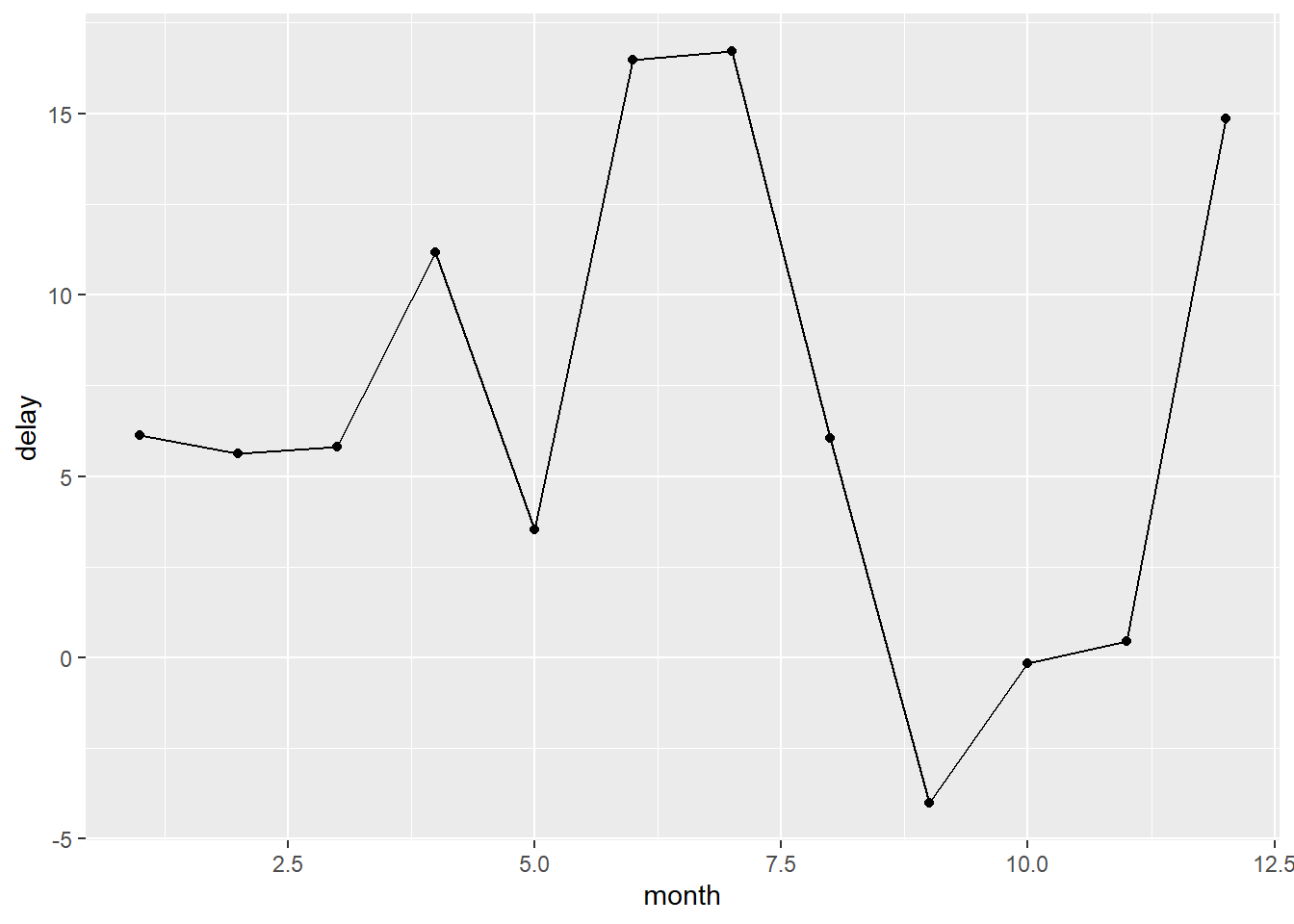
[…] syntax for per-operation grouping, the .by argument. group_by() and ungroup() aren’t going away, but you can now also use the .by argument to group within a single operation. .by works with all verbs and has the advantage that you don’t need to use the .groups argument to suppress the grouping message or ungroup() when you’re done.

flights |> 
  summarize(
    delay = mean(dep_delay, na.rm = TRUE), 
    n = n(),
    .by = month
  )
# A tibble: 12 × 3
   month delay     n
   <int> <dbl> <int>
 1     1 10.0  27004
 2    10  6.24 28889
 3    11  5.44 27268
 4    12 16.6  28135
 5     2 10.8  24951
 6     3 13.2  28834
 7     4 13.9  28330
 8     5 13.0  28796
 9     6 20.8  28243
10     7 21.7  29425
11     8 12.6  29327
12     9  6.72 27574
flights |> 
  summarize(
    delay = mean(dep_delay, na.rm = TRUE), 
    n = n(),
    .by = c(origin, dest)
  )
# A tibble: 224 × 4
   origin dest  delay     n
   <chr>  <chr> <dbl> <int>
 1 EWR    IAH   11.8   3973
 2 LGA    IAH    9.06  2951
 3 JFK    MIA    9.34  3314
 4 JFK    BQN    6.67   599
 5 LGA    ATL   11.4  10263
 6 EWR    ORD   14.6   6100
 7 EWR    FLL   13.5   3793
 8 LGA    IAD   16.7   1803
 9 JFK    MCO   10.6   5464
10 LGA    ORD   10.7   8857
# ℹ 214 more rows

3.5.7(연습문제)

  • 1
flights |>
  group_by(carrier) |>
  summarize(avg_dep_delay = mean(dep_delay, na.rm = TRUE)) |>
  arrange(desc(avg_dep_delay))
# A tibble: 16 × 2
   carrier avg_dep_delay
   <chr>           <dbl>
 1 F9              20.2 
 2 EV              20.0 
 3 YV              19.0 
 4 FL              18.7 
 5 WN              17.7 
 6 9E              16.7 
 7 B6              13.0 
 8 VX              12.9 
 9 OO              12.6 
10 UA              12.1 
11 MQ              10.6 
12 DL               9.26
13 AA               8.59
14 AS               5.80
15 HA               4.90
16 US               3.78
  • 2
flights |> 
  group_by(dest) |> 
  arrange(dest, desc(dep_delay)) |>
  slice_head(n = 5) |>
  relocate(dest, dep_delay)
# A tibble: 517 × 19
# Groups:   dest [105]
   dest  dep_delay  year month   day dep_time sched_dep_time arr_time
   <chr>     <dbl> <int> <int> <int>    <int>          <int>    <int>
 1 ABQ         142  2013    12    14     2223           2001      133
 2 ABQ         139  2013    12    17     2220           2001      120
 3 ABQ         125  2013     7    30     2212           2007       57
 4 ABQ         125  2013     9     2     2212           2007       48
 5 ABQ         119  2013     7    23     2206           2007      116
 6 ACK         219  2013     7    23     1139            800     1250
 7 ACK         138  2013     7     2     1018            800     1119
 8 ACK         117  2013     7     4      957            800     1106
 9 ACK         101  2013     5    30     1321           1140     1419
10 ACK         100  2013     6    24      940            800     1111
# ℹ 507 more rows
# ℹ 11 more variables: sched_arr_time <int>, arr_delay <dbl>, carrier <chr>,
#   flight <int>, tailnum <chr>, origin <chr>, air_time <dbl>, distance <dbl>,
#   hour <dbl>, minute <dbl>, time_hour <dttm>
  • 3
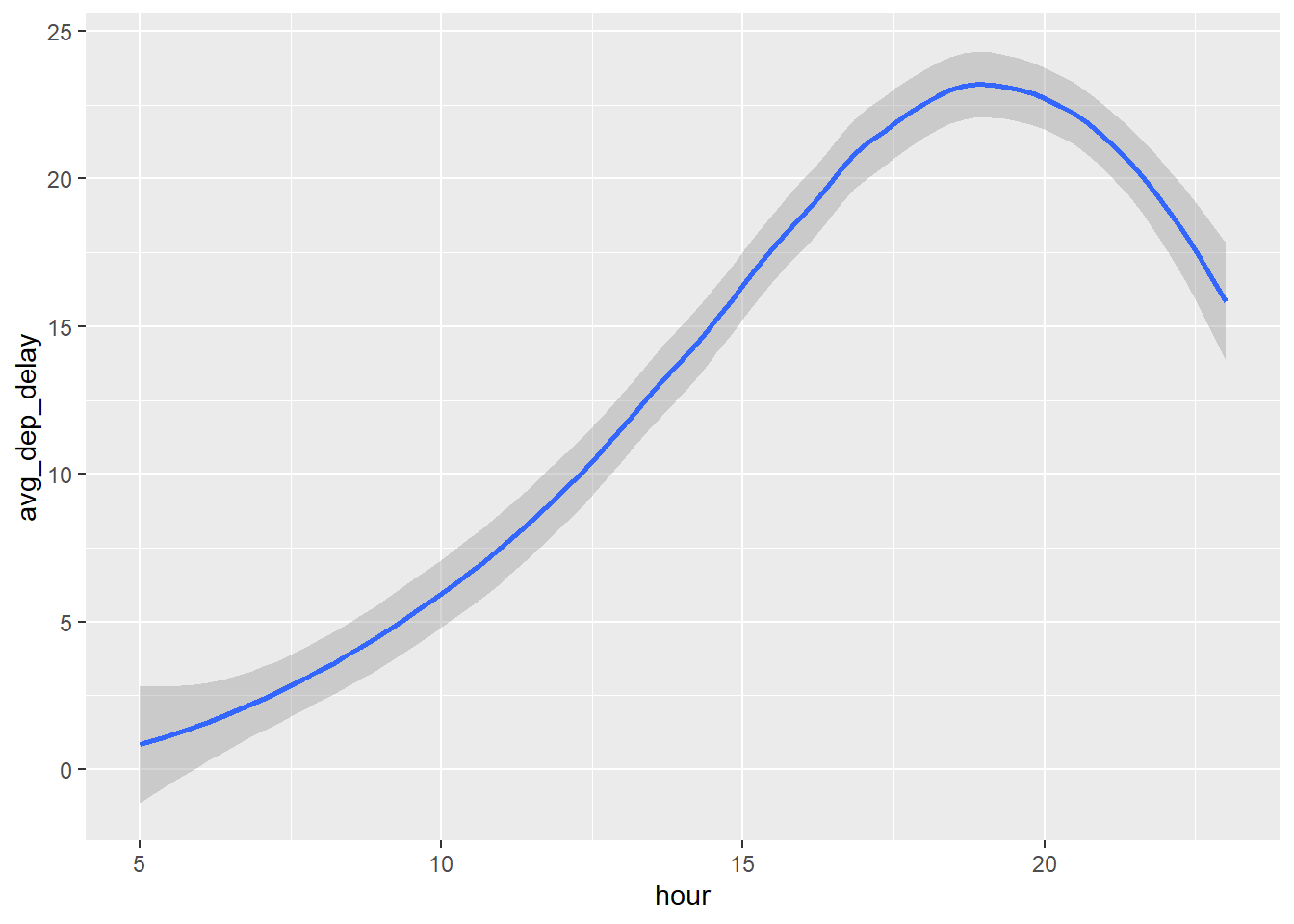
flights |>
  group_by(hour) |>
  summarize(avg_dep_delay = mean(dep_delay, na.rm = TRUE)) |>
  ggplot(aes(x = hour, y = avg_dep_delay)) + 
  geom_smooth()
`geom_smooth()` using method = 'loess' and formula = 'y ~ x'
Warning: Removed 1 row containing non-finite outside the scale range
(`stat_smooth()`).

  • 4
flights |> 
  slice_min(dep_delay, n = -5) |>
  relocate(dep_delay)
# A tibble: 336,776 × 19
   dep_delay  year month   day dep_time sched_dep_time arr_time sched_arr_time
       <dbl> <int> <int> <int>    <int>          <int>    <int>          <int>
 1       -43  2013    12     7     2040           2123       40           2352
 2       -33  2013     2     3     2022           2055     2240           2338
 3       -32  2013    11    10     1408           1440     1549           1559
 4       -30  2013     1    11     1900           1930     2233           2243
 5       -27  2013     1    29     1703           1730     1947           1957
 6       -26  2013     8     9      729            755     1002            955
 7       -25  2013    10    23     1907           1932     2143           2143
 8       -25  2013     3    30     2030           2055     2213           2250
 9       -24  2013     3     2     1431           1455     1601           1631
10       -24  2013     5     5      934            958     1225           1309
# ℹ 336,766 more rows
# ℹ 11 more variables: arr_delay <dbl>, carrier <chr>, flight <int>,
#   tailnum <chr>, origin <chr>, dest <chr>, air_time <dbl>, distance <dbl>,
#   hour <dbl>, minute <dbl>, time_hour <dttm>
flights |> 
  slice_min(dep_delay, n = 5) |>
  relocate(dep_delay)
# A tibble: 5 × 19
  dep_delay  year month   day dep_time sched_dep_time arr_time sched_arr_time
      <dbl> <int> <int> <int>    <int>          <int>    <int>          <int>
1       -43  2013    12     7     2040           2123       40           2352
2       -33  2013     2     3     2022           2055     2240           2338
3       -32  2013    11    10     1408           1440     1549           1559
4       -30  2013     1    11     1900           1930     2233           2243
5       -27  2013     1    29     1703           1730     1947           1957
# ℹ 11 more variables: arr_delay <dbl>, carrier <chr>, flight <int>,
#   tailnum <chr>, origin <chr>, dest <chr>, air_time <dbl>, distance <dbl>,
#   hour <dbl>, minute <dbl>, time_hour <dttm>
flights |> 
  slice_max(dep_delay, n = -5) |>
  relocate(dep_delay)
# A tibble: 336,776 × 19
   dep_delay  year month   day dep_time sched_dep_time arr_time sched_arr_time
       <dbl> <int> <int> <int>    <int>          <int>    <int>          <int>
 1      1301  2013     1     9      641            900     1242           1530
 2      1137  2013     6    15     1432           1935     1607           2120
 3      1126  2013     1    10     1121           1635     1239           1810
 4      1014  2013     9    20     1139           1845     1457           2210
 5      1005  2013     7    22      845           1600     1044           1815
 6       960  2013     4    10     1100           1900     1342           2211
 7       911  2013     3    17     2321            810      135           1020
 8       899  2013     6    27      959           1900     1236           2226
 9       898  2013     7    22     2257            759      121           1026
10       896  2013    12     5      756           1700     1058           2020
# ℹ 336,766 more rows
# ℹ 11 more variables: arr_delay <dbl>, carrier <chr>, flight <int>,
#   tailnum <chr>, origin <chr>, dest <chr>, air_time <dbl>, distance <dbl>,
#   hour <dbl>, minute <dbl>, time_hour <dttm>
flights |> 
  slice_max(dep_delay, n = 5) |>
  relocate(dep_delay)
# A tibble: 5 × 19
  dep_delay  year month   day dep_time sched_dep_time arr_time sched_arr_time
      <dbl> <int> <int> <int>    <int>          <int>    <int>          <int>
1      1301  2013     1     9      641            900     1242           1530
2      1137  2013     6    15     1432           1935     1607           2120
3      1126  2013     1    10     1121           1635     1239           1810
4      1014  2013     9    20     1139           1845     1457           2210
5      1005  2013     7    22      845           1600     1044           1815
# ℹ 11 more variables: arr_delay <dbl>, carrier <chr>, flight <int>,
#   tailnum <chr>, origin <chr>, dest <chr>, air_time <dbl>, distance <dbl>,
#   hour <dbl>, minute <dbl>, time_hour <dttm>
  • 6
df <- tibble(
  x = 1:5,
  y = c("a", "b", "a", "a", "b"),
  z = c("K", "K", "L", "L", "K")
)
df |>
  group_by(y)
# A tibble: 5 × 3
# Groups:   y [2]
      x y     z    
  <int> <chr> <chr>
1     1 a     K    
2     2 b     K    
3     3 a     L    
4     4 a     L    
5     5 b     K    
df |>
  arrange(y)
# A tibble: 5 × 3
      x y     z    
  <int> <chr> <chr>
1     1 a     K    
2     3 a     L    
3     4 a     L    
4     2 b     K    
5     5 b     K    
df |>
  group_by(y) |>
  summarize(mean_x = mean(x))
# A tibble: 2 × 2
  y     mean_x
  <chr>  <dbl>
1 a       2.67
2 b       3.5 
df |>
  group_by(y, z) |>
  summarize(mean_x = mean(x))
`summarise()` has grouped output by 'y'. You can override using the `.groups`
argument.
# A tibble: 3 × 3
# Groups:   y [2]
  y     z     mean_x
  <chr> <chr>  <dbl>
1 a     K        1  
2 a     L        3.5
3 b     K        3.5
df |>
  group_by(y, z) |>
  summarize(mean_x = mean(x), .groups = "drop")
# A tibble: 3 × 3
  y     z     mean_x
  <chr> <chr>  <dbl>
1 a     K        1  
2 a     L        3.5
3 b     K        3.5
df |>
  group_by(y, z) |>
  summarize(mean_x = mean(x))
`summarise()` has grouped output by 'y'. You can override using the `.groups`
argument.
# A tibble: 3 × 3
# Groups:   y [2]
  y     z     mean_x
  <chr> <chr>  <dbl>
1 a     K        1  
2 a     L        3.5
3 b     K        3.5
df |>
  group_by(y, z) |>
  mutate(mean_x = mean(x))
# A tibble: 5 × 4
# Groups:   y, z [3]
      x y     z     mean_x
  <int> <chr> <chr>  <dbl>
1     1 a     K        1  
2     2 b     K        3.5
3     3 a     L        3.5
4     4 a     L        3.5
5     5 b     K        3.5

4. Workflow - code style

[…] Open the palette by pressing Cmd/Ctrl + Shift + P, then type “styler” to see all the shortcuts offered by styler.

4.1 Naems

[…] by mutate()) should use only lowercase letters, numbers, and . Use to separate words within a name. […] If you have a bunch of names for related things, do your best to be consistent. It’s easy for inconsistencies to arise when you forget a previous convention, so don’t feel bad if you have to go back and rename things. In general, if you have a bunch of variables that are a variation on a theme, you’re better off giving them a common prefix rather than a common suffix because autocomplete works best on the start of a variable.

# Strive for:
short_flights <- flights |> filter(air_time < 60)

# Avoid:
SHORTFLIGHTS <- flights |> filter(air_time < 60)

4.2 Spaces

Put spaces on either side of mathematical operators apart from ^ (i.e. +, -, ==, <, …), and around the assignment operator (<-).

# Strive for
z <- (a + b)^2 / d

# Avoid
z<-( a + b ) ^ 2/d

It’s OK to add extra spaces if it improves alignment. For example, if you’re creating multiple variables in mutate(), you might want to add spaces so that all the = line up.1 This makes it easier to skim the code.

# Strive for
mean(x, na.rm = TRUE)

# Avoid
mean (x ,na.rm=TRUE)

4.3 Pipes

|> should always have a space before it and should typically be the last thing on a line. […] After the first step of the pipeline, indent each line by two spaces. RStudio will automatically put the spaces in for you after a line break following a |> . If you’re putting each argument on its own line, indent by an extra two spaces. Make sure ) is on its own line, and un-indented to match the horizontal position of the function name. […] Finally, be wary of writing very long pipes, say longer than 10-15 lines. Try to break them up into smaller sub-tasks, giving each task an informative name. The names will help cue the reader into what’s happening and makes it easier to check that intermediate results are as expected. Whenever you can give something an informative name, you should give it an informative name, for example when you fundamentally change the structure of the data, e.g., after pivoting or summarizing. Don’t expect to get it right the first time! This means breaking up long pipelines if there are intermediate states that can get good names.

# Strive for 
flights |>  
  filter(!is.na(arr_delay), !is.na(tailnum)) |> 
  count(dest)
# A tibble: 104 × 2
   dest      n
   <chr> <int>
 1 ABQ     254
 2 ACK     264
 3 ALB     418
 4 ANC       8
 5 ATL   16837
 6 AUS    2411
 7 AVL     261
 8 BDL     412
 9 BGR     358
10 BHM     269
# ℹ 94 more rows
# Avoid
flights|>filter(!is.na(arr_delay), !is.na(tailnum))|>count(dest)
# A tibble: 104 × 2
   dest      n
   <chr> <int>
 1 ABQ     254
 2 ACK     264
 3 ALB     418
 4 ANC       8
 5 ATL   16837
 6 AUS    2411
 7 AVL     261
 8 BDL     412
 9 BGR     358
10 BHM     269
# ℹ 94 more rows
# Strive for
flights |>  
  group_by(tailnum) |> 
  summarize(
    delay = mean(arr_delay, na.rm = TRUE),
    n = n()
  )
# A tibble: 4,044 × 3
   tailnum  delay     n
   <chr>    <dbl> <int>
 1 D942DN  31.5       4
 2 N0EGMQ   9.98    371
 3 N10156  12.7     153
 4 N102UW   2.94     48
 5 N103US  -6.93     46
 6 N104UW   1.80     47
 7 N10575  20.7     289
 8 N105UW  -0.267    45
 9 N107US  -5.73     41
10 N108UW  -1.25     60
# ℹ 4,034 more rows
# Avoid
flights |>
  group_by(
    tailnum
  ) |> 
  summarize(delay = mean(arr_delay, na.rm = TRUE), n = n())
# A tibble: 4,044 × 3
   tailnum  delay     n
   <chr>    <dbl> <int>
 1 D942DN  31.5       4
 2 N0EGMQ   9.98    371
 3 N10156  12.7     153
 4 N102UW   2.94     48
 5 N103US  -6.93     46
 6 N104UW   1.80     47
 7 N10575  20.7     289
 8 N105UW  -0.267    45
 9 N107US  -5.73     41
10 N108UW  -1.25     60
# ℹ 4,034 more rows
# Strive for 
flights |>  
  group_by(tailnum) |> 
  summarize(
    delay = mean(arr_delay, na.rm = TRUE),
    n = n()
  )
# A tibble: 4,044 × 3
   tailnum  delay     n
   <chr>    <dbl> <int>
 1 D942DN  31.5       4
 2 N0EGMQ   9.98    371
 3 N10156  12.7     153
 4 N102UW   2.94     48
 5 N103US  -6.93     46
 6 N104UW   1.80     47
 7 N10575  20.7     289
 8 N105UW  -0.267    45
 9 N107US  -5.73     41
10 N108UW  -1.25     60
# ℹ 4,034 more rows
# Avoid
flights|>
  group_by(tailnum) |> 
  summarize(
    delay = mean(arr_delay, na.rm = TRUE), 
    n = n()
  )
# A tibble: 4,044 × 3
   tailnum  delay     n
   <chr>    <dbl> <int>
 1 D942DN  31.5       4
 2 N0EGMQ   9.98    371
 3 N10156  12.7     153
 4 N102UW   2.94     48
 5 N103US  -6.93     46
 6 N104UW   1.80     47
 7 N10575  20.7     289
 8 N105UW  -0.267    45
 9 N107US  -5.73     41
10 N108UW  -1.25     60
# ℹ 4,034 more rows
# Avoid
flights|>
  group_by(tailnum) |> 
  summarize(
  delay = mean(arr_delay, na.rm = TRUE), 
  n = n()
  )
# A tibble: 4,044 × 3
   tailnum  delay     n
   <chr>    <dbl> <int>
 1 D942DN  31.5       4
 2 N0EGMQ   9.98    371
 3 N10156  12.7     153
 4 N102UW   2.94     48
 5 N103US  -6.93     46
 6 N104UW   1.80     47
 7 N10575  20.7     289
 8 N105UW  -0.267    45
 9 N107US  -5.73     41
10 N108UW  -1.25     60
# ℹ 4,034 more rows
# This fits compactly on one line
df |> mutate(y = x + 1)
# A tibble: 5 × 3
      x     y z    
  <int> <dbl> <chr>
1     1     2 K    
2     2     3 K    
3     3     4 L    
4     4     5 L    
5     5     6 K    
# While this takes up 4x as many lines, it's easily extended to 
# more variables and more steps in the future
df |> 
  mutate(
    y = x + 1
  )
# A tibble: 5 × 3
      x     y z    
  <int> <dbl> <chr>
1     1     2 K    
2     2     3 K    
3     3     4 L    
4     4     5 L    
5     5     6 K    

4.4 ggplot2

The same basic rules that apply to the pipe also apply to ggplot2; just treat + the same way as |>. […] Again, if you can’t fit all of the arguments to a function on to a single line, put each argument on its own line:

flights |> 
  group_by(month) |> 
  summarize(
    delay = mean(arr_delay, na.rm = TRUE)
  ) |> 
  ggplot(aes(x = month, y = delay)) +
  geom_point() + 
  geom_line()

flights |> 
  group_by(dest) |> 
  summarize(
    distance = mean(distance),
    speed = mean(distance / air_time, na.rm = TRUE)
  ) |> 
  ggplot(aes(x = distance, y = speed)) +
  geom_smooth(
    method = "loess",
    span = 0.5,
    se = FALSE, 
    color = "white", 
    linewidth = 4
  ) +
  geom_point()
`geom_smooth()` using formula = 'y ~ x'
Warning: Removed 1 row containing non-finite outside the scale range
(`stat_smooth()`).
Warning: Removed 1 row containing missing values or values outside the scale range
(`geom_point()`).

Section

As your scripts get longer, you can use sectioning comments to break up your file into manageable pieces:

# Load data --------------------------------------

# Plot data --------------------------------------

4.6(연습문제)

flights |>
  filter(dest == "IAH") |>
  group_by(year, month, day) |>
  summarize(
    n = n(),
    delay = mean(arr_delay, na.rm = TRUE)
  ) |>
  filter(n > 10)
`summarise()` has grouped output by 'year', 'month'. You can override using the
`.groups` argument.
# A tibble: 365 × 5
# Groups:   year, month [12]
    year month   day     n delay
   <int> <int> <int> <int> <dbl>
 1  2013     1     1    20 17.8 
 2  2013     1     2    20  7   
 3  2013     1     3    19 18.3 
 4  2013     1     4    20 -3.2 
 5  2013     1     5    13 20.2 
 6  2013     1     6    18  9.28
 7  2013     1     7    19 -7.74
 8  2013     1     8    19  7.79
 9  2013     1     9    19 18.1 
10  2013     1    10    19  6.68
# ℹ 355 more rows
flights |>
  filter(
    carrier == "UA", 
    dest %in% c("IAH", "HOU"), 
    sched_dep_time > 0900, 
    sched_arr_time < 2000
  ) |>
  group_by(flight) |>
  summarize(
    delay = mean(arr_delay, na.rm = TRUE), 
    cancelled = sum(is.na(arr_delay)), n = n()
  ) |>
  filter(n > 10)
# A tibble: 74 × 4
   flight delay cancelled     n
    <int> <dbl>     <int> <int>
 1     53 12.5          2    18
 2    112 14.1          0    14
 3    205 -1.71         0    14
 4    235 -5.36         0    14
 5    255 -9.47         0    15
 6    268 38.6          1    15
 7    292  6.57         0    21
 8    318 10.7          1    20
 9    337 20.1          2    21
10    370 17.5          0    11
# ℹ 64 more rows

5. Data tidying

Tidy data

“Happy families are all alike; every unhappy family is unhappy in its own way.” — Leo Tolstoy, “Tidy datasets are all alike, but every messy dataset is messy in its own way.” — Hadley Wickham

library(tidyverse)
library(ggthemes)

One of them, table1, will be much easier to work with inside the tidyverse because it’s tidy.

table1 # tidy!
# A tibble: 6 × 4
  country      year  cases population
  <chr>       <dbl>  <dbl>      <dbl>
1 Afghanistan  1999    745   19987071
2 Afghanistan  2000   2666   20595360
3 Brazil       1999  37737  172006362
4 Brazil       2000  80488  174504898
5 China        1999 212258 1272915272
6 China        2000 213766 1280428583
table2
# A tibble: 12 × 4
   country      year type            count
   <chr>       <dbl> <chr>           <dbl>
 1 Afghanistan  1999 cases             745
 2 Afghanistan  1999 population   19987071
 3 Afghanistan  2000 cases            2666
 4 Afghanistan  2000 population   20595360
 5 Brazil       1999 cases           37737
 6 Brazil       1999 population  172006362
 7 Brazil       2000 cases           80488
 8 Brazil       2000 population  174504898
 9 China        1999 cases          212258
10 China        1999 population 1272915272
11 China        2000 cases          213766
12 China        2000 population 1280428583
table3
# A tibble: 6 × 3
  country      year rate             
  <chr>       <dbl> <chr>            
1 Afghanistan  1999 745/19987071     
2 Afghanistan  2000 2666/20595360    
3 Brazil       1999 37737/172006362  
4 Brazil       2000 80488/174504898  
5 China        1999 212258/1272915272
6 China        2000 213766/1280428583

There are three interrelated rules that make a dataset tidy: - Each variable is a column; each column is a variable., - Each observation is a row; each row is an observation., - Each value is a cell; each cell is a single value.

Why ensure that your data is tidy? There are two main advantages: - If you have a consistent data structure, it’s easier to learn the tools that work with it because they have an underlying uniformity., - There’s a specific advantage to placing variables in columns because it allows R’s vectorized nature to shine.

# Compute rate per 10,000
table1 |>
  mutate(rate = cases / population * 10000)
# A tibble: 6 × 5
  country      year  cases population  rate
  <chr>       <dbl>  <dbl>      <dbl> <dbl>
1 Afghanistan  1999    745   19987071 0.373
2 Afghanistan  2000   2666   20595360 1.29 
3 Brazil       1999  37737  172006362 2.19 
4 Brazil       2000  80488  174504898 4.61 
5 China        1999 212258 1272915272 1.67 
6 China        2000 213766 1280428583 1.67 
table1 |> 
  group_by(year) |> 
  summarize(total_cases = sum(cases))
# A tibble: 2 × 2
   year total_cases
  <dbl>       <dbl>
1  1999      250740
2  2000      296920
ggplot(table1, aes(x = year, y = cases)) +
  geom_line(aes(group = country), color = "grey50") +
  geom_point(aes(color = country, shape = country)) +
  scale_x_continuous(breaks = c(1999, 2000)) # x-axis breaks at 1999 and 2000

5.2.1(연습문제)

2

table2 |>
  pivot_wider(
    names_from = type,
    values_from = count
  ) |> 
  mutate(rate = cases / population * 10000)
# A tibble: 6 × 5
  country      year  cases population  rate
  <chr>       <dbl>  <dbl>      <dbl> <dbl>
1 Afghanistan  1999    745   19987071 0.373
2 Afghanistan  2000   2666   20595360 1.29 
3 Brazil       1999  37737  172006362 2.19 
4 Brazil       2000  80488  174504898 4.61 
5 China        1999 212258 1272915272 1.67 
6 China        2000 213766 1280428583 1.67 
table3 |>
  separate_wider_delim(
    cols = rate, 
    delim = "/", 
    names = c("cases", "population"),
  ) |>
  mutate(
    cases = as.numeric(cases),
    population = as.numeric(population),
    rate = cases / population * 10000
  )
# A tibble: 6 × 5
  country      year  cases population  rate
  <chr>       <dbl>  <dbl>      <dbl> <dbl>
1 Afghanistan  1999    745   19987071 0.373
2 Afghanistan  2000   2666   20595360 1.29 
3 Brazil       1999  37737  172006362 2.19 
4 Brazil       2000  80488  174504898 4.61 
5 China        1999 212258 1272915272 1.67 
6 China        2000 213766 1280428583 1.67 

Lengthening data

The principles of tidy data might seem so obvious that you wonder if you’ll ever encounter a dataset that isn’t tidy. Unfortunately, however, most real data is untidy. There are two main reasons: - Data is often organized to facilitate some goal other than analysis. For example, it’s common for data to be structured to make data entry, not analysis, easy. - Most people aren’t familiar with the principles of tidy data, and it’s hard to derive them yourself unless you spend a lot of time working with data.

This means that most real analyses will require at least a little tidying. You’ll begin by figuring out what the underlying variables and observations are. Sometimes this is easy; other times you’ll need to consult with the people who originally generated the data. Next, you’ll pivot your data into a tidy form, with variables in the columns and observations in the rows.

billboard |> 
  pivot_longer(
    cols = starts_with("wk"), 
    names_to = "week", 
    values_to = "rank"
  )
# A tibble: 24,092 × 5
   artist track                   date.entered week   rank
   <chr>  <chr>                   <date>       <chr> <dbl>
 1 2 Pac  Baby Don't Cry (Keep... 2000-02-26   wk1      87
 2 2 Pac  Baby Don't Cry (Keep... 2000-02-26   wk2      82
 3 2 Pac  Baby Don't Cry (Keep... 2000-02-26   wk3      72
 4 2 Pac  Baby Don't Cry (Keep... 2000-02-26   wk4      77
 5 2 Pac  Baby Don't Cry (Keep... 2000-02-26   wk5      87
 6 2 Pac  Baby Don't Cry (Keep... 2000-02-26   wk6      94
 7 2 Pac  Baby Don't Cry (Keep... 2000-02-26   wk7      99
 8 2 Pac  Baby Don't Cry (Keep... 2000-02-26   wk8      NA
 9 2 Pac  Baby Don't Cry (Keep... 2000-02-26   wk9      NA
10 2 Pac  Baby Don't Cry (Keep... 2000-02-26   wk10     NA
# ℹ 24,082 more rows
billboard |> 
  pivot_longer(
    cols = starts_with("wk"), 
    names_to = "week", 
    values_to = "rank",
    values_drop_na = TRUE
  )
# A tibble: 5,307 × 5
   artist  track                   date.entered week   rank
   <chr>   <chr>                   <date>       <chr> <dbl>
 1 2 Pac   Baby Don't Cry (Keep... 2000-02-26   wk1      87
 2 2 Pac   Baby Don't Cry (Keep... 2000-02-26   wk2      82
 3 2 Pac   Baby Don't Cry (Keep... 2000-02-26   wk3      72
 4 2 Pac   Baby Don't Cry (Keep... 2000-02-26   wk4      77
 5 2 Pac   Baby Don't Cry (Keep... 2000-02-26   wk5      87
 6 2 Pac   Baby Don't Cry (Keep... 2000-02-26   wk6      94
 7 2 Pac   Baby Don't Cry (Keep... 2000-02-26   wk7      99
 8 2Ge+her The Hardest Part Of ... 2000-09-02   wk1      91
 9 2Ge+her The Hardest Part Of ... 2000-09-02   wk2      87
10 2Ge+her The Hardest Part Of ... 2000-09-02   wk3      92
# ℹ 5,297 more rows
billboard_longer <- billboard |> 
  pivot_longer(
    cols = starts_with("wk"), 
    names_to = "week", 
    values_to = "rank",
    values_drop_na = TRUE
  ) |> 
  mutate(
    week = parse_number(week)
  )

billboard_longer |> 
  ggplot(aes(x = week, y = rank, group = track)) + 
  geom_line(alpha = 0.25) + 
  scale_y_reverse()

How does pivoting work?

df <- tribble(
  ~id,  ~bp1, ~bp2,
   "A",  100,  120,
   "B",  140,  115,
   "C",  120,  125
)

df |> 
  pivot_longer(
    cols = bp1:bp2,
    names_to = "measurement",
    values_to = "value"
  )
# A tibble: 6 × 3
  id    measurement value
  <chr> <chr>       <dbl>
1 A     bp1           100
2 A     bp2           120
3 B     bp1           140
4 B     bp2           115
5 C     bp1           120
6 C     bp2           125

Many variables in column names

[…] To organize these six pieces of information in six separate columns, we use pivot_longer() with a vector of column names for names_to and instructors for splitting the original variable names into pieces for names_sep as well as a column name for values_to

who2 |> 
  pivot_longer(
    cols = !(country:year),
    names_to = c("diagnosis", "gender", "age"), 
    names_sep = "_",
    values_to = "count"
  )
# A tibble: 405,440 × 6
   country      year diagnosis gender age   count
   <chr>       <dbl> <chr>     <chr>  <chr> <dbl>
 1 Afghanistan  1980 sp        m      014      NA
 2 Afghanistan  1980 sp        m      1524     NA
 3 Afghanistan  1980 sp        m      2534     NA
 4 Afghanistan  1980 sp        m      3544     NA
 5 Afghanistan  1980 sp        m      4554     NA
 6 Afghanistan  1980 sp        m      5564     NA
 7 Afghanistan  1980 sp        m      65       NA
 8 Afghanistan  1980 sp        f      014      NA
 9 Afghanistan  1980 sp        f      1524     NA
10 Afghanistan  1980 sp        f      2534     NA
# ℹ 405,430 more rows

Data and variable names in the column headers

To solve this problem we again need to supply a vector to names_to but this time we use the special “.value” sentinel; this isn’t the name of a variable but a unique value that tells pivot_longer() to do something different. This overrides the usual values_to argument to use the first component of the pivoted column name as a variable name in the output.

household |> 
  pivot_longer(
    cols = !family, 
    names_to = c(".value", "child"), 
    names_sep = "_", 
    values_drop_na = TRUE
  )
# A tibble: 9 × 4
  family child  dob        name  
   <int> <chr>  <date>     <chr> 
1      1 child1 1998-11-26 Susan 
2      1 child2 2000-01-29 Jose  
3      2 child1 1996-06-22 Mark  
4      3 child1 2002-07-11 Sam   
5      3 child2 2004-04-05 Seth  
6      4 child1 2004-10-10 Craig 
7      4 child2 2009-08-27 Khai  
8      5 child1 2000-12-05 Parker
9      5 child2 2005-02-28 Gracie

Widening data

cms_patient_experience |> 
  pivot_wider(
    id_cols = starts_with("org"),
    names_from = measure_cd,
    values_from = prf_rate
  )
# A tibble: 95 × 8
   org_pac_id org_nm CAHPS_GRP_1 CAHPS_GRP_2 CAHPS_GRP_3 CAHPS_GRP_5 CAHPS_GRP_8
   <chr>      <chr>        <dbl>       <dbl>       <dbl>       <dbl>       <dbl>
 1 0446157747 USC C…          63          87          86          57          85
 2 0446162697 ASSOC…          59          85          83          63          88
 3 0547164295 BEAVE…          49          NA          75          44          73
 4 0749333730 CAPE …          67          84          85          65          82
 5 0840104360 ALLIA…          66          87          87          64          87
 6 0840109864 REX H…          73          87          84          67          91
 7 0840513552 SCL H…          58          83          76          58          78
 8 0941545784 GRITM…          46          86          81          54          NA
 9 1052612785 COMMU…          65          84          80          58          87
10 1254237779 OUR L…          61          NA          NA          65          NA
# ℹ 85 more rows
# ℹ 1 more variable: CAHPS_GRP_12 <dbl>
df <- tribble(
  ~id, ~measurement, ~value,
  "A",        "bp1",    100,
  "B",        "bp1",    140,
  "B",        "bp2",    115, 
  "A",        "bp2",    120,
  "A",        "bp3",    105
)

df |> 
  pivot_wider(
    names_from = measurement,
    values_from = value
  )
# A tibble: 2 × 4
  id      bp1   bp2   bp3
  <chr> <dbl> <dbl> <dbl>
1 A       100   120   105
2 B       140   115    NA
df |> 
  distinct(measurement) |> 
  pull()
[1] "bp1" "bp2" "bp3"
df |> 
  select(-measurement, -value) |> 
  distinct()
# A tibble: 2 × 1
  id   
  <chr>
1 A    
2 B    
df |> 
  select(-measurement, -value) |> 
  distinct() |> 
  mutate(x = NA, y = NA, z = NA)
# A tibble: 2 × 4
  id    x     y     z    
  <chr> <lgl> <lgl> <lgl>
1 A     NA    NA    NA   
2 B     NA    NA    NA   
df <- tribble(
  ~id, ~measurement, ~value,
  "A",        "bp1",    100,
  "A",        "bp1",    102,
  "A",        "bp2",    120,
  "B",        "bp1",    140, 
  "B",        "bp2",    115
)

df |>
  pivot_wider(
    names_from = measurement,
    values_from = value
  )
Warning: Values from `value` are not uniquely identified; output will contain list-cols.
• Use `values_fn = list` to suppress this warning.
• Use `values_fn = {summary_fun}` to summarise duplicates.
• Use the following dplyr code to identify duplicates.
  {data} |>
  dplyr::summarise(n = dplyr::n(), .by = c(id, measurement)) |>
  dplyr::filter(n > 1L)
# A tibble: 2 × 3
  id    bp1       bp2      
  <chr> <list>    <list>   
1 A     <dbl [2]> <dbl [1]>
2 B     <dbl [1]> <dbl [1]>
df |> 
  group_by(id, measurement) |> 
  summarize(n = n(), .groups = "drop") |> 
  filter(n > 1)
# A tibble: 1 × 3
  id    measurement     n
  <chr> <chr>       <int>
1 A     bp1             2

6. Workflow - scripts and projects

scripts and projects give you a solid workflow that will serve you well in the future: - Create one RStudio project for each data analysis project., - Save your scripts (with informative names) in the project, edit them, run them in bits or as a whole., - Restart R frequently to make sure you’ve captured everything in your scripts., - Only ever use relative paths, not absolute paths., - Then everything you need is in one place and cleanly separated from all the other projects that you are working on.

7. Reading data from a file

students <- read_csv("data/students.csv")
Rows: 6 Columns: 5
── Column specification ────────────────────────────────────────────────────────
Delimiter: ","
chr (4): Full Name, favourite.food, mealPlan, AGE
dbl (1): Student ID

ℹ Use `spec()` to retrieve the full column specification for this data.
ℹ Specify the column types or set `show_col_types = FALSE` to quiet this message.
students <- read_csv("data/students.csv", na = c("N/A", ""))
Rows: 6 Columns: 5
── Column specification ────────────────────────────────────────────────────────
Delimiter: ","
chr (4): Full Name, favourite.food, mealPlan, AGE
dbl (1): Student ID

ℹ Use `spec()` to retrieve the full column specification for this data.
ℹ Specify the column types or set `show_col_types = FALSE` to quiet this message.
students |> 
  rename(
    student_id = `Student ID`,
    full_name = `Full Name`
  )
# A tibble: 6 × 5
  student_id full_name        favourite.food     mealPlan            AGE  
       <dbl> <chr>            <chr>              <chr>               <chr>
1          1 Sunil Huffmann   Strawberry yoghurt Lunch only          4    
2          2 Barclay Lynn     French fries       Lunch only          5    
3          3 Jayendra Lyne    <NA>               Breakfast and lunch 7    
4          4 Leon Rossini     Anchovies          Lunch only          <NA> 
5          5 Chidiegwu Dunkel Pizza              Breakfast and lunch five 
6          6 Güvenç Attila    Ice cream          Lunch only          6    
students |> janitor::clean_names()
# A tibble: 6 × 5
  student_id full_name        favourite_food     meal_plan           age  
       <dbl> <chr>            <chr>              <chr>               <chr>
1          1 Sunil Huffmann   Strawberry yoghurt Lunch only          4    
2          2 Barclay Lynn     French fries       Lunch only          5    
3          3 Jayendra Lyne    <NA>               Breakfast and lunch 7    
4          4 Leon Rossini     Anchovies          Lunch only          <NA> 
5          5 Chidiegwu Dunkel Pizza              Breakfast and lunch five 
6          6 Güvenç Attila    Ice cream          Lunch only          6    
students |>
  janitor::clean_names() |>
  mutate(meal_plan = factor(meal_plan))
# A tibble: 6 × 5
  student_id full_name        favourite_food     meal_plan           age  
       <dbl> <chr>            <chr>              <fct>               <chr>
1          1 Sunil Huffmann   Strawberry yoghurt Lunch only          4    
2          2 Barclay Lynn     French fries       Lunch only          5    
3          3 Jayendra Lyne    <NA>               Breakfast and lunch 7    
4          4 Leon Rossini     Anchovies          Lunch only          <NA> 
5          5 Chidiegwu Dunkel Pizza              Breakfast and lunch five 
6          6 Güvenç Attila    Ice cream          Lunch only          6    
students <- students |>
  janitor::clean_names() |>
  mutate(
    meal_plan = factor(meal_plan),
    age = parse_number(if_else(age == "five", "5", age))
  )

7.2.4(연습문제)

annoying <- tibble(
  `1` = 1:10,
  `2` = `1` * 2 + rnorm(length(`1`))
)

annoying |>
  select(`1`)
# A tibble: 10 × 1
     `1`
   <int>
 1     1
 2     2
 3     3
 4     4
 5     5
 6     6
 7     7
 8     8
 9     9
10    10
ggplot(annoying, aes(x = `2`, y = `1`)) +
  geom_point()

annoying |>
  mutate(`3` = `2` / `1`)
# A tibble: 10 × 3
     `1`   `2`   `3`
   <int> <dbl> <dbl>
 1     1  2.95  2.95
 2     2  4.84  2.42
 3     3  6.36  2.12
 4     4  7.37  1.84
 5     5  9.79  1.96
 6     6 11.0   1.83
 7     7 14.4   2.06
 8     8 16.4   2.04
 9     9 17.7   1.96
10    10 20.0   2.00
annoying |>
  mutate(`3` = `2` / `1`) |>
  rename(
    "one" = `1`,
    "two" = `2`,
    "three" = `3`
  )
# A tibble: 10 × 3
     one   two three
   <int> <dbl> <dbl>
 1     1  2.95  2.95
 2     2  4.84  2.42
 3     3  6.36  2.12
 4     4  7.37  1.84
 5     5  9.79  1.96
 6     6 11.0   1.83
 7     7 14.4   2.06
 8     8 16.4   2.04
 9     9 17.7   1.96
10    10 20.0   2.00

Data entry

tribble(
  ~x, ~y, ~z,
  1, "h", 0.08,
  2, "m", 0.83,
  5, "g", 0.60
)
# A tibble: 3 × 3
      x y         z
  <dbl> <chr> <dbl>
1     1 h      0.08
2     2 m      0.83
3     5 g      0.6 

8. Workflow - getting help

Google is your friend

[…] If you get an error message and you have no idea what it means, try googling it! Chances are that someone else has been confused by it in the past, and there will be help somewhere on the web. (If the error message isn’t in English, run Sys.setenv(LANGUAGE = “en”) and re-run the code; you’re more likely to find help for English error messages.)

Making a reprex

First, you need to make your code reproducible. This means that you need to capture everything, i.e. include any library() calls and create all necessary objects. The easiest way to make sure you’ve done this is using the reprex package.

y <- 1:4
mean(y)
[1] 2.5
reprex::reprex(y)
ℹ Non-interactive session, setting `html_preview = FALSE`.
ℹ Rendering reprex...
CLIPR_ALLOW has not been set, so clipr will not run interactively

This text is formatted in a special way, called Markdown, which can be pasted to sites like StackOverflow or Github and they will automatically render it to look like code. Here’s what that Markdown would look like rendered on GitHub:

dput(mtcars)
structure(list(mpg = c(21, 21, 22.8, 21.4, 18.7, 18.1, 14.3, 
24.4, 22.8, 19.2, 17.8, 16.4, 17.3, 15.2, 10.4, 10.4, 14.7, 32.4, 
30.4, 33.9, 21.5, 15.5, 15.2, 13.3, 19.2, 27.3, 26, 30.4, 15.8, 
19.7, 15, 21.4), cyl = c(6, 6, 4, 6, 8, 6, 8, 4, 4, 6, 6, 8, 
8, 8, 8, 8, 8, 4, 4, 4, 4, 8, 8, 8, 8, 4, 4, 4, 8, 6, 8, 4), 
    disp = c(160, 160, 108, 258, 360, 225, 360, 146.7, 140.8, 
    167.6, 167.6, 275.8, 275.8, 275.8, 472, 460, 440, 78.7, 75.7, 
    71.1, 120.1, 318, 304, 350, 400, 79, 120.3, 95.1, 351, 145, 
    301, 121), hp = c(110, 110, 93, 110, 175, 105, 245, 62, 95, 
    123, 123, 180, 180, 180, 205, 215, 230, 66, 52, 65, 97, 150, 
    150, 245, 175, 66, 91, 113, 264, 175, 335, 109), drat = c(3.9, 
    3.9, 3.85, 3.08, 3.15, 2.76, 3.21, 3.69, 3.92, 3.92, 3.92, 
    3.07, 3.07, 3.07, 2.93, 3, 3.23, 4.08, 4.93, 4.22, 3.7, 2.76, 
    3.15, 3.73, 3.08, 4.08, 4.43, 3.77, 4.22, 3.62, 3.54, 4.11
    ), wt = c(2.62, 2.875, 2.32, 3.215, 3.44, 3.46, 3.57, 3.19, 
    3.15, 3.44, 3.44, 4.07, 3.73, 3.78, 5.25, 5.424, 5.345, 2.2, 
    1.615, 1.835, 2.465, 3.52, 3.435, 3.84, 3.845, 1.935, 2.14, 
    1.513, 3.17, 2.77, 3.57, 2.78), qsec = c(16.46, 17.02, 18.61, 
    19.44, 17.02, 20.22, 15.84, 20, 22.9, 18.3, 18.9, 17.4, 17.6, 
    18, 17.98, 17.82, 17.42, 19.47, 18.52, 19.9, 20.01, 16.87, 
    17.3, 15.41, 17.05, 18.9, 16.7, 16.9, 14.5, 15.5, 14.6, 18.6
    ), vs = c(0, 0, 1, 1, 0, 1, 0, 1, 1, 1, 1, 0, 0, 0, 0, 0, 
    0, 1, 1, 1, 1, 0, 0, 0, 0, 1, 0, 1, 0, 0, 0, 1), am = c(1, 
    1, 1, 0, 0, 0, 0, 0, 0, 0, 0, 0, 0, 0, 0, 0, 0, 1, 1, 1, 
    0, 0, 0, 0, 0, 1, 1, 1, 1, 1, 1, 1), gear = c(4, 4, 4, 3, 
    3, 3, 3, 4, 4, 4, 4, 3, 3, 3, 3, 3, 3, 4, 4, 4, 3, 3, 3, 
    3, 3, 4, 5, 5, 5, 5, 5, 4), carb = c(4, 4, 1, 1, 2, 1, 4, 
    2, 2, 4, 4, 3, 3, 3, 4, 4, 4, 1, 2, 1, 1, 2, 2, 4, 2, 1, 
    2, 2, 4, 6, 8, 2)), row.names = c("Mazda RX4", "Mazda RX4 Wag", 
"Datsun 710", "Hornet 4 Drive", "Hornet Sportabout", "Valiant", 
"Duster 360", "Merc 240D", "Merc 230", "Merc 280", "Merc 280C", 
"Merc 450SE", "Merc 450SL", "Merc 450SLC", "Cadillac Fleetwood", 
"Lincoln Continental", "Chrysler Imperial", "Fiat 128", "Honda Civic", 
"Toyota Corolla", "Toyota Corona", "Dodge Challenger", "AMC Javelin", 
"Camaro Z28", "Pontiac Firebird", "Fiat X1-9", "Porsche 914-2", 
"Lotus Europa", "Ford Pantera L", "Ferrari Dino", "Maserati Bora", 
"Volvo 142E"), class = "data.frame")
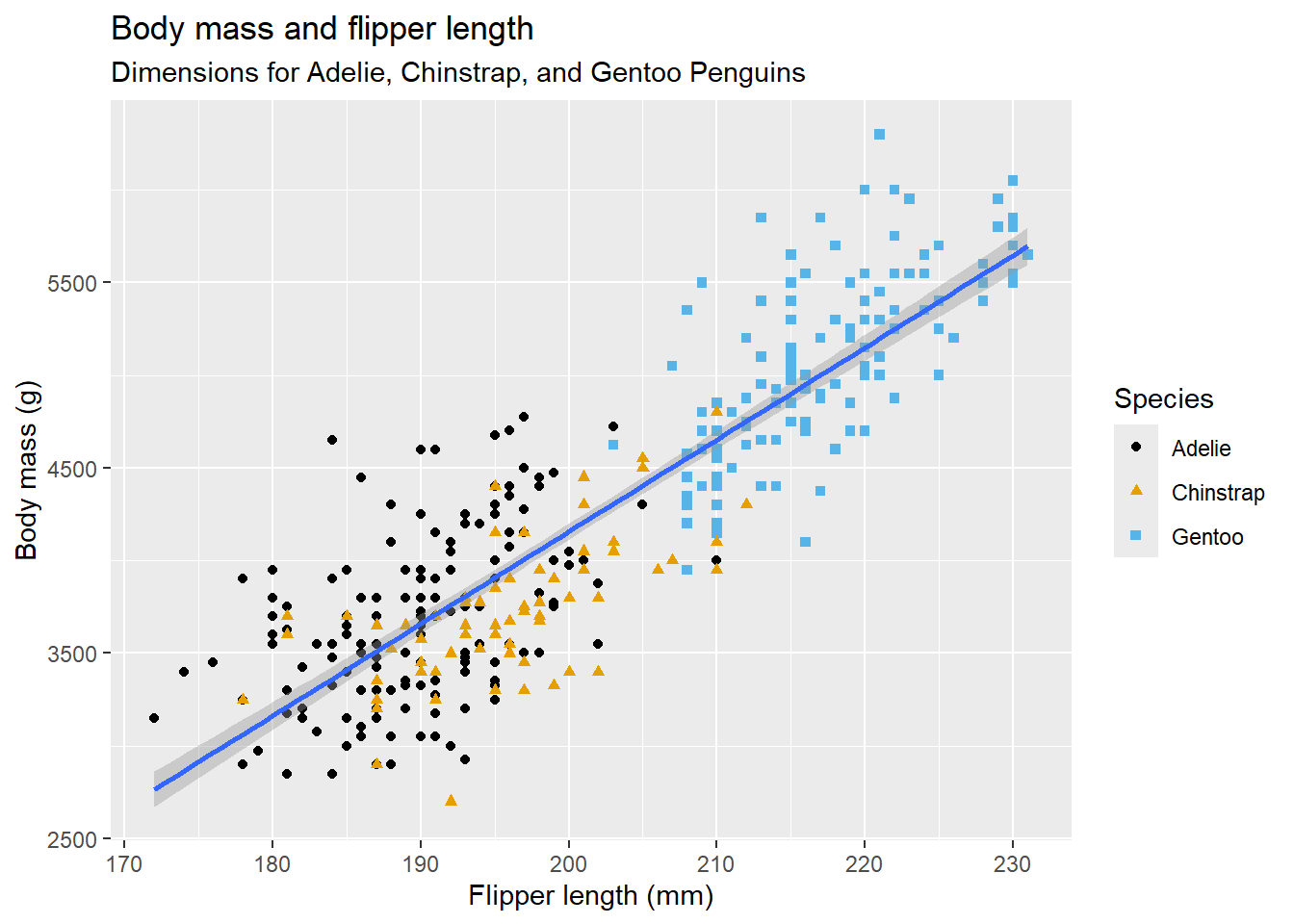
reprex::reprex(mtcars)
ℹ Non-interactive session, setting `html_preview = FALSE`.
ℹ Rendering reprex...

Spend a little bit of time ensuring that your code is easy for others to read: 1) Make sure you’ve used spaces and your variable names are concise yet informative. 2) Use comments to indicate where your problem lies. 3) Do your best to remove everything that is not related to the problem. 4) The shorter your code is, the easier it is to understand and the easier it is to fix.

library(tidyverse)

9. Layers

Aesthetic mappings

Using alpha for a discrete variable is not advised.

# Left
ggplot(mpg, aes(x = displ, y = hwy, size = class)) +
  geom_point()
Warning: Using size for a discrete variable is not advised.

# Right
ggplot(mpg, aes(x = displ, y = hwy, alpha = class)) +
  geom_point()
Warning: Using alpha for a discrete variable is not advised.

Geometric objects

ggplot2 will treat them as local mappings for the layer. It will use these mappings to extend or overwrite the global mappings for that layer only. This makes it possible to display different aesthetics in different layers.

ggplot(mpg, aes(x = displ, y = hwy)) + 
  geom_point(aes(color = class)) + 
  geom_smooth()
`geom_smooth()` using method = 'loess' and formula = 'y ~ x'

If this sounds strange, we can make it clearer by overlaying the lines on top of the raw data and then coloring everything according to drv.

ggplot(mpg, aes(x = displ, y = hwy, color = drv)) + 
  geom_point() +
  geom_smooth(aes(linetype = drv))
`geom_smooth()` using method = 'loess' and formula = 'y ~ x'

The best place to get a comprehensive overview of all of the geoms ggplot2 offers, as well as all functions in the package, is the reference page: https://ggplot2.tidyverse.org/reference. To learn more about any single geom, use the help (e.g., ?geom_smooth).

Facets

By default each of the facets share the same scale and range for x and y axes. This is useful when you want to compare data across facets but it can be limiting when you want to visualize the relationship within each facet better. Setting the scales argument in a faceting function to “free_x” will allow for different scales of x-axis across columns, “free_y” will allow for different scales on y-axis across rows, and “free” will allow both.

ggplot(mpg, aes(x = displ, y = hwy)) + 
  geom_point() + 
  facet_grid(drv ~ cyl, scales = "free")
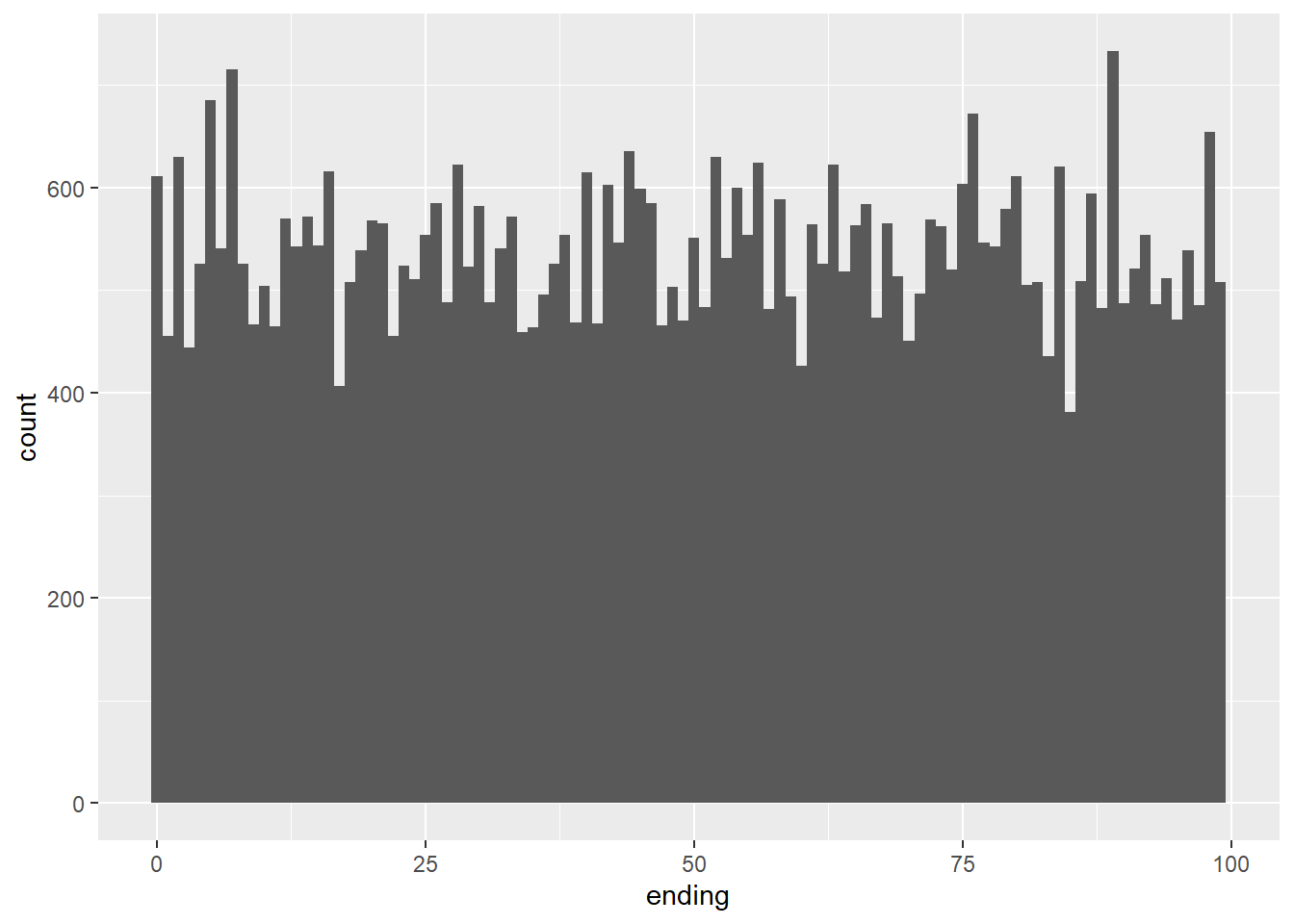
Statistical transformations

The algorithm used to calculate new values for a graph is called a stat, short for statistical transformation. Figure 9.2 shows how this process works with geom_bar().

ggplot(diamonds, aes(x = cut)) + 
  geom_bar()

Every geom has a default stat; and every stat has a default geom. This means that you can typically use geoms without worrying about the underlying statistical transformation. However, there are three reasons why you might need to use a stat explicitly:

ggplot(diamonds) + 
  stat_summary(
    aes(x = cut, y = depth),
    fun.min = min,
    fun.max = max,
    fun = median
  )

Position adjustments

The stacking is performed automatically using the position adjustment specified by the position argument. If you don’t want a stacked bar chart, you can use one of three other options: “identity”, “dodge” or “fill”.

# Left
ggplot(mpg, aes(x = drv, fill = class)) + 
  geom_bar(position = "fill")
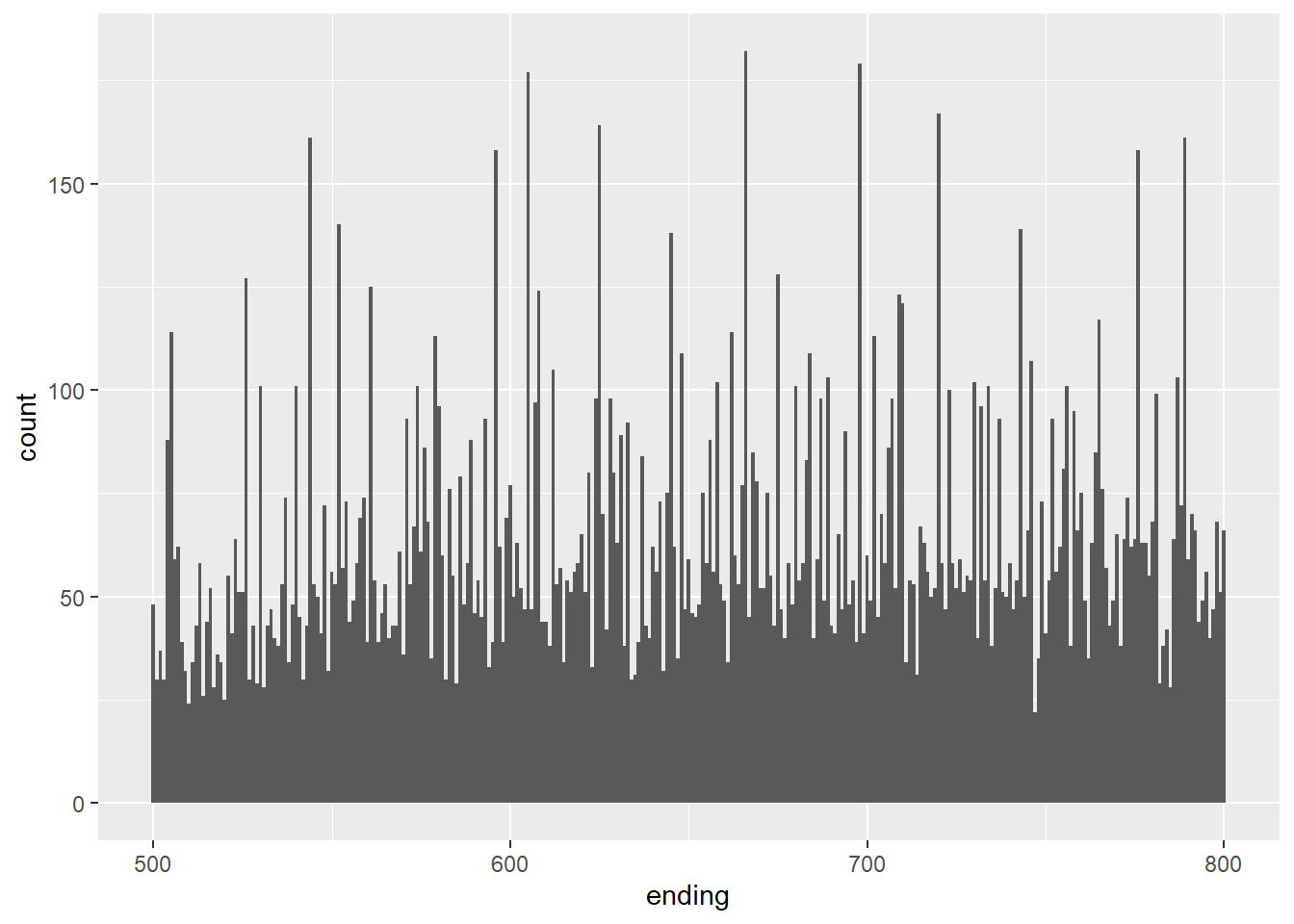
# Right
ggplot(mpg, aes(x = drv, fill = class)) + 
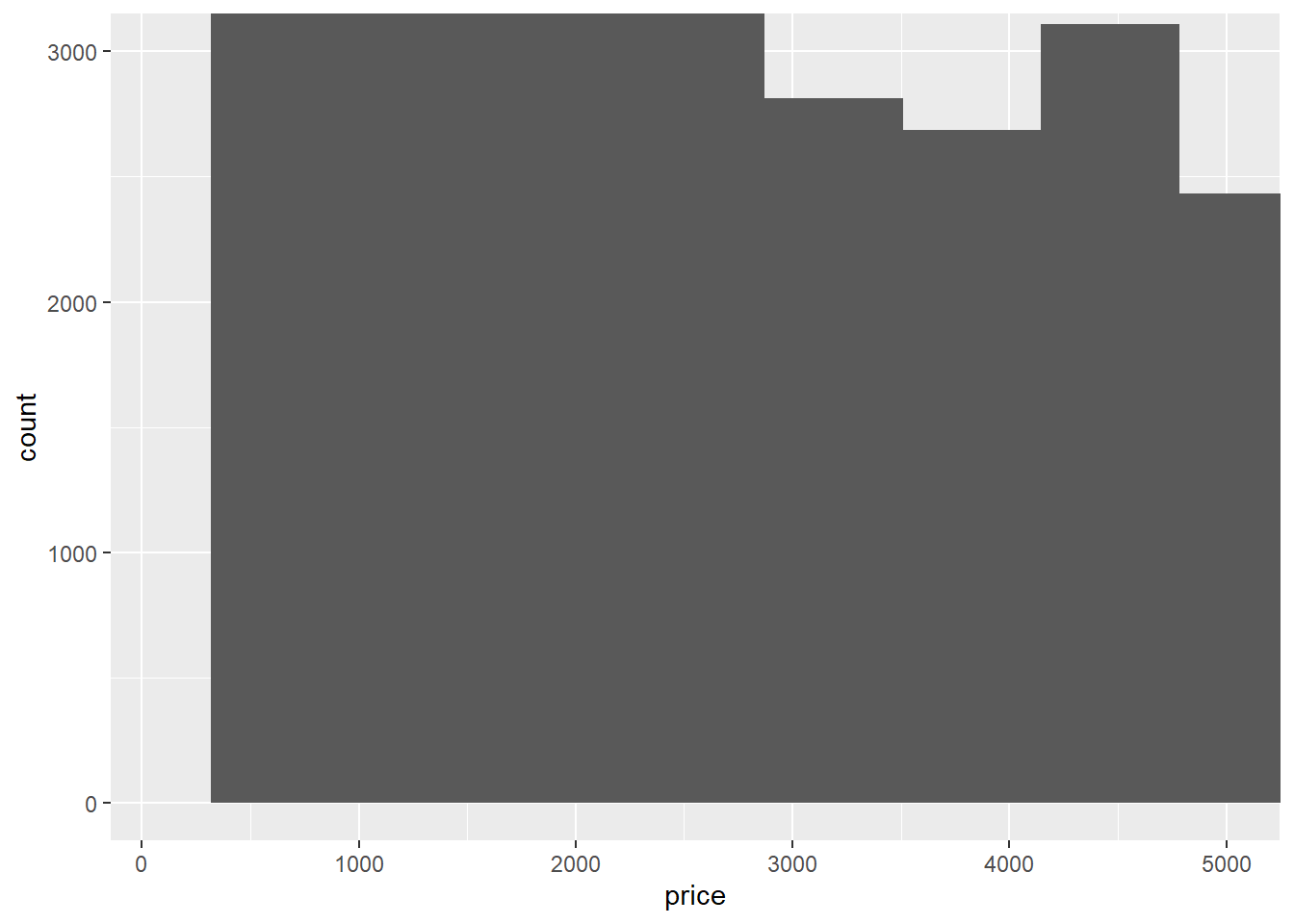
  geom_bar(position = "dodge")

Coordinate systems

coord_quickmap() sets the aspect ratio correctly for geographic maps. This is very important if you’re plotting spatial data with ggplot2. We don’t have the space to discuss maps in this book, but you can learn more in the Maps chapter of ggplot2: Elegant graphics for data analysis.

bar <- ggplot(data = diamonds) + 
  geom_bar(
    mapping = aes(x = clarity, fill = clarity), 
    show.legend = FALSE,
    width = 1
  ) + 
  theme(aspect.ratio = 1)

bar + coord_flip()

bar + coord_polar()

The layered grammar of graphics

If you’d like to learn more about the theoretical underpinnings of ggplot2, you might enjoy reading “The Layered Grammar of Graphics”, the scientific paper that describes the theory of ggplot2 in detail.

ggplot(data = <DATA>) + 
  <GEOM_FUNCTION>(
     mapping = aes(<MAPPINGS>),
     stat = <STAT>, 
     position = <POSITION>
  ) +
  <COORDINATE_FUNCTION> +
  <FACET_FUNCTION>
students <- read_csv("data/students.csv")
Rows: 6 Columns: 5
── Column specification ────────────────────────────────────────────────────────
Delimiter: ","
chr (4): Full Name, favourite.food, mealPlan, AGE
dbl (1): Student ID

ℹ Use `spec()` to retrieve the full column specification for this data.
ℹ Specify the column types or set `show_col_types = FALSE` to quiet this message.
students |> janitor::clean_names()
# A tibble: 6 × 5
  student_id full_name        favourite_food     meal_plan           age  
       <dbl> <chr>            <chr>              <chr>               <chr>
1          1 Sunil Huffmann   Strawberry yoghurt Lunch only          4    
2          2 Barclay Lynn     French fries       Lunch only          5    
3          3 Jayendra Lyne    N/A                Breakfast and lunch 7    
4          4 Leon Rossini     Anchovies          Lunch only          <NA> 
5          5 Chidiegwu Dunkel Pizza              Breakfast and lunch five 
6          6 Güvenç Attila    Ice cream          Lunch only          6    
students |>
  janitor::clean_names() |>
  mutate(meal_plan = factor(meal_plan))
# A tibble: 6 × 5
  student_id full_name        favourite_food     meal_plan           age  
       <dbl> <chr>            <chr>              <fct>               <chr>
1          1 Sunil Huffmann   Strawberry yoghurt Lunch only          4    
2          2 Barclay Lynn     French fries       Lunch only          5    
3          3 Jayendra Lyne    N/A                Breakfast and lunch 7    
4          4 Leon Rossini     Anchovies          Lunch only          <NA> 
5          5 Chidiegwu Dunkel Pizza              Breakfast and lunch five 
6          6 Güvenç Attila    Ice cream          Lunch only          6    
students <- students |>
  janitor::clean_names() |>
  mutate(
    meal_plan = factor(meal_plan),
    age = parse_number(if_else(age == "five", "5", age))
  )

Data entry

tribble(
  ~x, ~y, ~z,
  1, "h", 0.08,
  2, "m", 0.83,
  5, "g", 0.60
)
# A tibble: 3 × 3
      x y         z
  <dbl> <chr> <dbl>
1     1 h      0.08
2     2 m      0.83
3     5 g      0.6 

10. Exploratory data analysis

This chapter will show you how to use visualization and transformation to explore your data in a systematic way, a task that statisticians call exploratory data analysis, or EDA for short. EDA is an iterative cycle. You: 1) Generate questions about your data. 2) Search for answers by visualizing, transforming, and modelling your data. 3) Use what you learn to refine your questions and/or generate new questions.

EDA is a state of mind.

library(tidyverse)

Questions

“There are no routine statistical questions, only questionable statistical routines.” — Sir David Cox

“Far better an approximate answer to the right question, which is often vague, than an exact answer to the wrong question, which can always be made precise.” — John Tukey

Variation

The key to asking good follow-up questions will be to rely on your curiosity (What do you want to learn more about?) as well as your skepticism (How could this be misleading?).

ggplot(diamonds, aes(x = carat)) + 
  geom_histogram(binwidth = 0.5)

However, if they have a substantial effect on your results, you shouldn’t drop them without justification. You’ll need to figure out what caused them (e.g., a data entry error) and disclose that you removed them in your write-up.

10.3.3(연습문제)

1

summary(select(diamonds, x, y, z))
       x                y                z         
 Min.   : 0.000   Min.   : 0.000   Min.   : 0.000  
 1st Qu.: 4.710   1st Qu.: 4.720   1st Qu.: 2.910  
 Median : 5.700   Median : 5.710   Median : 3.530  
 Mean   : 5.731   Mean   : 5.735   Mean   : 3.539  
 3rd Qu.: 6.540   3rd Qu.: 6.540   3rd Qu.: 4.040  
 Max.   :10.740   Max.   :58.900   Max.   :31.800  
ggplot(diamonds) +
  geom_histogram(mapping = aes(x = x), binwidth = 0.01)

ggplot(diamonds) +
  geom_histogram(mapping = aes(x = y), binwidth = 0.01)
ggplot(diamonds) +
  geom_histogram(mapping = aes(x = z), binwidth = 0.01)

2

ggplot(filter(diamonds, price < 2500), aes(x = price)) +
  geom_histogram(binwidth = 10, center = 0)

ggplot(filter(diamonds), aes(x = price)) +
  geom_histogram(binwidth = 100, center = 0)

diamonds %>%
  mutate(ending = price %% 10) %>%
  ggplot(aes(x = ending)) +
  geom_histogram(binwidth = 1, center = 0)

diamonds %>%
  mutate(ending = price %% 100) %>%
  ggplot(aes(x = ending)) +
  geom_histogram(binwidth = 1)

diamonds %>%
  mutate(ending = price %% 1000) %>%
  filter(ending >= 500, ending <= 800) %>%
  ggplot(aes(x = ending)) +
  geom_histogram(binwidth = 1)

3

diamonds %>%
  filter(carat >= 0.99, carat <= 1) %>%
  count(carat)
# A tibble: 2 × 2
  carat     n
  <dbl> <int>
1  0.99    23
2  1     1558
diamonds %>%
  filter(carat >= 0.9, carat <= 1.1) %>%
  count(carat) %>%
  print(n = Inf)
# A tibble: 21 × 2
   carat     n
   <dbl> <int>
 1  0.9   1485
 2  0.91   570
 3  0.92   226
 4  0.93   142
 5  0.94    59
 6  0.95    65
 7  0.96   103
 8  0.97    59
 9  0.98    31
10  0.99    23
11  1     1558
12  1.01  2242
13  1.02   883
14  1.03   523
15  1.04   475
16  1.05   361
17  1.06   373
18  1.07   342
19  1.08   246
20  1.09   287
21  1.1    278

4

ggplot(diamonds) +
  geom_histogram(mapping = aes(x = price)) +
  coord_cartesian(xlim = c(100, 5000), ylim = c(0, 3000))
`stat_bin()` using `bins = 30`. Pick better value with `binwidth`.

ggplot(diamonds) +
  geom_histogram(mapping = aes(x = price)) +
  xlim(100, 5000) +
  ylim(0, 3000)
`stat_bin()` using `bins = 30`. Pick better value with `binwidth`.
Warning: Removed 14714 rows containing non-finite outside the scale range
(`stat_bin()`).
Warning: Removed 6 rows containing missing values or values outside the scale range
(`geom_bar()`).

Unusual values

If you’ve encountered unusual values in your dataset, and simply want to move on to the rest of your analysis, you have two options. Drop the entire row with the strange values: We don’t recommend this option because one invalid value doesn’t imply that all the other values for that observation are also invalid. Additionally, if you have low quality data, by the time that you’ve applied this approach to every variable you might find that you don’t have any data left! Instead, we recommend replacing the unusual values with missing values. The easiest way to do this is to use mutate() to replace the variable with a modified copy. You can use the if_else() function to replace unusual values with NA:

10.4.1(연습문제)

1

diamonds2 <- diamonds %>%
  mutate(y = ifelse(y < 3 | y > 20, NA, y))

ggplot(diamonds2, aes(x = y)) +
  geom_histogram()
`stat_bin()` using `bins = 30`. Pick better value with `binwidth`.
Warning: Removed 9 rows containing non-finite outside the scale range
(`stat_bin()`).

diamonds %>%
  mutate(cut = if_else(runif(n()) < 0.1, NA_character_, as.character(cut))) %>%
  ggplot() +
  geom_bar(mapping = aes(x = cut))

2

mean(c(0, 1, 2, NA), na.rm = TRUE)
[1] 1
sum(c(0, 1, 2, NA), na.rm = TRUE)
[1] 3

Covariation

If variation describes the behavior within a variable, covariation describes the behavior between variables. Covariation is the tendency for the values of two or more variables to vary together in a related way. The best way to spot covariation is to visualize the relationship between two or more variables.

10.5.1.1(연습문제)

  1. None

  2. None

  3. None

  4. None

  5. None

  6. None

Two categorical variables

To visualize the covariation between categorical variables, you’ll need to count the number of observations for each combination of levels of these categorical variables. One way to do that is to rely on the built-in geom_count():

ggplot(diamonds, aes(x = cut, y = color)) +
  geom_count()

diamonds |> 
  count(color, cut)
# A tibble: 35 × 3
   color cut           n
   <ord> <ord>     <int>
 1 D     Fair        163
 2 D     Good        662
 3 D     Very Good  1513
 4 D     Premium    1603
 5 D     Ideal      2834
 6 E     Fair        224
 7 E     Good        933
 8 E     Very Good  2400
 9 E     Premium    2337
10 E     Ideal      3903
# ℹ 25 more rows
diamonds |> 
  count(color, cut) |>  
  ggplot(aes(x = color, y = cut)) +
  geom_tile(aes(fill = n))

10.5.2.1(연습문제)

  1. None

  2. None

  3. None

Two numerical variables

You’ve already seen one great way to visualize the covariation between two numerical variables: draw a scatterplot with geom_point(). You can see covariation as a pattern in the points. For example, you can see a positive relationship between the carat size and price of a diamond: diamonds with more carats have a higher price. The relationship is exponential.

smaller <- diamonds |> 
  filter(carat < 3)
ggplot(smaller, aes(x = carat, y = price)) +
  geom_point()

geom_bin2d() and geom_hex() divide the coordinate plane into 2d bins and then use a fill color to display how many points fall into each bin. geom_bin2d() creates rectangular bins. geom_hex() creates hexagonal bins. You will need to install the hexbin package to use geom_hex().

ggplot(smaller, aes(x = carat, y = price)) + 
  geom_point(alpha = 1 / 100)

ggplot(smaller, aes(x = carat, y = price)) +
  geom_bin2d()

# install.packages("hexbin")
ggplot(smaller, aes(x = carat, y = price)) +
  geom_hex()
Warning: Computation failed in `stat_binhex()`.
Caused by error in `compute_group()`:
! The package "hexbin" is required for `stat_bin_hex()`.

ggplot(smaller, aes(x = carat, y = price)) + 
  geom_boxplot(aes(group = cut_width(carat, 0.1)))

10.5.3.1(연습문제)

  1. None

  2. None

  3. None

  4. None

  5. None

  6. None

Patterns and models

If a systematic relationship exists between two variables it will appear as a pattern in the data. If you spot a pattern, ask yourself: 1) Could this pattern be due to coincidence (i.e. random chance)? 2) How can you describe the relationship implied by the pattern? 3) How strong is the relationship implied by the pattern? 4) What other variables might affect the relationship? 5) Does the relationship change if you look at individual subgroups of the data?

Patterns in your data provide clues about relationships, i.e., they reveal covariation. If you think of variation as a phenomenon that creates uncertainty, covariation is a phenomenon that reduces it. If two variables covary, you can use the values of one variable to make better predictions about the values of the second. If the covariation is due to a causal relationship (a special case), then you can use the value of one variable to control the value of the second.

library(tidymodels)
── Attaching packages ────────────────────────────────────── tidymodels 1.2.0 ──
✔ broom        1.0.7     ✔ rsample      1.2.1
✔ dials        1.3.0     ✔ tune         1.2.1
✔ infer        1.0.7     ✔ workflows    1.1.4
✔ modeldata    1.4.0     ✔ workflowsets 1.1.0
✔ parsnip      1.2.1     ✔ yardstick    1.3.1
✔ recipes      1.1.0     
── Conflicts ───────────────────────────────────────── tidymodels_conflicts() ──
✖ scales::discard() masks purrr::discard()
✖ dplyr::filter()   masks stats::filter()
✖ recipes::fixed()  masks stringr::fixed()
✖ dplyr::lag()      masks stats::lag()
✖ yardstick::spec() masks readr::spec()
✖ recipes::step()   masks stats::step()
• Search for functions across packages at https://www.tidymodels.org/find/
diamonds <- diamonds |>
  mutate(
    log_price = log(price),
    log_carat = log(carat)
  )

diamonds_fit <- linear_reg() |>
  fit(log_price ~ log_carat, data = diamonds)

diamonds_aug <- augment(diamonds_fit, new_data = diamonds) |>
  mutate(.resid = exp(.resid))

ggplot(diamonds_aug, aes(x = carat, y = .resid)) + 
  geom_point()

ggplot(diamonds_aug, aes(x = cut, y = .resid)) + 
  geom_boxplot()

References

Hadley Wickham, G. G. (2023). R for data science 2nd. O’Reilly Media.
Islam, M., & Jin, S. (2019). An overview of data visualization. 2019 International Conference on Information Science and Communications Technologies (ICISCT), 1–7.
Kelleher, C., & Wagener, T. (2011). Ten guidelines for effective data visualization in scientific publications. Environmental Modelling & Software, 26(6), 822–827.
Midway, S. R. (2020). Principles of effective data visualization. Patterns, 1(9).